


When it comes to website and app performance tracking, Google Analytics stands out as the top tool. It offers free insights into website performance and user behavior. But do Google Analytics cookies raise privacy issues?
Many website owners wonder if their site is GDPR compliant if they use Google Analytics. Do you need to ask users for consent before tracking them and using that data to improve your digital marketing strategy?
In this article, I’ll explain Google Analytics cookies, whether you need to ask visitors for consent, and how to collect data analytics within the bounds of privacy policy compliance.
In This Article:
- What is a Web Cookie?
- Does Google Analytics Use Cookies?
- Do You Need Cookie Consent for Google Analytics?
- Google Analytics Cookies + GDPR Compliance
- Google Analytics Cookies + CCPA Compliance
- How to Add Cookie Consent to Google Analytics
- Bonus: The Easiest Way to Add Google Analytics Cookie Consent in WordPress (WP Consent)
- Cookie and Data Collection FAQs
Legal Disclaimer: Due to the dynamic nature of websites, no single plugin can offer 100% legal compliance. Please consult a specialist or internet law attorney to determine if you are in compliance with all applicable laws for your jurisdictions and your use cases. Nothing on this website should be considered legal advice.
What is a Web Cookie?
A web cookie is a small text file that a website stores on a user’s device. Also known as an HTTP cookie, browser cookie, or internet cookie, websites use cookies to remember information about the user, such as login status, preferences, and site activity.
This helps improve user experience by making interactions with the website more personalized and efficient.
Think of it like a little note that websites leave on a device to remember certain information about a user’s interactions.
Now, ready to learn how cookies work with Google Analytics and privacy laws?
Does Google Analytics Use Cookies?
The short answer is yes. Google Analytics uses cookies to provide user tracking and measurement data. These tiny pieces of data (cookies) are stored when users visit a site that has Google Analytics tracking code installed.
They help Google Analytics recognize unique users, trace interactions, and collect data such as pageviews, session duration, and engagement.
Hold on, isn’t GA4 supposed to be cookieless?
Is Google Analytics 4 cookieless?
Yes, Google Analytics 4 (GA4) is cookieless, but that can be a little confusing because cookieless doesn’t actually mean no cookies. Instead, it means that Google Analytics 4 doesn’t use or accept third-party cookies. The service relies on first-party cookies and other methods of data collection.
For example, Google Analytics stores the client ID (made up of a unique ID and timestamp) in a first-party GA cookie.
That way, Google can tell if someone is a returning user or not, accurately attribute actions taken by unique visitors, and provide metrics about the number of first visits, first-time customers, and more.
Do You Need Cookie Consent for Google Analytics?
Whether you need cookie consent for Google Analytics depends on where your website visitors and business are located, the data you collect, and what you do with that data. Google Analytics is neither compliant nor non-compliant with data privacy policies.
Instead, it’s up to you to make sure you’re using the service in a way that aligns with applicable regulations.
Cookie consent laws vary by country (even within the EU). Some require notice and consent for specific cookies, while others may require you to create a cookie banner for any cookies on your site.

Google Analytics 4 took some major strides to become more privacy-friendly and help websites comply.
Most notably, unlike the previous version (Universal Analytics), GA4 doesn’t store users’ IP addresses or allow websites to collect personally identifiable information (PII).
That said, it doesn’t mean you’re totally in the clear to use GA4 without a cookie notice. The specific data you collect, what you do with it, and if you connect Google Analytics to other products like Google Ads can all increase the risk of a privacy violation.
That’s because if you collect or process personal data from EU residents, you must comply with GDPR (General Data Protection Regulation).
In addition, if your business meets certain conditions and collects or processes any personal data from residents of California, CCPA (California Consumer Privacy Act) compliance is required.
With hefty penalties for violations, we recommend a “better safe than sorry approach,” ensuring compliance with the full scope of regulations your website currently falls under or could potentially fall under.
Google Analytics Cookies + GDPR Compliance
GDPR laws are pretty clear about cookies: You must obtain explicit consent from visitors before using Google Analytics cookies to collect personal information.
Keep in mind that one general cookie consent notice won’t cut it. To collect any identifying information, you need specific consent for analytical cookies before you can run the tracking code.
Your cookie notice also needs to follow certain GDPR standards.

So, you can anonymize or disable all potentially personal identifying data, or you can get explicit consent before loading the Google Analytics tracking code. We’ll go over this more below.
To learn more about GDPR, check out our guide to making your site GDPR-compliant.
Google Analytics Cookies + CCPA Compliance
CCPA is a bit more lenient when it comes to cookie consent: You don’t need to get explicit consent prior to storing cookies on visitors’ devices, but businesses need to inform visitors of the type of cookies used and provide a Google Analytics opt-out option.

To ensure compliance with CCPA regulations, you’ll also need to follow other policies concerning data retention, user requests, etc.
To learn more about CCPA compliance, check out Google Analytics CCPA Compliance: Make Your Site Compliant.
How to Add Cookie Consent to Google Analytics
Because websites are dynamic in nature, no single plugin or tool can guarantee 100% compliance with all privacy laws. But MonsterInsights, the best GDPR plugin and Google Analytics tool for WordPress, can help.
MonsterInsights is the best Google Analytics plugin for WordPress. You can connect your Google Analytics account to your site and set up advanced tracking without editing any code or hiring a developer. You’ll get the insights that matter right inside your WordPress dashboard.

With MonsterInsights, you also get access to tons of other Google Analytics features and sophisticated tracking in only a few clicks, such as:
- 1-click eCommerce tracking
- Conversion tracking for Facebook Ads, Google Ads, and Microsoft (Bing) Ads.
- Custom dimensions and custom event tracking
- Social media and referral tracking
- Advanced form tracking
- Outbound and affiliate link tracking
- Video play tracking
- … And much more
Using MonsterInsights for Privacy Compliance
The EU Compliance addon is available on all premium licenses and automates some of the Google Analytics GDPR compliance factors, including:
- Disabling the Demographics and Interests Reports ONLY for remarketing and advertising tracking on Google Analytics hits (you’ll continue to get demographic data from aggregated data).
- Disables UserID tracking on Google Analytics hits, eCommerce hits, form tracking hits, and the UserID dimension in custom dimensions.
- Disables author tracking in the custom dimensions

As for Google cookie settings, MonsterInsights offers automatic integration with popular cookie plugins:
If your website uses any of these plugins to get analytics data tracking consent, MonsterInsights will automatically configure everything to make sure the JavaScript tracking code for Analytics (gtag.js) only loads based on users’ selected preferences.

Keep PII Out of Google Analytics
Another piece of being privacy-law compliant is keeping personally identifiable information (PII) out of Google Analytics. However, there are various website features, CRMs, email marketing platforms, and more that can add PII to Google Analytics without your knowledge, making you not compliant.
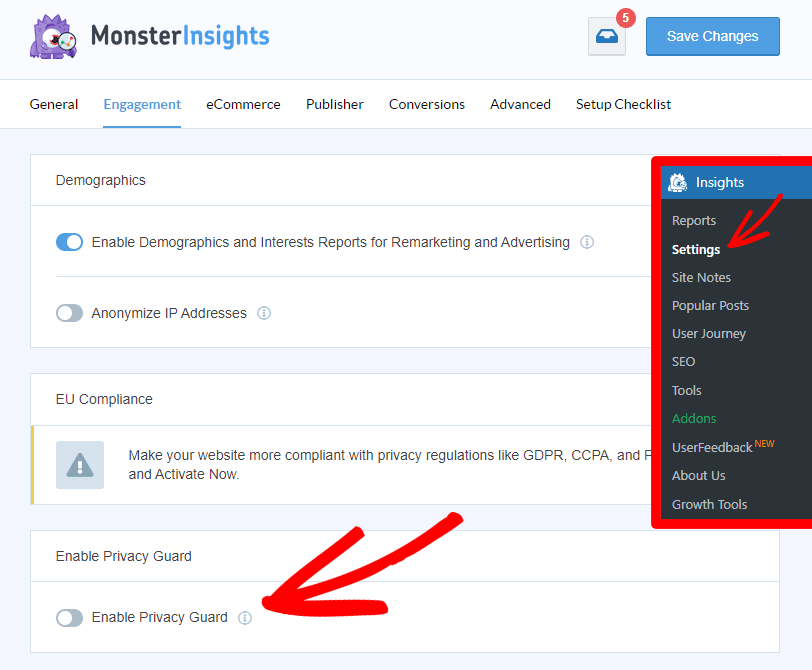
To keep PII out of Google Analytics, MonsterInsights strips sensitive information out of your URLs, ensuring it doesn’t end up in Google Analytics. Simply enable the Privacy Guard feature to keep your Analytics account PII-free.
How to Add a Google Analytics Opt-Out Option
Only need to provide an opt-out option? If you’re complying with CCPA, but don’t need to get explicit consent for GDPR, you can easily set up an opt-out cookie consent box on your WordPress site with a free plugin like CookieBot.
For example, CookieBot conducts a scan of your website and generates a link for users. Plus, it provides a Do Not Sell My Personal Information document that you can link to.
MonsterInsights will integrate in the same way to exclude users who opt-out from being tracked, and you can customize the addons settings.
Kay Cunningham
MonsterInsights is a game changer. I am not a fan of Google Analytics; I don’t need one more unnecessarily overly-complicated piece of software to figure out what is happening on my site. I have enough headaches! […] Super easy to install, use, and understand. I could not recommend MonsterInsights more highly.
Bonus: The Easiest Way to Add Google Analytics Cookie Consent in WordPress (WP Consent)
If you want a simple, reliable way to add proper Google Analytics cookie consent to your WordPress site, WP Consent is the easiest solution — especially if you’re already using MonsterInsights.

WP Consent is a WordPress privacy compliance plugin built specifically to handle cookie consent for tools like Google Analytics. It takes care of the most error-prone parts of compliance automatically, so you don’t have to manually configure scripts, policies, or consent logic.
How WP Consent Works with Google Analytics
WP Consent is designed to work seamlessly with Google Analytics and MonsterInsights. Once set up, it:
- Automatically detects Google Analytics cookies on your site
- Blocks Google Analytics tracking scripts until a visitor gives consent
- Reactivates tracking instantly after consent, so your analytics continue without disruption
- Keeps your cookie policy updated automatically as cookies or services change
This ensures Google Analytics only runs when it’s legally allowed to — without requiring you to edit code or manage complex configurations.
Built for GDPR, CCPA, and Global Privacy Laws
WP Consent helps website owners meet the requirements of major privacy regulations, including GDPR and CCPA, by offering:
- Customizable cookie consent banners (banner, floating bar, or modal)
- Granular cookie categories (essential, statistics, marketing)
- Downloadable user consent logs for proof of compliance
- Automatic cookie scanning to detect changes over time
- Geolocation-based consent rules for different regions
Because WP Consent is fully self-hosted in WordPress, all consent data stays on your own site — giving you more control and better privacy than many SaaS-based consent tools.
MonsterInsights + WP Consent: A Complete Privacy-Friendly Analytics Setup
MonsterInsights and WP Consent work together to give you a complete Google Analytics compliance solution:
- WP Consent controls when Google Analytics can load
- MonsterInsights controls how data is collected once consent is given
With this setup, you can confidently track user behavior, conversions, and site performance — while respecting user privacy and meeting consent requirements.
If you’re serious about using Google Analytics responsibly and staying on the right side of privacy laws, WP Consent is the best way to handle cookie consent in WordPress.
That’s it!
Cookie and Data Collection FAQs
What is a first-party cookie?
A first-party cookie is served directly by the website visited. It’s used to remember things like preferences, login status, active shopping carts, etc. Most people don’t have an issue with these cookies as they primarily help websites provide a smoother experience when a user returns.
What is a third-party cookie?
A third-party cookie is served by a third-party site that’s usually linked through an ad. It’s used to pass information about your browsing between websites, usually to display more relevant advertisements. Unlike first-party cookies, third-party cookies often raise a red flag with users.
Although they’re not necessarily bad by nature, if you’ve ever seen a timely ad pop up and sworn your phone is reading your mind, third-party cookies may be to blame. They also have the potential to be used for not-so-above-board practices like recording contact info for spam targeting.
What is Google Analytics Consent Mode v2?
Google Analytics Consent Mode v2 is an updated framework that allows websites to adjust data collection based on user consent choices. It helps comply with privacy regulations like GDPR by enabling Google Analytics and Google Ads tracking while respecting consent preferences. It introduces new consent signals, such as ad_user_data and ad_personalization, for better compliance and data control.
If a user gives permission to track data, Consent Mode ensures that Google Analytics functions as usual. However, if a user denies consent, the tracking process is modified to maintain privacy.
MonsterInsights takes care of this with one simple click, but you can learn more about configuring consent mode using Google Tag Manager (GTM) in Google’s resources.
When does a cookie expire?
How long a cookie stays in the browser varies and largely has to do with what it’s used for. Session cookies last as long as the browser is open and are then automatically deleted. However, persistent cookies can stay after the browser is closed and are typically used for remembering user preferences.
Browsers can also set limits on how long a cookie can last. For instance, Google Chrome requires that a cookie can’t expire more than 400 days from the time it was set.
How long does Google Analytics retain data?
By default, Google Analytics 4 retains data associated with cookies and user or advertising identifiers for only 2 months. However, you can change this setting to 14 months in the data settings area of your Google Analytics account.
Although it doesn’t affect most standard reporting, this time frame does affect your ability to use historical data in custom reports. So, we recommend changing it to 14 months immediately after setting up Google Analytics.
Is Google Analytics legal in Europe?
Google Analytics 4 is now legal in Europe. The news came in July 2023 following the official transition to GA4. The European Commission accepted the EU-U.S. Data Privacy Framework and confirms that personal data transferred from the EU to the United States is equally safeguarded.
This eliminates the need for additional data protection measures in Google Analytics, but companies are still responsible for complying with standards and privacy policies.
Google Analytics Cookies & Consent: Video Walkthrough
We hope this article has helped clear up the mystery around Google Analytics cookies, whether you need consent, and how to use MonsterInsights with a Google Analytics opt-out box to get your site compliant.
If you enjoyed this article, you may want to also check out:
Google Analytics GDPR Compliance – Make Your Site Compliant
Best WordPress GDPR Plugins to Ensure Your Site is Compliant
Google EEA Compliance & Consent Signals Guide (Ads Personalization)
Not using MonsterInsights yet? What are you waiting for?
Don’t forget to follow us on YouTube for the best WordPress tutorials and Google Analytics updates.