


When you’re trying to add analytics to your WordPress site, you’ll quickly come across two names: Google Analytics and MonsterInsights. A lot of beginners assume they’re competing tools — or that MonsterInsights is just another analytics service you’d use instead of Google Analytics.
That’s not the case. They do completely different things, and understanding how they relate to each other is the key to getting useful data from your WordPress site.
Google Analytics is a free web analytics service from Google that tracks your website visitors and stores that data. MonsterInsights is a WordPress plugin that connects your site to Google Analytics — handling the technical setup, adding tracking that GA4 doesn’t do natively in WordPress, and bringing your analytics reports right into your WordPress dashboard.
In this article, I’ll explain what each tool does, how they work together, and why most WordPress site owners use both.
In This Article:
- What Is Google Analytics?
- What Is MonsterInsights?
- 8 Reasons Why Website Owners Use MonsterInsights
- What If You Use Google Analytics Without MonsterInsights?
- Do You Need Both Google Analytics and MonsterInsights?
- MonsterInsights vs. Google Analytics: Which One Is Better?
- FAQs About MonsterInsights vs. Google Analytics
What Is Google Analytics?
Google Analytics is a free web analytics service from Google that tracks all your website traffic and provides you with useful information about your website visitors.

Here are some of the major questions Google Analytics will answer about your site:
- How many people visit your website?
- Who are your website visitors? (age, gender, location)
- What technology are they using to visit your site? (browser, operating system, devices)
- What are the sources of your website traffic? (search engines, social media, advertisements, or referral links)
- What do your users do on your site?
- Which pages are the most popular on your site?
- How many visitors converted into leads or customers?
- What is your eCommerce conversion rate?
The challenge is that to set up Google Analytics properly and see all of the above insights, you’d need to hire a developer or know how to write code.
Not to mention, you would have to spend time learning the Google Analytics interface so you can actually find the stats that really matter.

As you can imagine, most business owners want to focus on growing their businesses rather than learning how to code or becoming analytics experts.
That’s what makes MonsterInsights so popular.
What Is MonsterInsights?
MonsterInsights is the best Google Analytics plugin for WordPress because it allows you to easily connect your WordPress site with Google Analytics (without hiring a developer or writing any code).

With the click of a button, you can set up sophisticated tracking features such as event tracking, eCommerce tracking, form tracking, custom dimension tracking, outbound link tracking, media tracking, and more.
In the past, you would have to spend money to hire a developer to set up all these tracking tools properly. Not anymore!
MonsterInsights makes it easy for you to see all the stats that matter in a single place inside your WordPress dashboard.
That way, you don’t have to spend months learning the complex Google Analytics interface.
8 Reasons Why Website Owners Use MonsterInsights
Here’s a closer look at the eight features that explain why over 3 million WordPress site owners rely on MonsterInsights.
Each one represents something GA4 either can’t do natively in WordPress, or makes significantly harder than it needs to be.
1. Quick and Easy Setup

With MonsterInsights, it’s really easy and quick to set up Google Analytics on your WordPress site. All you need to do is create a Google Analytics account and connect it to your WordPress site.
It takes just a few clicks to complete the whole setup process.
You’ll be able to see your website reports in just a few minutes. Follow our step-by-step guide to get started.
Don’t have a budget right now? You can check out our post on how to get an unlimited free trial of MonsterInsights to get started.
2. Google Analytics Dashboard Inside Your WordPress Admin
MonsterInsights allows you to see all the important metrics right in your WordPress dashboard. Therefore, you don’t need to navigate away from your WordPress dashboard or log in to other accounts.
The Google Analytics dashboard looks like this:
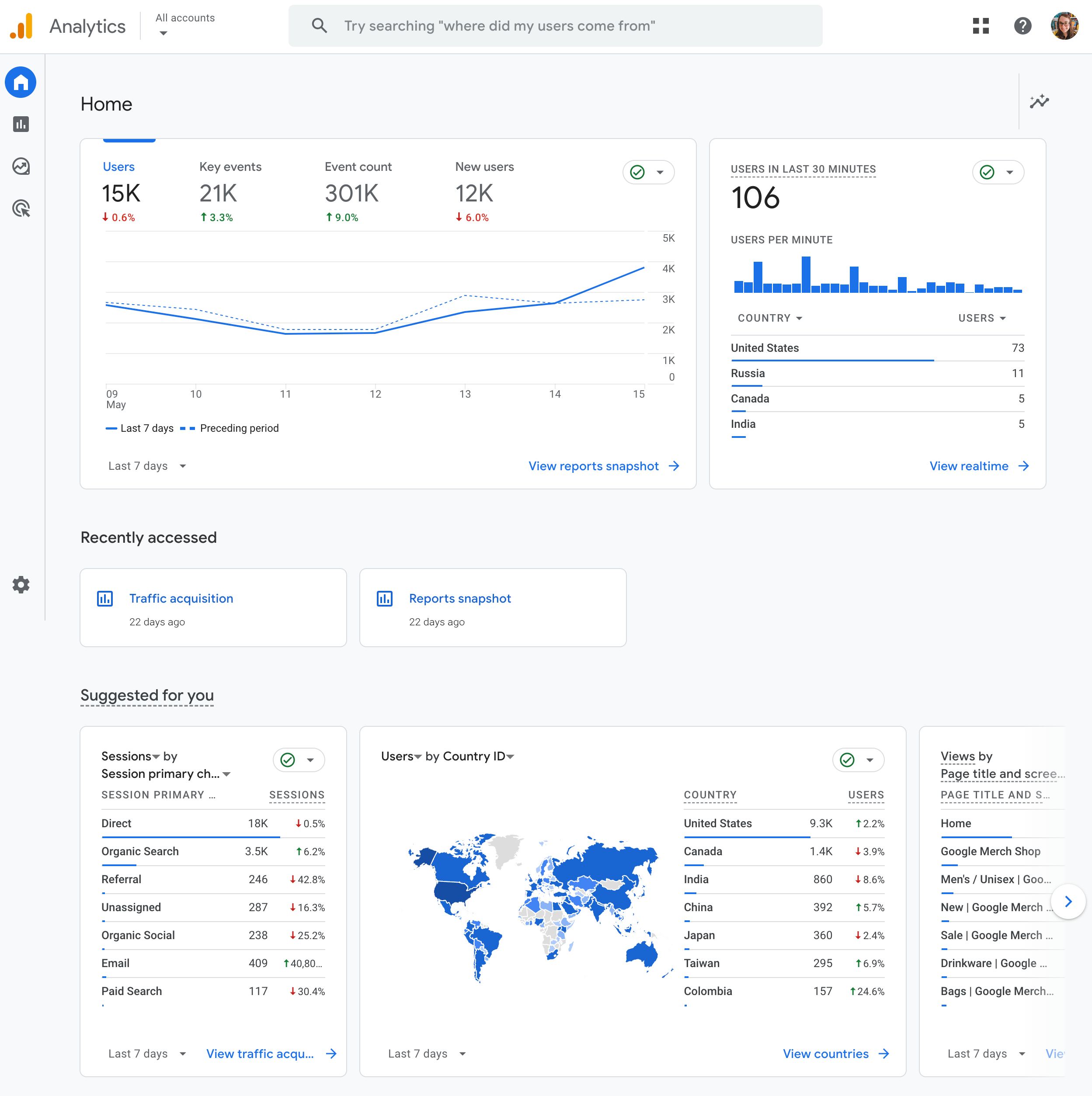
MonsterInsights, on the other hand, looks like this:

Navigate through the tabs to see in-depth but easy-to-understand traffic reports, reports for publishers, a Search Console report, eCommerce reports, a dimensions report, a forms report, and more.
The reports you’ll get access to will vary depending on which license level (or free version) you choose to use.
If you don’t use MonsterInsights, you must open your Google Analytics account in a separate tab to view your website reports. You would also need to know where to look to find the right stats in Google Analytics.
Plus, some of the reports MonsterInsights offers don’t come standard in Google Analytics, like video tracking, eCommerce reports, form submission reports, and more.
3. eCommerce Tracking Made Easy
MonsterInsights makes eCommerce tracking easy. With a single click, you can start tracking sales from your WooCommerce or other eCommerce store (no coding necessary).
MonsterInsights also shows you overall conversion rates, top-performing products, coupons used, and other useful insights about your store right inside your dashboard.
Without MonsterInsights, Google Analytics users would have to hire developers or learn a complicated Google Tag Manager setup to use eCommerce tracking properly.
MonsterInsights has eliminated that aggravation for WordPress users.

For a full walkthrough, see our Google Analytics eCommerce Tracking Tutorial.
4. File Downloads Tracking
If you have a website offering file downloads, then it’s crucial to know whether your users are actually downloading them.
MonsterInsights makes it easy to track your file downloads accurately. Google Analytics, by default, doesn’t track downloads right out of the box.

With Google Analytics 4’s Enhanced Measurement capabilities, you can add download tracking to your analytics. However, to find your download data, you’ll have to either build a custom Explore report or use the Events report:

5. Forms Tracking
Forms are very important for business websites because they are your means of collecting leads and conversions. That’s why it’s extremely important to know how well your forms are converting.
The MonsterInsights Forms addon allows you to track your form views and conversions easily. It works perfectly with WPForms and most other popular WordPress contact form plugins.

Google Analytics doesn’t come with form submission tracking out of the box.
6. PPC Conversion Tracking
If you run Google, Meta, or Microsoft PPC ads, you probably know what a headache it is to ensure that the tracking pixel or code is on the right pages of your site. With MonsterInsights, you can just copy and paste your snippet into our PPC settings and forget about messing with code!

Track your Google Ads, Bing Ads, and Meta Ads.
7. Addons and Advanced Tracking
MonsterInsights also offers other advanced tracking options like affiliate link tracking, media tracking, author tracking, category tracking, custom post types tracking, custom dimensions tracking, and more.
It also comes with powerful addons like:
- The EU Compliance addon helps you to improve compliance with GDPR and other privacy regulations.
- The Media addon lets you track your embedded YouTube, Vimeo, or HTML5 videos.
- The User Journey addon shows you how your eCommerce purchasers navigated your site.
- The PPC Ads Tracking addon lets you set up your Google Ads conversion tracking, Microsoft Ads conversion tracking, and your Facebook Pixel and conversion tracking.
- The Dimensions addon lets you track authors, categories, tags, focus keywords, SEO score, logged-in users, and more.
- The Exceptions addon, available to MonsterInsights Agency users, will alert you if a big change is noticed in your analytics data.
More importantly, you can install and enable these addons in just 2 clicks. If you wanted to set these up without MonsterInsights, you’d most likely need to hire a developer and/or learn Google Tag Manager.

8. Charlie Chat
MonsterInsights 10.2 introduced Charlie Chat — an AI assistant built into your MonsterInsights dashboard that connects directly to your GA4 data. Instead of navigating reports to track down an answer, you ask Charlie in plain English and get a specific, actionable response.
Click the Charlie icon in the bottom right corner of your MonsterInsights Reports screen to open it. You’ll see suggested starter questions, or you can type your own:
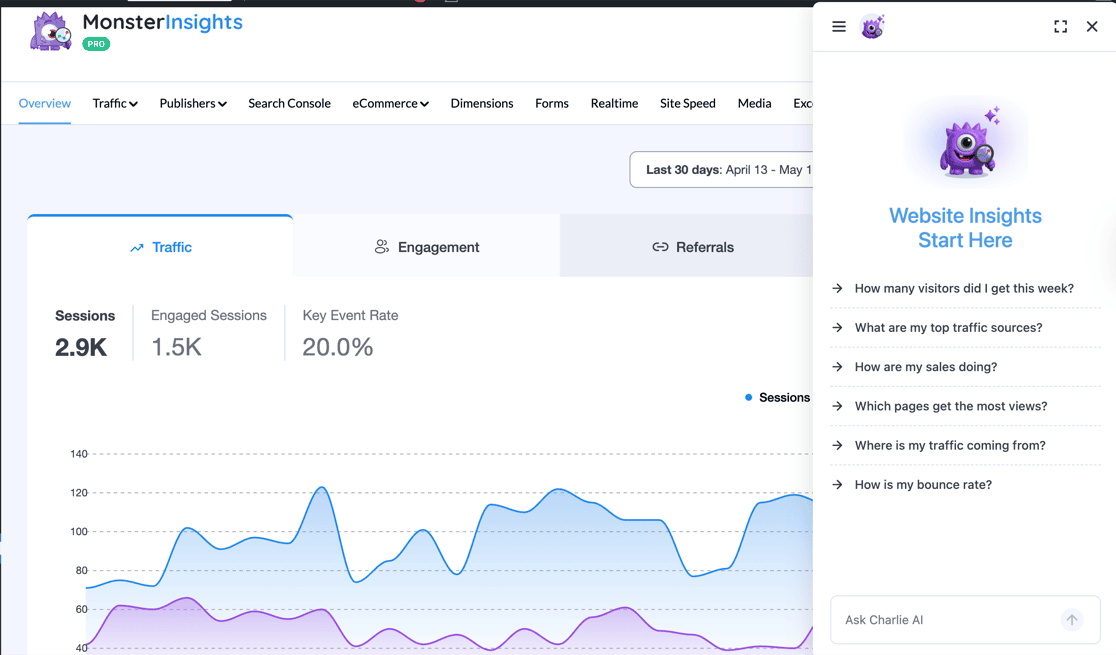
Every response breaks down your current performance, compares it to a previous period, and explains what it means in plain language.
The standout feature is the Recommended Action — a specific next step based on what your actual data shows:

You can ask about traffic sources, eCommerce metrics like cart abandonment, SEO performance, and more.
Charlie Chat is available to all MonsterInsights users — including the free Lite plan. Users with eCommerce addons get deeper insights into purchases, revenue, and cart metrics.
To see the full feature list, explore all of MonsterInsights’ plans and features.
Worth Knowing
MonsterInsights isn’t a replacement for Google Analytics — it’s the layer that makes GA4 practical for WordPress users. GA4 collects the data; MonsterInsights makes it accessible and extends what gets tracked.
What If You Use Google Analytics Without MonsterInsights?
Now that you know the benefits of using MonsterInsights, what if you decide to use Google Analytics without the plugin?
Here’s what will happen:
1. You’ll Need to Set Up Analytics Tracking Manually
Without MonsterInsights, you’ll have to enter the Google Analytics tracking code manually into the header of your WordPress website.
This can be a challenge for beginners, as it requires editing code. If you make any mistake while entering the code, you could mess up tracking or even break your entire website. Plus, any time you update your theme, the code will be erased.
But with MonsterInsights, setting up Google Analytics in WordPress is a walk in the park.
2. You Risk Skewing Analytics Data
If you use Google Analytics without a plugin, there is a risk of skewing your data. That’s because Google Analytics tracks visits from logged-in users like administrators, authors, editors, and other user roles.
So, if you decide to update a blog post and then preview the changes, Analytics will record your visit as a real visit and add it to your total traffic.
This will lead to inaccurate reporting and you may even see a spike in pageviews. However, the sudden increase in traffic is because the data is skewed and it includes your own visits.
MonsterInsights ensures that you get accurate reports and your analytics do not skew. It allows you to easily exclude logged-in users and different user roles from tracking in Google Analytics.
3. You’ll Have to Use the Google Analytics Dashboards
While Google Analytics has a ton of really valuable information, it can be pretty difficult to find the most important numbers. There’s quite a learning curve to figure out how to get fully setup with Google Analytics, then how to access the reports you need.
In some cases, you’ll actually have to build your own custom reports in order to see your data in a way that makes sense:

Skip the Manual Setup — See Your Analytics Inside WordPress
MonsterInsights connects GA4 to WordPress in minutes and brings your reports right into your dashboard — no code, no Tag Manager, no digging through GA4.
Get Started with MonsterInsightsDo You Need Both Google Analytics and MonsterInsights?
Yes — and they’re not in competition. Google Analytics is the analytics engine. MonsterInsights is the interface that makes it practical inside WordPress.
GA4 collects your data and stores it in Google’s infrastructure. MonsterInsights connects your WordPress site to GA4, ensures the right data gets tracked automatically, and gives you clean reports without having to leave your dashboard. If you remove one, you lose something meaningful: remove GA4, and there’s no data to report on; remove MonsterInsights, and you lose the tracking, the in-dashboard reports, and the features that GA4 can’t provide natively in WordPress.
Pro Tip: MonsterInsights has a free version that covers the core connection and basic reports. You can start there and upgrade when you need features like eCommerce tracking, form reporting, or advanced tracking addons.
Who Benefits Most from MonsterInsights?
The short answer is: anyone running a WordPress site who wants to understand their audience without learning to navigate GA4. That said, a few types of site owners get the most out of it:
- Bloggers and content creators — The Publishers Report shows your top posts, scroll depth, outbound click data, and Search Console metrics in one place inside WordPress. I’d recommend it for anyone who publishes content regularly and wants to know what’s actually resonating.
- WooCommerce store owners — One-click eCommerce tracking, the User Journeys report, and the eCommerce dashboard eliminate what would otherwise be a complex GTM setup. If you run a store, this is the feature that justifies the upgrade on its own.
- Agencies and consultants — Managing multiple client sites is much easier when every client can log into their own WordPress dashboard and see their data. Charlie Chat can answer data questions about any client site on demand, which means less time manually checking reports across accounts.
If you’re curious about the value for your specific use case, our Is MonsterInsights Worth It? guide goes deeper on that question.
Make GA4 Work for Your WordPress Site
Over 3 million WordPress site owners use MonsterInsights to connect GA4, track what matters, and get reports that actually make sense — right inside their dashboard.
See MonsterInsights Plans and PricingMonsterInsights vs. Google Analytics: Which One Is Better?
It’s not a versus situation — you need both. Google Analytics provides the data infrastructure; MonsterInsights makes it usable inside WordPress and extends what GA4 tracks natively.
That said, MonsterInsights is clearly the better choice over manually adding the GA4 tracking snippet to your theme. The manual approach breaks on theme updates, doesn’t filter logged-in users, and gives you none of the in-dashboard reports or automatic tracking features.
If you want to grow your business using data you can actually act on, getting both set up together is the right move. Our step-by-step setup guide walks you through the whole process in under 10 minutes.
FAQs About MonsterInsights vs. Google Analytics
Do I need MonsterInsights if I already have Google Analytics?
Yes, for most WordPress site owners. Having a Google Analytics account is a separate thing from having GA4 properly connected and configured on your WordPress site. MonsterInsights handles the connection, filters out logged-in users from your data, and adds automatic tracking for forms, downloads, eCommerce, and more — all things you’d need custom code or Google Tag Manager to do on your own.
Is MonsterInsights the same as Google Analytics?
No. Google Analytics is an analytics service from Google — it collects and stores data about your website visitors. MonsterInsights is a WordPress plugin that connects your site to Google Analytics, makes your data accessible inside WordPress, and extends what GA4 tracks automatically. They do different things and work together, not against each other.
Can I use Google Analytics without MonsterInsights?
Yes, you can add the GA4 tracking snippet manually to your WordPress theme. The downside is that manual code gets erased whenever you update your theme, it tracks your own visits alongside real visitors, and you lose all the automatic tracking features (forms, eCommerce, affiliate links, downloads) that MonsterInsights adds. Most WordPress site owners find that MonsterInsights is worth using from day one.
Does MonsterInsights replace Google Analytics?
No. MonsterInsights requires Google Analytics — it’s a WordPress plugin that connects to GA4, not a replacement for it. Your data is still collected and stored in your Google Analytics property. MonsterInsights gives you a better way to view and work with that data from inside WordPress.
Is MonsterInsights free?
Yes, there’s a free version available in the WordPress plugin repository that covers the core GA4 connection and basic dashboard reports. Paid plans (Plus, Pro, Agency) unlock advanced features like eCommerce tracking, Forms reporting, and additional addons. Charlie Chat is included on every plan, including the free version. You can also start with an extended free trial to test the premium features before committing.
What does MonsterInsights add to Google Analytics?
MonsterInsights adds in-dashboard reporting inside WordPress, automatic tracking for events that GA4 doesn’t track natively (form submissions, file downloads, affiliate link clicks, eCommerce purchases), a cleaner setup experience, and Charlie Chat for on-demand analytics answers. It also handles data accuracy issues like filtering out logged-in user traffic that would otherwise inflate your metrics.
That’s it! I hope this article helped you understand the real difference between MonsterInsights and Google Analytics. If you liked this article, check out the following beginner-friendly guides:
- How to Properly Set Up Google Analytics in WordPress
- Ultimate Guide to MonsterInsights Dashboard Reports
- How to Track eCommerce Sales in Google Analytics
- Is MonsterInsights Worth It?
- How Does Google Analytics Work? Beginner’s Guide
- Beginner’s Guide to User Permissions in Google Analytics
Follow us on X, Facebook, and YouTube for more Google Analytics tips.