


A competitor’s post just jumped three spots above yours, and the real question isn’t the ranking — it’s how much traffic that jump is actually worth.
A website traffic checker can give you that number — or at least a solid estimate — without you ever touching their analytics.
I’ve cross-checked a few of these tools while researching competitors, and the estimates rarely match exactly — each one pulls from a different data source.
Here’s how the best website traffic checkers compare, what each one is actually measuring, and how to see your own site’s real numbers instead of an estimate.
In This Article:
- Why check how much traffic a website gets?
- 7 Best Website Traffic Checkers (+ 2 Bonus Tools)
- 1. Semrush — Best for Deep Competitor Research and Keyword Analysis
- 2. Ahrefs — Best for Backlink Analysis and Content Gap Research
- 3. SimilarWeb — Best for Quick Competitive Insights via Chrome Extension
- 4. Neil Patel's Website Traffic Checker — Best for Free Traffic Estimates for Beginners
- 5. Sitechecker — Best for Simple, Affordable Traffic Overviews
- 6. SERanking — Best for Agencies Tracking Keywords and Competitors Together
- 7. Serpstat — Best for an All-in-One SEO Platform on a Budget
- BONUS: Moz — Best for Domain Authority Scores and Link-Building Research
- BONUS: MonsterInsights — Best for Real (Not Estimated) Traffic Data on Your Own WordPress Site
- A Quick Overview of the Best Website Traffic Checkers
- Which Website Traffic Checker Should You Use?
- FAQs About Website Traffic Checkers
Why check how much traffic a website gets?
Understanding your competition’s traffic patterns can give you valuable insights to improve your own marketing strategy.
The right traffic checker tools go beyond a single traffic number. They can show you which content performs best for your competitors, what keywords they’re ranking for, and even which marketing channels bring them the most visitors.
You can learn:
- Which traffic channels are sending the most traffic to your competitors
- Which keywords your competitors are ranking for
- Which keywords your competitors are losing or have lost
- Which pages or posts are getting the most traffic on your competitors’ sites
- What paid ads your competitors are running
Understanding your competitors’ keywords and traffic sources isn’t just about copying what they do. Instead, it’s about finding opportunities to create even better content that serves your audience. I’ve used this strategy successfully to grow organic traffic by identifying gaps in competitor content and creating more comprehensive resources (a.k.a. stealing their traffic).
When you know how much traffic your competitors are getting, you have a realistic benchmark to work toward. I always check their social media engagement, email marketing tactics, and other marketing channels to get the full picture — not just their website traffic.
The tools below can help you analyze your competition and see exactly where their traffic is coming from.
Track Your Own Site’s Traffic — Right in WordPress
These tools show competitor estimates — MonsterInsights shows you exact, real-time traffic data for your own WordPress site, right inside your dashboard. No toggling between tabs required.
Get MonsterInsightsHow Do These Traffic Estimates Actually Work?
Every tool in this list estimates traffic a different way, which is exactly why the same domain can show wildly different numbers depending on which one you check.
Most rely on some blend of clickstream data (anonymized browsing data purchased from ISPs, VPNs, and browser extensions), panel data (a smaller group of users who’ve opted into tracking), and modeled estimates that fill in the gaps using ranking signals and algorithms.
None of that replaces tracking your own visitors directly. An analytics platform like Google Analytics counts real sessions on your own site — no modeling required. That’s the difference we’ll get into later in this guide.
7 Best Website Traffic Checkers (+ 2 Bonus Tools)
- Semrush
- Ahrefs
- SimilarWeb
- Neil Patel’s Website Traffic Checker
- Sitechecker
- SERanking
- Serpstat
- BONUS: Moz
- BONUS: MonsterInsights
1. Semrush — Best for Deep Competitor Research and Keyword Analysis

BEST FOR: SEO professionals and digital marketers needing deep competitor research and keyword analysis
KEY FEATURES: Traffic Analytics, Keyword Magic Tool, backlink analysis, rank tracking, PPC research
PRICING: From $117.33/month
FREE PLAN / TRIAL: Limited free plan available
Semrush is one of the leading tools to check website traffic. Beyond that, it offers a full suite of SEO tools that can help you boost your site’s traffic and rankings. With Semrush, you can:
- Find out which keywords your competitors are ranking for
- Get an idea of how much traffic your competitors get
- Track keyword rankings for your own website
- Mine your competitors’ backlinks to find opportunities for your site
- And more
Enter a website’s URL and Semrush will give you information about its traffic, top organic keywords, top landing pages, backlinks, and more.

It even offers a feature called Traffic Analytics. This feature allows you to see the competitor’s total number of visits, traffic sources, countries that send traffic, and more.
Plus, their Keyword Magic Tool can help you find the exact keywords that are going to be the best ones for your site to rank for. Just type in a keyword to find related keywords, volume, search trend, how hard it’ll be to rank for, and more.

Semrush’s Traffic Analytics “Compare” feature lets you benchmark up to 5 competitor domains side by side, which saves real time during quarterly competitive reviews.
Semrush is our favorite website traffic checker tool because it offers so much more than just the ability to view website traffic.
While the cost of Semrush can be too much for some, there is a limited free version you can use, too.
MY TAKE
Semrush is the go-to when the question is “how big is this competitor, really?” — the Traffic Analytics comparison view answers that faster than anything else on this list.
PROS
- Deep keyword and backlink data in one platform
- Traffic Analytics compares up to 5 domains at once
- Keyword Magic Tool surfaces related terms fast
CONS
- Higher monthly cost than most tools on this list
- Steep learning curve for brand-new users
- Free plan is very limited
2. Ahrefs — Best for Backlink Analysis and Content Gap Research

BEST FOR: SEO professionals focused on backlink analysis, content gap research, and organic traffic estimates
KEY FEATURES: Site Explorer, Keywords Explorer, Content Gap tool, backlink analysis, rank tracking
PRICING: From $29/month (Starter plan)
FREE PLAN / TRIAL: Free Ahrefs Webmaster Tools for your own sites
Ahrefs is another popular SEO tool and website traffic checker that provides in-depth information about your competitors’ website traffic. Like Semrush, it also includes a suite of other SEO tools beyond competitor research.
If you want to measure a competitor’s organic traffic, just paste in their URL to see estimated monthly visitors, organic keywords, traffic value, competing domains, and more.
I find Ahrefs particularly strong for content gap analysis — it’s one of the fastest ways to find keywords your competitors rank for that you’re not yet targeting.
Using the organic keywords report, you can perform your own keyword research and see which search terms others are ranking for. Then use those keywords to create better content and optimize your pages.

Not only that, but you can use it to perform a technical SEO analysis on your site. You can find broken links and referring domains, see anchor distribution for your competitors or your own site, and identify content gaps — all from the same dashboard.
MY TAKE
Ahrefs trades a bit of Semrush’s breadth for the sharpest backlink and content-gap data on this list — if competitor keyword gaps are the main question, this is the better starting point.
PROS
- Best-in-class backlink index
- Content Gap tool finds missed keywords fast
- Free Ahrefs Webmaster Tools for your own site
CONS
- Traffic estimates skew conservative on smaller sites
- Entry-level Starter plan has limited report access
- No fully free traffic-checker mode like some competitors
3. SimilarWeb — Best for Quick Competitive Insights via Chrome Extension

BEST FOR: Marketers wanting quick competitive traffic insights via a convenient Chrome extension
KEY FEATURES: Chrome extension, traffic sources, global/country ranking, keyword ranking, competitive intelligence
PRICING: Premium plans from $199/month
FREE PLAN / TRIAL: Free Chrome extension with basic data; free account available
SimilarWeb is another popular website traffic checker in the SEO industry. They also have a platform with multiple tools for SEO and marketing professionals. What sets SimilarWeb apart, in my opinion, though, is its Chrome extension.
Once you install the extension, you can click it to learn basic traffic metrics for any website, then click into it for even more data. You can find out:
- The global ranking of a website
- Top traffic countries
- Visits over time
- Traffic sources
- Keyword ranking
- Organic traffic estimate
You can unlock more features in its premium version, but if you’re just starting out, its free website traffic checker extension is definitely helpful.
For more tools like this, see our list of the 11 best free SEO Chrome extensions.
Besides the Chrome extension, SimilarWeb provides a whole suite of tools for marketing teams. Their Competitive Research tool will show you your market share compared with competitors you choose, plus many of the same metrics as Semrush and Ahrefs.
MY TAKE
SimilarWeb’s Chrome extension is the fastest way to check a competitor’s traffic mid-meeting — one click gets a number before the call ends.
PROS
- Free Chrome extension needs no signup
- Quick global and country ranking at a glance
- Deeper Competitive Research suite for teams that need it
CONS
- Free extension data is fairly high-level
- Premium plans get expensive fast
- Smaller or niche sites often show incomplete data
4. Neil Patel’s Website Traffic Checker — Best for Free Traffic Estimates for Beginners

BEST FOR: Beginners and small business owners needing free, basic traffic estimates without a paid subscription
KEY FEATURES: Organic traffic estimates, organic keywords, top pages, domain authority, backlink overview
PRICING: Free; Ubersuggest paid plans from $29/month
FREE PLAN / TRIAL: Free plan available (limited to 4 months of history)
Neil Patel’s Website Traffic Checker is a free tool built on Ubersuggest’s underlying SEO data and technology. It’s simpler than the other tools we’ve reviewed so far, but still has some nice features.
When you input a URL, you’ll see estimates for:
- Organic traffic
- Organic keywords
- Top pages
- Domain authority
- Backlinks
The free version is limited to the past 4 months. If you want to see more historical data, you’ll have to upgrade to the paid version of Ubersuggest.
MY TAKE
This free tier undercuts everything else on this list on price — a 4-month history cap is the tradeoff, but for a beginner just testing the waters, that’s a fair trade.
PROS
- Genuinely free tier, not just a trial
- Simple, uncluttered interface
- Doubles as a lightweight keyword research tool
CONS
- Only 4 months of historical data on the free plan
- Traffic estimates are rougher than paid competitors
- Fewer advanced filters than SEO-first tools
Try Neil Patel’s Website Traffic Checker now!
5. Sitechecker — Best for Simple, Affordable Traffic Overviews

BEST FOR: Small businesses and freelancers needing a simple, affordable traffic overview at a lower price point
KEY FEATURES: 3-month traffic overview, engagement metrics, traffic by country/source, top keywords, competitor data
PRICING: From $99/month
FREE PLAN / TRIAL: Free traffic checker with limited data
The Website Traffic Checker tool inside of Sitechecker is another tool that you can use to view website traffic for free in a limited capacity. Like the others on our list, it is located within a dashboard with other tools.
When you input a website URL into their tool, you get:
- 3 months of traffic overview
- Engagement metrics
- Traffic by country
- Traffic by source
- Top 5 organic keywords
- Top referrals
- Competitors
This is a great tool that can help you understand a competitor’s traffic on a basic level. If you need more in-depth data, you can sign up for a paid plan.
MY TAKE
Running a competitor’s domain through Sitechecker takes under a minute for a usable 3-month traffic snapshot — it’s the quickest gut-check on this list.
PROS
- Fast, no-friction traffic snapshot
- Includes top referrals and country breakdown
- Lower monthly price than most competitors
CONS
- Free version caps out quickly
- Less backlink depth than Ahrefs or Semrush
- Smaller keyword database overall
6. SERanking — Best for Agencies Tracking Keywords and Competitors Together

BEST FOR: Agencies and marketers who need comprehensive keyword tracking alongside competitor analysis
KEY FEATURES: Competitor analysis, domain/page trust scores, organic traffic estimates, keyword rank tracking, SERP features
PRICING: From $103/month
FREE PLAN / TRIAL: 14-day free trial available
SE Ranking’s Website Competitor Analysis Tool is another tool that lives within a whole dashboard suite of SEO and marketing tools. Submitting a URL brings you into their dashboard with multiple tools and gives you a lot of insights into the competitor you’re researching.
You’ll be able to see:
- Domain & page trust
- Estimated organic traffic
- Referring domains & backlinks
- Total keywords
- Organic keywords
- Organic competitors
- SERP features
- And more
This is a very comprehensive tool, and the free version provides a decent amount of data. If you need more or want to track your own keywords, you can buy a monthly plan.
MY TAKE
For a single tool that tracks your own rankings and a competitor’s traffic without paying for two subscriptions, SERanking fills that gap.
PROS
- Combines rank tracking with competitor analysis
- Domain and page trust scores included
- Reasonable pricing for the feature set
CONS
- Interface feels busier than some competitors
- Onboarding takes longer than simpler tools
- Traffic estimates lag slightly behind Semrush and Ahrefs
7. Serpstat — Best for an All-in-One SEO Platform on a Budget

BEST FOR: Marketing teams needing an all-in-one SEO platform with traffic checking at a competitive price
KEY FEATURES: Traffic checker, organic/paid keyword data, keyword position distribution, top pages, competitor analysis
PRICING: From $50/month
FREE PLAN / TRIAL: Free account with basic data; no time limit
Serpstat is another all-in-one SEO platform with a bunch of tools, including a website traffic checker. Just put in a domain and provide your email address to view website traffic and access even more data about your competitor.
You’ll get access to metrics like:
- Estimated monthly traffic
- Organic keywords
- Paid keywords
- Keyword position distribution
- Visibility, keyword & traffic trend
- Top pages
- Competitors
- And more
You’ll get the basics with a free account and can access more with a paid plan.
MY TAKE
A small team wanting Semrush-style features without the Semrush-style invoice is exactly who Serpstat is built for.
PROS
- Genuinely all-in-one at a lower price
- Free account has no time limit
- Covers both organic and paid keyword data
CONS
- Data freshness can lag bigger competitors
- Interface has a steeper learning curve early on
- Smaller backlink index than Ahrefs
BONUS: Moz — Best for Domain Authority Scores and Link-Building Research

BEST FOR: Marketers who want a domain’s Authority Score and backlink profile alongside their competitor research
KEY FEATURES: Link Explorer backlink index, Domain Authority & Page Authority scores, Spam Score, Link Intersect, Keyword Explorer
PRICING: From $99/month (Standard plan; $79/month billed yearly)
FREE PLAN / TRIAL: Free Moz Community account (limited Link Explorer & Keyword Explorer access); free trial available on paid plans
Moz won’t hand you a competitor’s estimated visitor count the way Semrush or Ahrefs will. Instead, it scores how strong a domain’s backlink profile is — one of the clearest signals of how much organic traffic that domain is capable of earning.
That score is Domain Authority, Moz’s 1-100 metric predicting how likely a site is to rank in search results. It’s become common shorthand in agency reports and client pitches, even outside the Moz platform itself.
Enter a domain into Link Explorer and you’ll get its Domain Authority and Page Authority scores, plus a Spam Score that flags risky backlinks. Moz’s link index covers more than 45 trillion links, so the backlink profile behind that score is easy to dig into.
The Link Intersect tool is worth calling out on its own: enter your site plus a few competitors, and it surfaces domains linking to them but not to you — a ready-made outreach list for link building.
A free Moz Community account gets you limited monthly access to Link Explorer and Keyword Explorer with no credit card required. Full access to Link Explorer, Keyword Explorer, and Moz’s other SEO tools starts with the Standard plan.
MY TAKE
Domain Authority is the metric agencies already quote in reports and client pitches — this is the pick when a client-facing authority score matters as much as the backlink data behind it.
PROS
- Domain Authority is an industry-recognized scoring standard
- Link Explorer’s index covers more than 45 trillion links
- Free Community account never expires
CONS
- No dedicated traffic-estimate feature like Semrush or Ahrefs
- Costs more than several other tools on this list
- Full feature access requires at least the Standard plan
BONUS: MonsterInsights — Best for Real (Not Estimated) Traffic Data on Your Own WordPress Site
Tracking your own traffic doesn’t have to mean estimates — you can get exact, real-time numbers instead.
Google Analytics gives you that data for free, but setting it up correctly and finding the right report can trip up beginners fast.
MonsterInsights, the WordPress analytics plugin, connects GA4 to your site correctly, then shows you the reports that matter right inside your dashboard — no logging into GA4 required.

BEST FOR: WordPress site owners who want exact Google Analytics data without leaving their admin dashboard
KEY FEATURES: GA4 dashboard reports, eCommerce tracking, real-time stats, custom dimensions, user behavior reports
PRICING: Free; paid plans from $99.50/year
FREE PLAN / TRIAL: Free plugin available (MonsterInsights Lite); 14-day money-back guarantee on paid plans
MonsterInsights isn’t just another traffic counter. It’s your analytics dashboard living right inside wp-admin, so you’re not toggling between browser tabs or decoding a GA4 report you don’t fully understand.
Once you install the plugin and connect Google Analytics, your traffic stats show up right on your dashboard home.

From there, you can see your top posts and pages, your top referral sources, average session duration, and a full device breakdown — all without leaving WordPress.
Not every question has a report built for it, though. That’s where Charlie Chat comes in — MonsterInsights’ built-in AI assistant lets you ask a plain-English question, like “why did my traffic spike last week?”, and get a direct answer plus a recommended next step.
It’s free on every plan, including Lite, so there’s no upgrade required to use it.

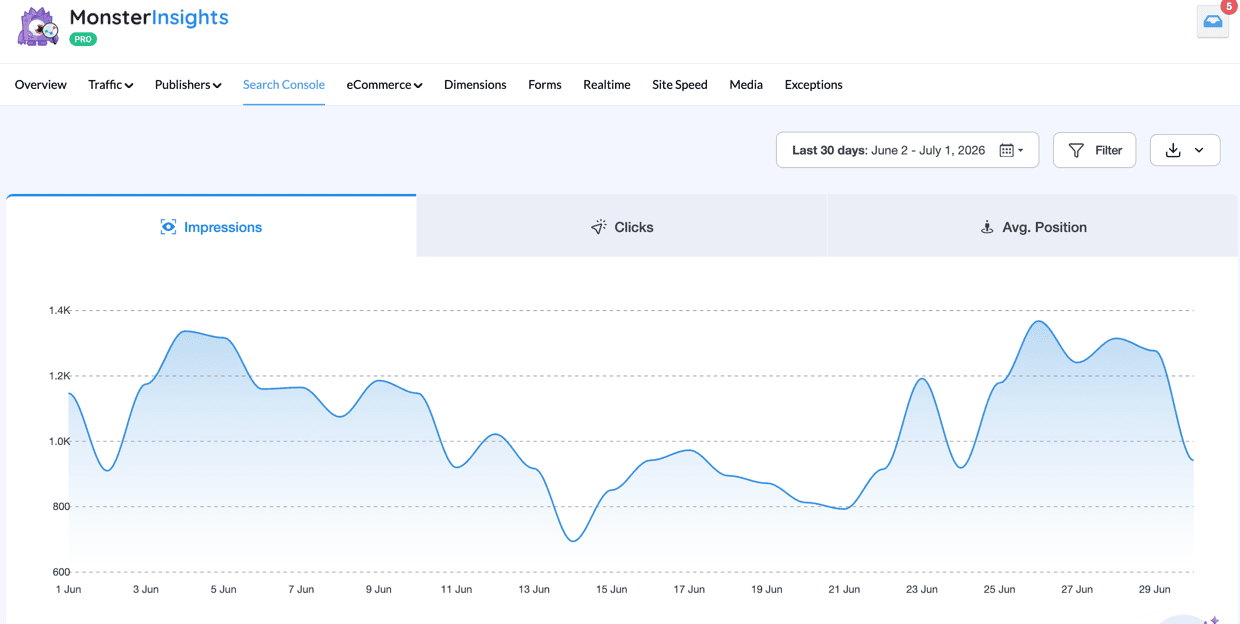
If organic search drives any of your traffic, the Search Console Report answers the same question this whole guide has been asking about competitors — except now it’s about your own site.
It shows real impressions, clicks, and average position for the queries actually sending you visitors, pulled straight from Google Search Console once you connect it (available on Plus and above).
MonsterInsights has plenty of other reports worth exploring — our guide to MonsterInsights dashboard reports walks through what each one shows you.
MY TAKE
Every other tool on this list is guessing at someone else’s traffic — MonsterInsights is the only one showing your own, in real numbers, without a second login.
PROS
- Real GA4 data, not an estimate
- Charlie Chat answers plain-English questions about your stats
- Reports live right inside wp-admin
CONS
- Only tracks the site it’s installed on, not competitors
- Some reports, like eCommerce and Forms, require Pro or above
- Requires connecting GA4 first (a few minutes of setup)
Get started with MonsterInsights today!
A Quick Overview of the Best Website Traffic Checkers
| PRODUCT NAME | BEST FOR | STARTING PRICE |
|---|---|---|
| Semrush | Deep competitor research and keyword analysis | $117.33/month |
| Ahrefs | Backlink analysis and content gap research | $29/month |
| SimilarWeb | Quick competitive traffic checks via Chrome extension | Free extension; premium from $199/month |
| Neil Patel’s Website Traffic Checker | Free, beginner-friendly traffic estimates | Free; paid from $29/month |
| Sitechecker | Simple, affordable traffic overviews | $99/month |
| SERanking | Agencies tracking keywords and competitors together | $103/month |
| Serpstat | All-in-one SEO platform on a budget | $50/month |
| Moz | Domain Authority scores and backlink research | $99/month |
| MonsterInsights | Real (not estimated) traffic data on your own WordPress site | Free; paid from $99.50/year |
Which Website Traffic Checker Should You Use?
If you want the deepest all-in-one SEO and competitor research platform: Semrush covers keyword research, backlinks, and traffic estimates without switching tools.
If backlink analysis and content gaps are your main question: Ahrefs has the strongest link index and content gap tool on this list.
If you just need a fast traffic check without logging into a dashboard: SimilarWeb‘s Chrome extension gets you a number in one click.
If you’re just getting started and don’t want to pay for a traffic checker yet: Neil Patel’s Website Traffic Checker is free, with a 4-month history cap that’s fine for casual research.
If you want a quick, affordable traffic snapshot without a big commitment: Sitechecker gives you a usable 3-month overview at one of the lower prices here.
If you want to track your own rankings and competitor traffic in one subscription: SERanking combines both without a second tool.
If your team wants Semrush-style features on a tighter budget: Serpstat covers organic and paid keyword data at a noticeably lower price.
If you want a client-facing authority score to back up your backlink research: Moz‘s Domain Authority score is the industry-standard number agencies already reference in reports and pitches.
If you want real numbers for your own WordPress site instead of an estimate: MonsterInsights is the only tool on this list that isn’t guessing — it reads your actual GA4 data.
FAQs About Website Traffic Checkers
How can I see the traffic of a website?
To see your website’s traffic, use tools like Google Analytics, which provides detailed visitor statistics, or third-party platforms such as SimilarWeb or Semrush for estimated traffic metrics for any website. These tools show traffic sources, user behavior, and page views, helping analyze web performance. For your own website, use Google Analytics or MonsterInsights on WordPress for exact visitor statistics.
Can I see how much traffic a website gets for free?
Yes, you can see website traffic estimates for free using limited versions of tools like Semrush, Ahrefs, or SimilarWeb. Or, use Google Analytics for free (for websites you own). These platforms offer limited insights, such as estimated traffic, top pages, and audience data, without requiring a paid subscription. For your own website, Google Analytics is completely free and provides exact traffic data.
How do I check how many people visited my website?
The most accurate way to check how many people visited your website is by using Google Analytics. Install the Google Analytics tracking code on your site (or use MonsterInsights for WordPress), then access reports showing unique visitors, pageviews, sessions, and user behavior. For WordPress users, MonsterInsights displays these statistics directly in your dashboard for easier access.
Are website traffic checker tools accurate?
Website traffic checker tools provide estimates, not exact numbers. Tools like Semrush and SimilarWeb use data from ISPs, browser extensions, and statistical modeling — accuracy tends to improve for larger sites with higher traffic volumes. For your own website, Google Analytics (or MonsterInsights for WordPress) provides fully accurate data since it reads directly from your actual visitors.
What is the best free website traffic checker?
SimilarWeb’s free Chrome extension is one of the best options for checking competitor traffic at a glance without any cost. For free competitor keyword research alongside traffic data, the limited free plans from Semrush and Ubersuggest are solid starting points. For tracking your own website, Google Analytics is completely free and provides exact visitor data — and MonsterInsights makes it easy to access those stats right inside WordPress.
How do I track competitor website traffic?
To track competitor website traffic, use a tool like Semrush, Ahrefs, or SimilarWeb. Simply enter a competitor’s domain URL to get estimated monthly traffic, top keywords, traffic sources, and more. I recommend cross-referencing two or three tools for a clearer picture, since each uses different data sources. Most offer free access to basic data, with paid plans for deeper insights.
Do website traffic checker tools track traffic from ChatGPT, Perplexity, or AI Overviews?
Not reliably yet. Most third-party traffic checkers are built on search-engine and panel data, so they’re designed to estimate organic and paid search traffic — not the newer referral traffic coming from AI chat tools or AI-generated search summaries. If you want to see that traffic on your own site, check your Source/Medium or referral report in Google Analytics (or MonsterInsights) for domains like chatgpt.com or perplexity.ai showing up as a traffic source.
Is Moz a good option for checking website traffic?
Moz is better known for its Domain Authority score and link-building tools than for standalone traffic estimates, though it’s a fine addition if you’re already comparing SEO platforms side by side. If checking traffic numbers is your main goal, a dedicated traffic checker like Semrush, Ahrefs, or SimilarWeb will give you a more direct answer.
Pick one of these tools, run a few competitor domains through it, and use what you find to shape your own content and keyword strategy. For more on turning that research into real traffic gains, these guides are a good next stop:
- Top 11 Important Google Analytics Metrics to Track in 2026
- How to Increase Organic Traffic in 2026 (12 Best Ways)
- How to Track Competitor Website Traffic and Ethically Steal It
- Google Analytics SEO Hacks to Increase Search Traffic
- How to Use Google Search Console for Keyword Research
- How to Do Keyword Research for SEO: Quick-Start Guide
Follow us on Twitter, Facebook, and YouTube for more Google Analytics tips.