


If you’re trying to choose between Independent Analytics and MonsterInsights, you’re weighing two very different philosophies about what website analytics should do for you. One is built for simplicity and data privacy. The other is built for growth.
Both are legitimate WordPress analytics plugins with real strengths, but they serve different types of website owners. We’ve seen this pattern consistently — the right choice comes down to what you actually need your analytics to do.
In this article, we’ll give you a clear, honest comparison of Independent Analytics vs MonsterInsights — covering setup, reporting, eCommerce, forms, privacy, performance, and pricing. By the end, you’ll know exactly which one fits your situation.
In This Article:
- Independent Analytics vs MonsterInsights: Quick Comparison Guide
- Independent Analytics vs. MonsterInsights: A Brief Introduction
- Installation & Setup: Which Is Easier?
- Google Analytics vs. Self-Hosted Tracking — What's the Difference?
- Reports & Dashboard Experience
- eCommerce Tracking: Which Is Better for Online Stores?
- Form Tracking & Lead Generation
- Privacy & GDPR Compliance
- Does MonsterInsights Slow Down Your Website?
- Independent Analytics vs MonsterInsights: Pricing Comparison
- Independent Analytics vs MonsterInsights: Final Verdict
- Frequently Asked Questions: Independent Analytics vs MonsterInsights
Independent Analytics vs MonsterInsights: Quick Comparison Guide
| FEATURE | INDEPENDENT ANALYTICS | MONSTERINSIGHTS |
|---|---|---|
| Uses Google Analytics | ❌ No | ✅ Yes (GA4) |
| eCommerce Tracking | ✅ Basic (Pro) | ✅ Enhanced, automatic |
| Form Tracking | ⚠️ Limited | ✅ Automatic, multi-plugin |
| GDPR Controls | ✅ Built-in | ✅ EU Compliance addon |
| Data Storage Location | WordPress database | Google Analytics servers |
| Search Console Integration | ❌ No | ✅ Yes |
| Advanced Reporting | ❌ Limited | ✅ Extensive |
| Custom Dimensions | ❌ No | ✅ Yes |
| Attribution & Segmentation | ❌ No | ✅ Yes |
| Scalability | ⚠️ Limited | ✅ High |
| Free Version | ✅ Yes | ✅ Yes (Lite) |
| Starting Price (Pro) | ~$49/year | From $99.50/year |
Key Takeaway
Independent Analytics delivers clean, simple traffic stats stored locally in WordPress — ideal for privacy-first personal sites with basic needs. MonsterInsights connects to GA4 to deliver deep behavioral insights, attribution data, eCommerce analytics, and automated tracking that serious website owners need to make confident growth decisions. For most growing WordPress sites, MonsterInsights offers significantly more value.
Independent Analytics vs. MonsterInsights: A Brief Introduction
Independent Analytics

Independent Analytics is a standalone WordPress plugin that tracks visitor data entirely within your own WordPress database. It doesn’t require a Google Analytics account, third-party services, or external data transmission.
It was built for website owners who want a simple, privacy-first solution: install it, activate it, and it starts collecting traffic data immediately.
The plugin appeals particularly to users who are wary of connecting their site to external platforms, or who operate in environments where local data storage is preferred.
Its dashboard is minimal by design, covering core metrics like page views, referrers, and geographic data without additional configuration.
MonsterInsights

MonsterInsights is the most popular Google Analytics plugin for WordPress, used by over 3 million websites.
Rather than replacing Google Analytics, it connects your WordPress site to GA4, the industry-standard analytics platform, and surfaces your most important data in a clean, actionable dashboard inside your WordPress admin.
Where Independent Analytics focuses on basic traffic stats, MonsterInsights is built for website owners who want to understand what their traffic is doing: which channels drive revenue, which forms convert leads, which products sell, and which content keeps people coming back.
It’s designed to grow with your site, from a simple blog to a full eCommerce operation.
The core difference: Independent Analytics tracks traffic. MonsterInsights tracks performance.
Installation & Setup: Which Is Easier?
Independent Analytics wins on raw simplicity. Install the plugin, activate it, and it starts tracking immediately — no accounts, no API connections, no configuration required.
For users who find the idea of setting up Google Analytics intimidating, that zero-friction experience is genuinely appealing.
MonsterInsights requires a few more steps because it connects your site to GA4.
That said, the plugin includes a guided setup wizard that walks you through the process step by step.

You don’t need to touch any code, paste any tracking snippets, or configure Google Tag Manager. For most users, the full setup takes under ten minutes.
MonsterInsights requires a slightly longer initial setup because it unlocks significantly more tracking capabilities.
The connection to GA4 is what enables cross-device tracking, attribution modeling, ad integrations, audience segmentation, and dozens of other features that Independent Analytics simply doesn’t offer.
The small upfront investment in setup pays dividends every time you log in to make a decision based on your data.
Google Analytics vs. Self-Hosted Tracking — What’s the Difference?
This is one of the most important distinctions in the Independent Analytics vs MonsterInsights comparison, and it’s worth understanding clearly before you decide.
Independent Analytics tracks visitors using its own lightweight script and stores everything inside your WordPress database. No data leaves your server. There’s no reliance on Google, no third-party accounts, and no external dependencies. For users who take data privacy extremely seriously, this may be very appealing.
MonsterInsights connects your WordPress site to Google Analytics 4, which is the analytics platform that the vast majority of professional marketers, developers, and businesses rely on as the global standard.
GA4 gives you access to capabilities that a self-hosted plugin fundamentally cannot replicate:
- Advanced segmentation: Filter traffic by behavior, demographics, device, or custom parameters
- Attribution modeling: Understand which channels truly drive conversions, not just last-click credit
- Cross-device tracking: See how users move between mobile and desktop before converting
- Ad platform integrations: Connect your analytics directly to Google Ads, Meta, and other channels
- Exploration reports: Build custom funnel analyses and cohort studies
- Predictive metrics: GA4 uses machine learning to surface purchase probability and churn risk
The “no Google” appeal of Independent Analytics is real and legitimate. But it’s worth asking honestly: if your goal is to grow your website, improve conversions, and make smarter marketing decisions, do you want less data or more?
MonsterInsights lets you configure GA4 privacy settings, including IP anonymization, disabled demographics, and cookie consent integrations. That way, using Google Analytics doesn’t have to mean surrendering control.
Reports & Dashboard Experience
Independent Analytics Reports
Independent Analytics presents a clean, minimal dashboard inside WordPress. The free version gives you access to:
- Page views and unique visitors over time
- Top pages — a list of your most-visited content
- Referrers — where your traffic is coming from
- Basic geographic data — visitor countries
- Device and browser breakdown
- Date range filters
The interface is genuinely easy to read. There’s no learning curve, no configuration required, and the data is presented plainly.

For a personal blog or small informational site where basic traffic volume is all you need to know, this dashboard may be entirely sufficient.

The limitation becomes apparent when you need to answer questions beyond “how many people visited?” — questions like which traffic source actually drives email signups, or which landing page converts the most WooCommerce customers, or which blog post brings in visitors who come back a second time.
Those answers require capabilities that Independent Analytics doesn’t currently offer.
MonsterInsights Reports
MonsterInsights surfaces GA4 data inside a robust WordPress dashboard designed for non-technical users. You don’t need to log into Google Analytics to access your most important metrics — they’re right in your admin panel.
In practice, having all of this accessible from your WordPress dashboard saves time every single week. Here are some of the main reports you’ll get in MonsterInsights:
Overview Report — A high-level summary of sessions, users, pageviews, bounce rate, session duration, and top traffic sources at a glance.

Traffic & Channels Report — Break down your traffic by source and medium. See exactly how much comes from organic search, social media, direct, referral, email, and paid campaigns — and how each channel performs relative to the others.
Search Console Integration — See which keywords are bringing visitors to your site directly inside WordPress. This is data that Independent Analytics has no equivalent for.

Top Landing Pages — Identify which pages drive the most entrances to your site and how they convert.
Technology Report — Understand which devices, browsers, and screen sizes your audience uses — critical for design and performance decisions.
Scroll Tracking — See how far down the page your users actually read, out of the box.
Affiliate Link Tracking — Automatically track clicks on outbound affiliate links without adding custom code.
Real-Time Reports — See who’s on your site right now.
Custom Dimensions — Track post authors, publication dates, logged-in vs. logged-out users, and more with a few clicks.
The distinction is meaningful: Independent Analytics tells you how much traffic you have. MonsterInsights tells you what that traffic is doing, and gives you the insights to act on it.
eCommerce Tracking: Which Is Better for Online Stores?
If you run a WooCommerce store or any other online shop on WordPress, this section may be the most important part of your Independent Analytics vs MonsterInsights decision.
Independent Analytics offers WooCommerce support in its Pro version. You can track basic revenue data, order counts, and transaction volume. For a store owner who just wants a high-level revenue summary alongside traffic data, this is functional.
MonsterInsights takes eCommerce tracking to an entirely different level — and does it automatically. Once enhanced eCommerce is enabled, you get:
- Conversion rate — The percentage of sessions that result in a purchase
- Revenue — Total and per-product
- Average order value — A critical metric for scaling ad spend profitably
- Product performance — Which products sell, which get viewed but not purchased
- Add-to-cart rate — Where shoppers are dropping out of the funnel
- Channel attribution — Which traffic sources are actually generating revenue (not just visits)
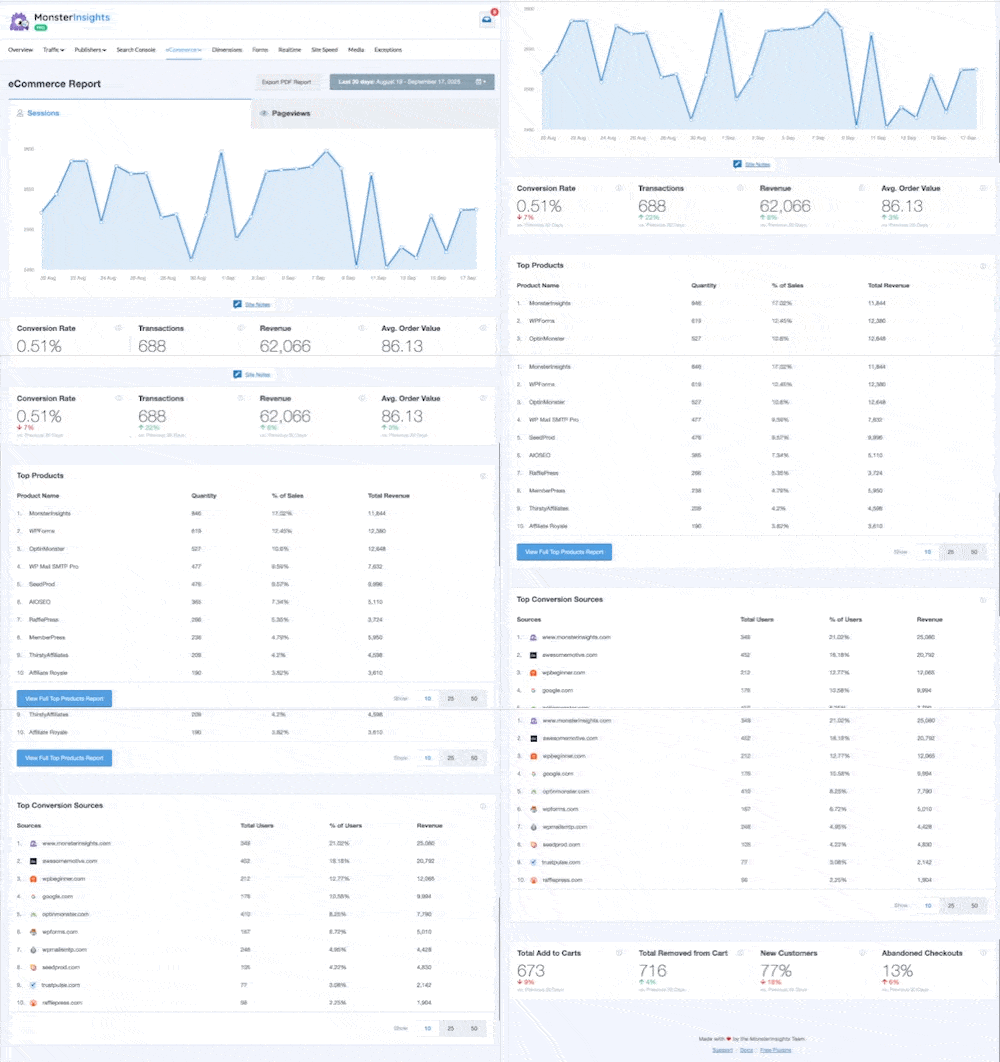
None of this requires custom JavaScript, manual tag configuration, or developer involvement.
MonsterInsights handles the implementation automatically for WooCommerce and other major eCommerce platforms.
For WooCommerce store owners especially, this is one of the first things we’d set up — having revenue, conversion rate, and traffic data in the same dashboard changes how you make every decision.
For any store owner spending money on ads, optimizing product listings, or trying to increase average order value, these eCommerce metrics aren’t optional luxuries — they’re the foundation of every profitable decision you make.
Independent Analytics simply doesn’t provide this level of eCommerce insight.
Track Every Sale, Product, and Revenue Source — Automatically
MonsterInsights sets up enhanced eCommerce tracking for WooCommerce in minutes. See your conversion rate, revenue, top products, and which channels are driving sales — no code required.
Form Tracking & Lead Generation
For coaches, agencies, service businesses, SaaS companies, and bloggers building email lists, forms are where website visitors become leads. Knowing which forms convert and which ones don’t is essential information.
Independent Analytics has limited native form tracking. It doesn’t offer deep integrations with the major WordPress form plugins, which means tracking lead generation performance requires additional setup or remains a blind spot entirely.
MonsterInsights includes automatic form tracking that works with all major WordPress form plugins, including:
For each form on your site, you can see impressions (how many times the form was displayed), conversions (how many times it was submitted), and conversion rate.
The best part is, you can do this without writing a single line of code or configuring anything manually.
Pro Tip: Use the Forms report alongside the Traffic & Channels report to see which traffic sources send your highest-converting visitors. That data alone can change how you allocate your marketing budget.

If your business depends on generating leads, this feature alone can justify MonsterInsights.
Knowing that your contact form on Page A converts at 4% while the same form on Page B converts at 11% is actionable intelligence that can meaningfully change your strategy.
Tammy L. Finch
I tried a few of these simple plugins for Google Analytics. This one is by far the easiest to use and edit… Thanks so much for putting this plugin out.
Privacy & GDPR Compliance
Privacy is a legitimate concern for any website owner, and it’s worth addressing clearly in this comparison.
Independent Analytics stores all visitor data inside your WordPress database. No data is transmitted to external servers, which means no third-party data processing agreements are required. This architecture is genuinely privacy-friendly by design, and it’s a real differentiator for users who need or prefer complete local data control.
MonsterInsights takes a different approach: it works with GA4, which processes data on Google’s servers. However, MonsterInsights includes an EU Compliance addon and a range of configuration options designed to support GDPR compliance:
- IP anonymization — Masks the last octet of visitor IP addresses
- Disable demographics and interest reports — Reduces data collection scope
- Cookie consent integrations — Works with major GDPR consent plugins including WP Consent, CookieYes, Complianz, and others, so tracking only activates after consent is given
- Data retention controls — Configurable within Google Analytics
An important point to keep in mind: GDPR compliance is not simply a matter of plugin choice. It depends on how your site is configured, your privacy policy, your cookie consent implementation, and how you handle user data requests.
Independent Analytics being self-hosted doesn’t automatically make a site compliant, and MonsterInsights using GA4 doesn’t automatically make a site non-compliant.
If privacy is a core requirement, both plugins can be configured responsibly — but they require different approaches to get there.
If you prefer zero external data transmission as a hard requirement, Independent Analytics is the cleaner choice. If you need powerful analytics and are willing to configure proper consent management, MonsterInsights fully supports that path.
For more on setting up GDPR-compliant analytics in WordPress, check out these related guides:
Does MonsterInsights Slow Down Your Website?
This concern comes up frequently in the MonsterInsights vs Independent Analytics discussion.
The Google Analytics 4 tracking script loaded by MonsterInsights runs asynchronously. That means it loads in the background without blocking the rendering of your page content. For the overwhelming majority of WordPress websites, the measurable impact on page speed is minimal.
It’s also worth noting that Independent Analytics isn’t “zero impact” either. It still executes tracking requests on every page load, those requests just go to your own server rather than Google’s.
Depending on your hosting environment, local tracking requests can sometimes have their own performance implications.
In practice, the sites that experience meaningful performance issues trace them to unoptimized images, heavy themes, poorly coded plugins, or inadequate hosting, not to Google Analytics.
Tools like GT Metrix or Google PageSpeed Insights can help you check your website speed and identify your actual bottlenecks.
If site speed is a concern for you, the right approach is a comprehensive performance audit, not avoiding a lightweight, asynchronously-loaded analytics script.
Independent Analytics vs MonsterInsights: Pricing Comparison
Independent Analytics Pricing
- Free — Unlimited sites, basic traffic stats, page views, referrers, devices, geographic data
- Pro Standard — $49/year, 1 website
- Pro Hobbyist — $79/year, up to 3 websites
- Pro Agency — $199/year, unlimited websites
- Guarantee — 30-day full refund policy
All Pro plans include WooCommerce integration, advanced filtering, and additional reporting features.
MonsterInsights Pricing
- Lite — Free; basic GA4 connection, overview reports, available on WordPress.org
- Plus — From $99.50/year; enhanced reports, Google Optimize, performance tracking
- Pro — From $199.50/year; eCommerce tracking, form tracking, Search Console, custom dimensions, advanced features
- Agency — From $399.50/year; multi-site support, client management features
Important context on pricing: MonsterInsights costs more than Independent Analytics at comparable tiers. But the comparison isn’t just about price per year — it’s about value per insight.
If MonsterInsights’ form tracking reveals that one landing page converts leads at three times the rate of another, and you reallocate your content investment accordingly, the ROI on that data far exceeds the subscription cost.
Lower price reflects a simpler feature set. MonsterInsights pricing reflects the breadth of automation, integrations, and scalability it delivers. For a growing website, that’s usually a worthwhile trade.
Independent Analytics vs MonsterInsights: Final Verdict
After comparing both plugins across every major dimension, here’s our honest breakdown:
Choose Independent Analytics if:
- You only need basic traffic volume stats (page views, referrers, device types)
- You have a strong preference for keeping all data inside WordPress with no external services
- You run a personal blog, portfolio, or small informational site with no eCommerce or lead generation
- You want the fastest possible setup with zero account configuration
- Your audience is in a jurisdiction where local data storage is a hard legal requirement
Choose MonsterInsights if:
- You run a WooCommerce store and need real conversion, revenue, and product performance data
- You collect leads through forms and want to know which forms and pages convert
- You run paid ads on Google, Meta, or other platforms and need attribution data
- You want to understand which traffic channels actually drive results — not just visits
- You publish content and want to see which posts bring in the most engaged audience
- You’re growing your website and want data that can scale with your ambitions
For most WordPress website owners, especially anyone with a business goal beyond simply publishing content, MonsterInsights is the stronger long-term choice.
The depth of insight it provides, combined with the automation that eliminates manual tracking setup, makes it the platform serious website owners rely on to make smarter decisions, faster.
Independent Analytics is a capable, honest tool for what it does. But if you want analytics that actively help you grow, MonsterInsights is in a different category.
Ready to See What Your Traffic Is Actually Doing?
Install MonsterInsights and get your most important analytics data — eCommerce, forms, traffic sources, and more — right inside your WordPress dashboard. Setup takes under 10 minutes.
Frequently Asked Questions: Independent Analytics vs MonsterInsights
Is Independent Analytics better than MonsterInsights?
It depends on your needs. Independent Analytics is better if you want a simple, self-hosted solution with zero external dependencies and basic traffic stats. MonsterInsights is better if you want advanced reports, eCommerce tracking, form analytics, attribution data, and scalability. For most growing websites, MonsterInsights delivers significantly more actionable value.
Does MonsterInsights require Google Analytics?
Yes. MonsterInsights connects your WordPress site to Google Analytics 4 (GA4), which is where your data is processed and stored. The plugin’s guided setup wizard makes connecting GA4 straightforward, even if you’ve never used Google Analytics before. If you prefer not to use Google Analytics, Independent Analytics is the right alternative.
Which is more privacy-friendly, MonsterInsights or Independent Analytics?
Independent Analytics stores data entirely within your WordPress database, no external transmission. MonsterInsights works with GA4, but supports IP anonymization, cookie consent integrations, and other GDPR configurations. Ultimately, privacy compliance depends on how either plugin is configured, not just plugin choice. Both can be implemented responsibly with the right setup.
Is MonsterInsights worth it?
For most website owners with a growth goal, whether that’s increasing revenue, generating leads, or improving content performance, yes. The automated tracking features alone (eCommerce, forms, scroll depth, affiliates) would require significant developer time to set up manually in GA4. MonsterInsights handles all of it out of the box, making its pricing a strong value for the time and insight it saves.
Can I use both plugins together?
Technically yes, but it’s generally not recommended. Running two analytics solutions simultaneously can create data conflicts, add unnecessary server overhead, and complicate your reporting. Choose the tool that fits your needs and commit to it for clean, reliable data.
Which is better for WooCommerce?
MonsterInsights is the clear choice for WooCommerce stores. Its automatic enhanced eCommerce tracking captures conversion rate, revenue, average order value, product performance, and channel attribution without any custom code. Independent Analytics offers basic WooCommerce revenue data in its Pro version, but it doesn’t come close to the depth of eCommerce insight MonsterInsights provides.
And that’s it! I hope this article helped you compare Independent Analytics vs MonsterInsights and find the right fit for your site. If you want to explore more plugin comparisons and analytics setup guides, check out the following:
- MonsterInsights vs. Google Site Kit: A Detailed Comparison
- MonsterInsights vs. Jetpack Stats: A Detailed Comparison
- MonsterInsights vs. Analytify – Which One Is the Best?
- How to Set Up WooCommerce Google Analytics Tracking (2026)
- Your Ultimate Guide to MonsterInsights Dashboard Reports
And don’t forget to follow us on Twitter, Facebook, and YouTube for more helpful reviews, tutorials, and Google Analytics tips.