


If you follow SEO news and best practices, you’ve probably run into the term “cornerstone content.” It sounds like just another buzzword, but treating every article on your site the same way is exactly why some of your best content never makes it past page two of Google. So what is cornerstone content, and how do you actually build it?
There are many SEO tips and tactics competing for your attention, and it takes real effort to figure out which ones actually move the needle for your website. I’ve looked at enough WordPress sites to say cornerstone content is one of the few tactics that consistently pays off, which is why it’s worth your time.
In this article, I’ll sum up cornerstone content for you. I’ll cover what it is, why it’s essential, and how you can create it, along with a few cornerstone content examples.
If you’re a WordPress user, stick around for the last section, where I’ll show you how to add cornerstone content specifically in WordPress.
In This Article:
What is Cornerstone Content?
Treat every article on your site the same way, and you risk spreading your SEO efforts too thin to rank anything particularly well. Cornerstone content fixes that: it’s a set of articles published on your website that contain your most important keywords and topics. They’re central to your content strategy, and it’s crucial to keep them updated and try to rank them in Google search results.
Cornerstone content is often longer and more in-depth than a lot of your other content.
I like to think of cornerstone content as a hub. It sits at the center of one particular topic, and all the other content you create around the same subject supports that hub.
For example, your cornerstone content piece might be called “The Ultimate Guide to WordPress SEO,” and supporting pieces might be “Top 10 Basic WordPress SEO Tips” and “How to Add WordPress Internal Links to Improve Your SEO”.
What Are the Benefits of Cornerstone Content?
Using the cornerstone content model on your website comes with several concrete benefits.
1. Increases E-E-A-T
Google E-E-A-T (Experience, Expertise, Authoritativeness, and Trustworthiness) is a concept that Google uses to explain how it chooses the best content to rank on the first page of search results.
By creating cornerstone content, you’re indicating to Google that you’re an expert on the subject. Your cornerstone content is also more likely to be linked to from other websites, leading Google to see that you’re trustworthy.
In my experience, sites that treat one article as the definitive resource on a topic build authority faster than sites spreading thin coverage across a dozen pages.
For more on E-E-A-T, check out the E-E-A-T guide from All in One SEO (AIOSEO).
2. Helps Users Navigate Your Site
Your cornerstones are likely to be your top landing pages. Cornerstone content works as a hub when you link it to your other important content on the same subject. That gives visitors a natural path through your site based on their interests.
It works the other way around, as well. Visitors will click on your links from other articles to check out your cornerstone content.
Not only is this helpful for users, but it also might boost your rankings! If people are sticking around on your site, engaging with your content, and clicking through to more pages, Google may use that as a positive ranking signal.
3. Is More Likely to Rank
If you create cornerstone content and follow the best practices in this article, it’s far more likely to rank than a regular piece of content would.
Creating cornerstone content naturally takes more time and effort than regular content. That extra time and effort should pay off with increased rankings, though, which means more traffic and more revenue!
See Which Cornerstone Pieces Are Actually Ranking
Marking an article as cornerstone content doesn’t guarantee it’ll rank — you still need to track whether it’s actually working. MonsterInsights shows you the exact search terms and pages sending organic traffic to your site, right inside your WordPress dashboard, so you can see which cornerstone pieces are pulling their weight and which ones need more attention.
See How to Track Your Organic RankingsHow to Create Cornerstone Content That Ranks
Ready to get started on your cornerstone content? Let’s dive into our tutorial.
Step 1: Choose 3 – 5 Cornerstone Topics
Your first step in creating cornerstone content is choosing your target topics and keywords. These should be topics central to your work and include keywords with higher search volumes.
Keep your cornerstone topics broad enough to cover a lot of ground. That gives you room for plenty of supporting content that links back to the cornerstone piece.
For example, our plugin, MonsterInsights, is a Google Analytics plugin for WordPress. So, one of our cornerstone content pieces is How to Add Google Analytics to WordPress the Right Way.
It’s very central to what we do, and there are high-volume keywords it can rank for. Plus, there’s a lot to explore about using Google Analytics on WordPress. All of that makes it an excellent cornerstone content piece!
Step 2: Research, Research, Research
Before you can finish and optimize your cornerstone content, do some keyword research. That research should confirm three things: you have all the necessary keywords, your content can compete with what’s already ranking, and it matches the right keyword intent.
Keywords: In addition to your focus keyword, ensure you’ve found all of its variants and super closely related topics to go over in your article.
For help with keyword research, check out How to Do Keyword Research for SEO: Quick-Start Guide.
Competition: If you want to outrank your competition, your article needs to compete with theirs in terms of topics covered, keywords used, and general awesomeness.
For more on competitor research, check out How to Track Competitor Website Traffic and Ethically Steal It.
Keyword Intent: What kind of content are users expecting to find when they type your focus keyword into Google? Are the top 10 results for your keyword mostly listicles, ultimate guides, videos, or something else? Try to align with what’s there, but make yours better.
It also helps to think about what the searcher really needs when they type in your keyword. Are they just looking for information, or are they ready to buy something? This will shape the main point of your entire article. When we review search intent on our own articles, mismatched intent is one of the most common reasons a piece that should be ranking well simply isn’t.
For more on writing for the right keyword intent, check out How to Master SEO Search Intent to Improve Your Rankings.
Step 3: Write a Longer, Detailed Article
Cornerstone content is typically lengthy and detailed in order to rank for not only your focus keyword but related keywords as well. These articles also often serve as hubs. They dip into different topics, and you write entire articles on those separately, linking the two pieces together.
In the article, separate different ideas with headings and include your focus keyword frequently. Link out to studies or other data, and generally show Google that you’re an expert on the topic.
We’ll give you a few more writing tips in the next section.
How to Add Cornerstone Content in WordPress
The first steps in adding cornerstone content to WordPress are the same as any other content. Write it using your keywords, give it descriptive headings, and make it look great.
Beyond that, here are a few extra tips for your cornerstone content pieces in WordPress:
- Include a table of contents: Cornerstone content is often on the longer side, so a table of contents can help readers and search engines easily see what’s included in the article.
- Craft a super compelling meta title and description: Although Google may change your meta description to closely match the searcher’s query, think of your meta title and description as an ad, persuading searchers to click on your result.
- Optimize your images: Every little bit of SEO-ing you can do to your article is helpful, including optimizing your images. Images can also be included in featured snippets, so ensure your image SEO is dialed in.
- Use an SEO plugin to analyze your article: Using an SEO plugin like All in One SEO to analyze your article can greatly help get it to rank. It’ll tell you whether your focus keyphrase is in all the right places, whether your images are optimized, whether your readability is strong, and more.
When your content is created and well optimized, there’s a special way you can add it as cornerstone content by using the All in One SEO plugin.
Step 1: Install AIOSEO

If you haven’t installed All in One SEO yet, it’s time to start. While they have a Lite version of the plugin, you’ll need the Pro version to access the Cornerstone Content feature (and a ton of other useful features). With AIOSEO Pro, you’ll also get features like:
- Easy SEO audits
- Schema
- Redirect manager
- Internal link assistant
- Advanced sitemaps
- WooCommerce SEO
- And much more
Step 2: Switch Cornerstone Content On
Now, you can use AIOSEO to indicate which articles you want to mark as cornerstone content. Click the AIOSEO score badge in the top toolbar of the post editor, select Advanced, and toggle the Mark as Cornerstone switch on:

Step 3: Use AIOSEO to Improve Your Cornerstone Content
Now that you’ve marked your most important articles as cornerstone content, the All in One SEO plugin will help you turn them into high performers.
First, note that you can now access your cornerstones quickly on your WordPress posts page:
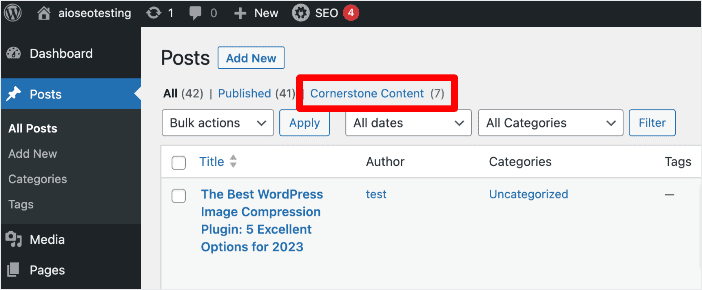
So, if you need to update those articles, you can quickly and easily find them in your list.
Before we do anything else, make sure to open each cornerstone article, click the AIOSEO score badge to open the Optimization panel, enter your Keywords, and make any essential updates that AIOSEO suggests:

Next, let’s take a look at the heart of your cornerstone content strategy: internal links.
Besides shaping your article into a fantastic piece of content, the most crucial part of cornerstone content is links. If you want that article to act as a cornerstone for your site, you want to link many other pages and posts to it. This not only shows search engines that the content is essential, but it also sends your human traffic there.
To build those crucial links, click the AIOSEO score badge, select Link Assistant, then click Open Link Assistant:

Then, head to the Link Suggestions tab and click on Inbound Internal Suggestions:

This is where it gets incredibly easy to build your internal links. All you have to do is click the blue Add Link button next to each suggestion, and it’ll be added to the article without opening it.
Want to edit the sentence or linked words? Just click into the Phrase and change it how you’d like before clicking Add Link.
Pro Tip: Rerun Link Assistant’s suggestions any time you publish new content — new posts create fresh internal link opportunities pointing back to your cornerstone pieces, and they won’t show up until Link Assistant re-scans your site.
That’s it – internal links added!
For more on internal linking with the AIOSEO Link Assistant, check out our guide on adding internal links in WordPress to improve your SEO.
The Bottom Line
Marking an article as cornerstone content is just a label. What actually convinces Google — and your readers — that the page matters is the internal links you build pointing to it. Revisit your cornerstone pieces regularly, because a page that never gets reinforced with fresh links and updates loses its power over time.
See our list of the best content audit tools for keeping cornerstone content fresh →
Cornerstone Content Examples
Want to see cornerstone content in action? Here are a few real examples worth studying.
- WPBeginner’s How to Make a WordPress Website (Ultimate Guide): This guide to making a WordPress website is excellent cornerstone content for a website that covers just about everything about WordPress. It covers everything just enough and links to longer guides on each subject. It likely has plenty of internal links pointing back to it, too.
- OptinMonster’s Email Marketing: The #1 Ridiculously Easy Way To Grow Your Business: OptinMonster is all about marketing and growth, so this email marketing cornerstone content targets precisely the right audience for them. Like WPBeginner’s cornerstone content, this guide goes over everything just enough to make sense for the guide, then links to supporting articles for further information.
- SeedProd’s 31 Best Coming Soon Page Examples + How to Create Your Own: If you want to create a coming soon page on your WordPress website, SeedProd is the best plugin for the job. So, this cornerstone content serves them really well! Google loves a list like this one that’s well-made with images and great examples.
- Backlinko’s Definitive Guide to Keyword Research: This cornerstone content is long, detailed, and full of important information that Backlinko touches on but goes more in depth in other articles. For example, the Keyword Research Tools section covers six great tools, but they’ve anchored that with 18 Best Free and Paid Keyword Research Tools for SEO and linked between the two.
These four examples share the same pattern: one genuinely comprehensive page at the center, with supporting articles linking back to reinforce it. That’s the approach worth copying, whatever topics you choose for your own cornerstone content.
FAQs About Cornerstone Content
What’s the difference between cornerstone content and pillar content?
The terms are often used interchangeably, and in most SEO contexts they mean the same thing: a comprehensive piece of content that acts as an authority on a topic and links out to more specific supporting articles. Some marketers use “pillar content” for a broader hub with many linked subtopics, while “cornerstone content” leans slightly more toward SEO strategy, but the practical approach to creating either is identical.
How much cornerstone content should a website have?
Most sites do well with somewhere between 5 and 15 cornerstone pieces, though the right number depends on how many distinct core topics your business covers. I’d rather see a handful of genuinely comprehensive cornerstone articles than a dozen thin ones — depth matters more than hitting a specific count.
How often should you update cornerstone content?
I’d recommend reviewing your cornerstone content at least twice a year, since these are your highest-value pages and search intent, competition, and facts can all shift over that time. Treat updates as an ongoing part of your content strategy, not a one-time task you finish and forget.
Does cornerstone content need to be a specific word count?
There’s no fixed word count requirement, but cornerstone content is usually longer and more detailed than your average post because it needs to cover a topic thoroughly enough to serve as the definitive resource. Focus on covering the topic completely rather than hitting an arbitrary number.
Can product or service pages be cornerstone content?
Yes. If a product or service page represents one of your business’s most important topics, and you can build supporting content and internal links around it, it can serve as cornerstone content just as well as a blog post can.
Do I need AIOSEO to create cornerstone content?
No — cornerstone content is a content strategy, not a plugin feature, so you can build it manually with good structure and internal linking. That said, using All in One SEO’s Cornerstone Content setting speeds up the process because it works with Link Assistant to surface internal linking opportunities automatically.
How does cornerstone content affect SEO rankings?
Cornerstone content helps rankings mainly through concentrated internal links and topical depth, both of which signal to Google that a page is authoritative on its subject. It won’t guarantee a top ranking on its own, but it gives your most important pages a real structural advantage over content that never gets reinforced this way.
And that’s it! I hope this article helped you understand what cornerstone content is and how to create it. If you liked this guide, check out the following related resources:
- Surefire Ways to Get a Google Answer Box
- How to Create a Table of Contents in WordPress (Plugin or Not)
- Best SEO Content Checker Tools for Content Optimization
- Google Analytics 4 SEO Hacks to Increase Search Traffic
Thanks for reading, and best of luck building out your own cornerstone content strategy!
And don’t forget to follow us on YouTube for more helpful Google Analytics tips and tutorials.