


I used to assume a page-one ranking meant the job was done. Lately I’ve noticed that’s not always true — I’ve seen lower-ranked pages get named in an AI Overview while a higher-ranked page on the same topic gets skipped.
That gap between ranking well and getting cited is only getting wider. Checking your position the old way — one keyword, one number — doesn’t tell you the whole story anymore.
Below, I’ll walk through the search engine ranking checker tools worth using, including a few built specifically to track how you show up in AI answers.
None of them does everything at once, so it helps to know what each one is actually built for. A free option straight from Google covers the ranking basics. A WordPress-native pick puts that same data inside your dashboard. And a couple of AI-focused platforms will tell you whether ChatGPT or Google’s AI Overviews cite you at all.
In This Article:
- What Do Search Engine Ranking Checker Tools Do?
- What to Look for in a Rank Checker Tool
- A Quick Overview of the Best Search Engine Ranking Checker Tools
- Our Top Picks for the Best Search Engine Ranking Checker Tools
- 1. Google Search Console — Best for Free, Direct-from-Google Ranking Data
- 2. MonsterInsights — Best for WordPress Site Owners Who Want Rankings Inside WordPress
- 3. Semrush — Best for Full-Service SEO Research Alongside Rank Tracking
- 4. Ahrefs — Best for Competitor Rank Comparisons and SERP-Feature Data
- 5. SE Ranking — Best for Budget-Friendly AI-Visibility Tracking
- 6. Nightwatch — Best for Verified Rank-Tracking Accuracy
- 7. Ranktracker — Best for One Subscription That Covers Rank Tracking and Keyword Research
- 8. Serpstat — Best for an All-in-One SEO Toolkit at a Lower Starting Price
- Which Search Engine Ranking Checker Should You Use?
- FAQs About Search Engine Ranking Checker Tools
What Do Search Engine Ranking Checker Tools Do?
Although ranking checker tools each have their own spin, they all work the same basic way. They crawl search results for the keywords you enter and report which position your site holds.
The most basic tools show you your rank, the keyword’s search volume, and sometimes its cost per click (CPC).
Beyond that, look for tools that also give you:
- Real-Time Ranking Data: Up-to-the-minute keyword position changes across search engines.
- Historical Tracking: A record of how your rankings move over weeks or months.
- Competitor Analysis: A look at how your rivals rank for the same keywords.
- Local and Global Insights: Rankings broken out by city, country, or device.
- Classic SERP Feature Tracking: Your presence in featured snippets, image packs, and People Also Ask boxes.
A handful of tools on this list now track one more thing: whether AI answers are citing you at all.
Ranking #1 for a keyword used to be a reliable proxy for visibility. Ahrefs’ most recent citation study found that only 38% of pages cited in Google’s AI Overviews also rank in the top 10 organically for that query. A year earlier, that number was 76%.
In plain terms: a page can rank well and still get skipped by the AI answer, or get cited by name while sitting on page two. That’s exactly why a few tools below now track AI visibility as its own metric, separate from your classic ranking.
Rank and Cite Are No Longer the Same Job
A top-10 ranking is now a weaker predictor of AI Overview citation than it was a year ago. None of the tools below can tell you whether that citation actually sent someone to your site — but MonsterInsights’ AI Traffic Report can. It breaks out sessions from ChatGPT, Claude, Gemini, and Perplexity, so you can see whether all that AI visibility is translating into real visitors.
Whether it’s classic or AI-aware, using a rank checker is still the best way to see whether your site actually shows up where people are searching. Improving those rankings is the whole point of working on your organic website traffic in the first place.
What to Look for in a Rank Checker Tool
Start by deciding what kind of ranking data and tracking capability you actually need — once you know that, choosing the right tool gets a lot easier.
For example, if you want historical ranking data to compare past results against where you stand today, you’ll want a complete SEO solution like Semrush or Ahrefs. For a lot of site owners, though, those platforms are more complexity and expense than they need. Thankfully, there are other options on our list you’ll probably like better.
Whatever level you’re at, here are the factors worth weighing before you pick a rank checker tool:
- Ease of Use: An intuitive interface that doesn’t require deep technical expertise keeps a tool accessible to SEO novices and experts alike.
- AI-Visibility Tracking: It’s worth checking whether the tool tracks citations in ChatGPT, Perplexity, or Google’s AI Overviews, not just your classic Google ranking.
- Data Accuracy: The tool should pull data directly from major search engines like Google and Bing. Accurate data is the foundation of an effective SEO strategy.
- Verified Accuracy Claims: If a tool advertises a specific accuracy number, check whether it’s benchmarked against a named alternative or just asserted with no comparison.
- Scalability: A tool that can grow with your site and your evolving SEO needs matters more than one that only works for today.
- Reporting Features: Clear, customizable reports make the biggest difference — the ability to interpret and share data easily matters for team collaboration.
- Update Frequency: SEO moves fast, so a tool that updates often enough to keep pace with algorithm changes is worth prioritizing.
- Integration Capabilities: Tools that connect well with other SEO tools or analytics platforms you already use save you extra setup work.
- Budget: It’s worth investing in quality, but pick the tool that offers the best value for your specific situation.
- Customer Support: Reliable support can save you real time when you run into issues or need guidance.
Search engine ranking checker tools aren’t all the same, and our picks below each take a slightly different approach. Check them all out, and you’ll find something that fits how you actually want to track your search visibility.
A Quick Overview of the Best Search Engine Ranking Checker Tools
| TOOL | BEST FOR | STARTING PRICE | AI-VISIBILITY TRACKING |
|---|---|---|---|
| Google Search Console | Free, direct-from-Google ranking data | Free | No |
| MonsterInsights | WordPress owners who want rankings inside wp-admin | $99.50/year (Plus) | No — Charlie Chat answers questions from your own GSC data |
| Semrush | Full-service SEO research alongside rank tracking | $139.95/month | Yes (add-on, +$99/mo) |
| Ahrefs | Competitor rank comparisons and SERP-feature data | $29/month | Yes (Brand Radar add-on, agency-priced) |
| SE Ranking | Budget-friendly AI-visibility tracking | $103.20/month | Yes (add-on, +$71.20/mo) |
| Nightwatch | Verified rank-tracking accuracy | ~$85/month (€79) | Yes (included on every plan) |
| Ranktracker | One subscription for rank tracking, keywords, and backlinks | $39/month | No |
| Serpstat | All-in-one SEO toolkit at a lower price | $59/month | No |
Our Top Picks for the Best Search Engine Ranking Checker Tools
1. Google Search Console — Best for Free, Direct-from-Google Ranking Data

BEST FOR: Free, direct-from-Google ranking and click data
KEY FEATURES: Search performance report, 16 months of history, index coverage, mobile usability checks
PRICING: Free
FREE PLAN / TRIAL: Completely free — no trial needed
Google Search Console gets you the most important thing a rank checker can offer for free: the data comes straight from Google itself.
It doesn’t have keyword research or competitor tracking built in. But it shows you exactly what keywords your site is already ranking for in Google search, with up to 16 months of historical data at no cost.
Just connect Search Console to your website to see your keywords alongside clicks, impressions, average click-through rate (CTR), and average position. You can toggle between keywords and landing pages to see which page ranks for each term.

For ideas on putting this data to work, see our guide on using Google Search Console for SEO.
MY TAKE
Google Search Console is the one tool on this list I’d tell anyone to set up on day one. It’s free, and there’s no reason to skip data that comes straight from Google itself.
PROS
- Completely free, with no usage cap
- Data comes directly from Google, not a third-party estimate
- Up to 16 months of historical ranking data
- Simple enough for SEO beginners to use right away
CONS
- No keyword research or competitor tracking
- No AI-visibility tracking for ChatGPT or AI Overviews
- Only shows queries you already rank for, not new opportunities
Get started with Google Search Console today.
2. MonsterInsights — Best for WordPress Site Owners Who Want Rankings Inside WordPress

BEST FOR: WordPress site owners who want ranking data inside wp-admin
KEY FEATURES: Search Console Report (clicks, impressions, CTR, avg. position, top 50 search terms), Charlie Chat AI assistant, full GA4 dashboard inside WordPress
PRICING: Plans start at $99.50/year (Plus), which includes the Search Console Report. Charlie Chat is included on every plan, including free Lite — confirm current pricing before publishing
FREE PLAN / TRIAL: A free Lite version is available on WordPress.org and includes Charlie Chat; no trial on paid plans
If your site runs on WordPress, MonsterInsights, the WordPress analytics plugin, puts your Search Console ranking data next to the rest of your traffic. You’re not logging into a second dashboard just to check where you rank.
On the Plus plan and above, MonsterInsights connects to Google Search Console and pulls in rankings for your most successful keywords, right inside WordPress. These are the terms actually sending you traffic from Google search.
The Search Console Report shows the top 50 search terms bringing people to your site, along with clicks, impressions, CTR, and average position for each one.

A couple of tools further down this list can tell you whether AI engines are citing your content. MonsterInsights takes a different angle on the AI moment: Charlie Chat.
Charlie Chat is the AI assistant built into every MonsterInsights plan, including the free Lite version. Instead of a report you have to interpret yourself, it answers questions about your own data in plain conversation.
Ask it something like “why did my organic clicks drop this month?” or “which keywords should I focus on next?” Charlie Chat draws on the Search Console data shown above. It answers in plain language, with a recommended next step.
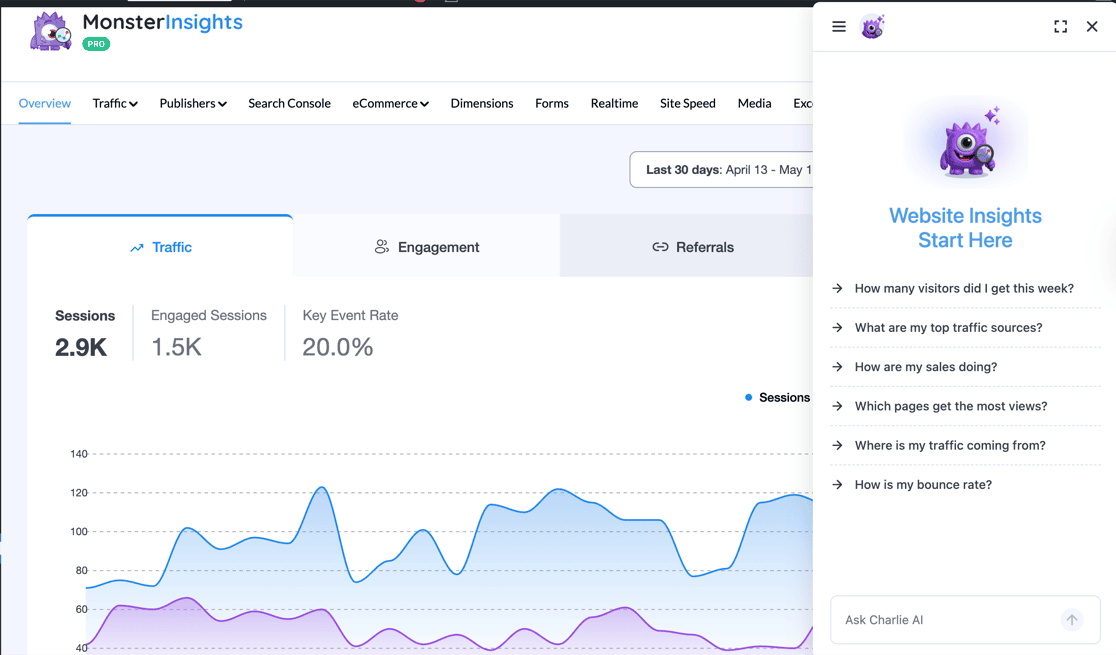
Charlie Chat is answering questions from your own first-party analytics — it isn’t tracking citations in ChatGPT, Gemini, or Perplexity the way a couple of the AI-visibility tools further down this list do.
Beyond ranking data, MonsterInsights connects to the rest of Google Analytics. You get straightforward reports on the metrics that actually matter, checked right inside WordPress.
MY TAKE
Checking rankings inside Search Console works fine on its own. Pulling that same data into the dashboard where you already check traffic is where this gets genuinely useful for a WordPress site owner who doesn’t want two logins.
PROS
- No separate login needed to see ranking data
- Charlie Chat answers SEO questions using your own Search Console data (available on every plan, including Lite)
- Combines ranking data with the rest of your GA4 analytics in one place
- 1-click setup with no coding required
CONS
- The Search Console Report itself requires the Plus plan or higher
- Only surfaces keywords you already rank for, not new keyword opportunities
- Not a substitute for a dedicated keyword-research tool
Get started with MonsterInsights today.
3. Semrush — Best for Full-Service SEO Research Alongside Rank Tracking

BEST FOR: Full-service SEO research alongside rank tracking
KEY FEATURES: Historical rank tracking for up to 1,000 keywords, AI Visibility Toolkit add-on (ChatGPT, Gemini, Perplexity, AI Overviews), backlink analysis, site audit
PRICING: Starts at $139.95/month (Pro); the AI Visibility Toolkit adds $99/month
FREE PLAN / TRIAL: Limited free version available; no free trial on paid plans
Semrush covers rank tracking as one piece of a much bigger SEO and keyword-research platform.
It has a huge number of tools and screens, but most are easy enough to follow. If you get stuck, Semrush backs it up with extensive documentation and responsive support.
As a premium SEO tool, Semrush’s rank-tracking side includes:
- Historical position tracking with real-time data for up to 1,000 keywords
- Position tracking in SERPs for keywords, domains, and competitors
- Keyword search volume, intent, cost, and difficulty data
- An AI Visibility Toolkit add-on that tracks brand mentions across ChatGPT, Gemini, Perplexity, and Google AI Overviews
That AI-visibility piece is genuinely new. It’s one reason Semrush still holds its own against newer, cheaper AI-tracking tools further down this list. It does cost extra, on top of an already premium plan.
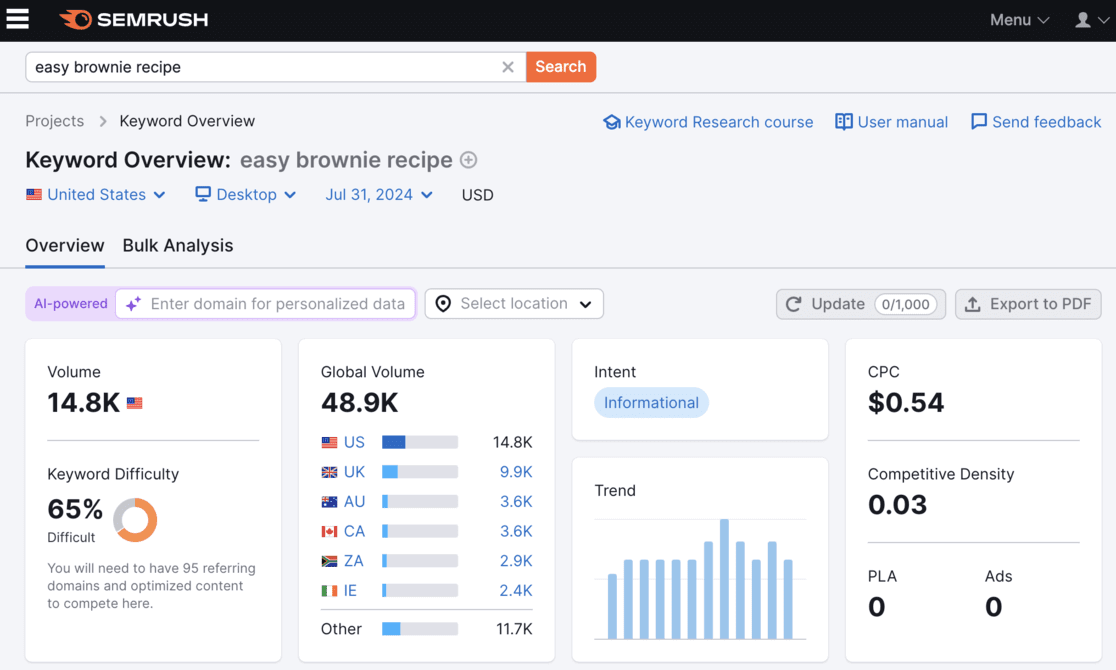
Semrush also includes a full set of on-page and off-page SEO tools: backlink analysis, a site audit checker, content optimization, and social media tracking.
If you’re managing every part of your site’s SEO and search marketing yourself, Semrush is worth the price. If you just need to check rankings, it’s probably more tool than you need.
MY TAKE
Semrush trades a steeper price tag for the deepest keyword and competitor data on this list, plus its own AI-visibility tracking as an add-on.
PROS
- Historical rank tracking for up to 1,000 keywords
- AI Visibility Toolkit tracks ChatGPT, Gemini, and Perplexity mentions (add-on)
- Extensive backlink analysis and site-audit tools
- Strong documentation and customer support
CONS
- The full platform gets expensive at scale
- AI-visibility tracking costs extra on top of the base plan
- Steep learning curve for SEO beginners
Get started with Semrush today.
4. Ahrefs — Best for Competitor Rank Comparisons and SERP-Feature Data

BEST FOR: Competitor rank comparisons and SERP-feature data
KEY FEATURES: Rank Tracker with SERP-feature tracking (AI Overviews, featured snippets), Site Explorer, Keywords Explorer, Site Audit, Brand Radar AI-visibility add-on
PRICING: Starter plan starts at $29/month; the Lite plan (more projects and history) starts at $129/month
FREE PLAN / TRIAL: Free Ahrefs Webmaster Tools available; no free trial on paid plans
Ahrefs rivals Semrush as a top-level SEO and keyword-research platform — powerful enough for agencies, but still usable for non-technical site owners.
The Ahrefs dashboard overview shows the number of organic keywords your site ranks for and how your top-tracked keywords are distributed across positions.
From there, the Rank Tracker shows you:
- Keyword rankings charted over time, along with volume, traffic, and related URLs
- SERP features like AI Overviews, ad positions, and featured snippets
- Rank, search traffic, and SERP-feature comparisons against up to 10 competitors
Ahrefs’ Starter plan, at $29/month, includes the Rank Tracker for up to 50 keywords — enough for a small site to keep an eye on its main terms. If you want to go further into AI-visibility tracking specifically, Ahrefs’ Brand Radar add-on covers ChatGPT, Gemini, and Perplexity, though it’s priced for agencies rather than solo site owners.

Ahrefs bundles in a full set of tools beyond rank tracking:
- Site Explorer: backlinks and broken links
- Keyword Explorer: new keyword ideas and search volume
- Site Audit: on-page SEO issues
- Content Explorer: content performance research
If you’re a beginner, Ahrefs backs all of this up with a large library of help docs, video courses, and other learning materials.
MY TAKE
What sets Ahrefs apart from Semrush is how much it surfaces about the competitive landscape around each keyword, not just your own position in it.
PROS
- $29/month Starter plan includes the Rank Tracker
- Tracks SERP features like AI Overviews and featured snippets
- Compares your rankings against up to 10 competitors
- Large library of tutorials and courses for beginners
CONS
- Deeper AI-visibility tracking (Brand Radar) is priced for agencies, not solo sites
- Starter plan caps you at 50 tracked keywords
- Interface takes some time to learn
Get started with Ahrefs today.
5. SE Ranking — Best for Budget-Friendly AI-Visibility Tracking

BEST FOR: Budget-friendly AI-visibility tracking alongside classic rank checking
KEY FEATURES: Rank tracking for up to 2,000 keywords, AI Search add-on (Google AI Overviews, AI Mode, Perplexity, ChatGPT), site audit, backlink tools
PRICING: Core plan starts at $103.20/month billed annually; the AI Search add-on is an additional $71.20/month
FREE PLAN / TRIAL: Free trial available; no permanent free plan
SE Ranking is one of the more affordable full-service platforms that also tracks AI visibility, without jumping straight to Semrush or Ahrefs pricing.
The Core plan covers rank tracking for up to 2,000 keywords, plus site audit and backlink tools — a reasonable base for a small business or growing blog.
The AI-visibility piece isn’t baked into that base price, though. It’s a separate AI Search add-on that unlocks tracking across Google’s AI Overviews and AI Mode, Perplexity, and ChatGPT.
Once the add-on is active, you can see how often your brand or content shows up in AI-generated answers, alongside your classic keyword rankings in the same dashboard. It’s worth budgeting for the add-on cost upfront rather than being surprised by it at checkout.
MY TAKE
I like SE Ranking for a team that wants AI-visibility tracking without paying agency-tier prices, as long as you budget for the add-on from the start.
PROS
- Core plan starts under $130/month, cheaper than Semrush or Ahrefs’ full platforms
- AI Search add-on covers Google AI Overviews, AI Mode, Perplexity, and ChatGPT
- Tracks up to 2,000 keywords on the entry plan
- Includes site audit and backlink tools in the base price
CONS
- AI-visibility tracking isn’t included by default — it’s a separate add-on
- Real monthly cost adds up once you factor in add-ons
- Covers fewer AI platforms than some dedicated AI-visibility tools
Get started with SE Ranking today.
6. Nightwatch — Best for Verified Rank-Tracking Accuracy

BEST FOR: Verified rank-tracking accuracy with AI-visibility tracking included
KEY FEATURES: Claimed 99.9% rank-tracking accuracy, AI-visibility tracking (ChatGPT, Claude, Gemini, Perplexity) included on every plan, white-label reporting, Map Pack tracking
PRICING: Starter plan runs about €79/month (roughly $85)
FREE PLAN / TRIAL: Free trial available; no permanent free plan
Nightwatch leads with a specific claim most competitors don’t make: 99.9% rank-tracking accuracy, benchmarked against an industry average. It gets there using its own network of data centers, instead of rented proxy pools that can get blocked or throttled.
That’s Nightwatch’s own claim, not an independently audited figure. It’s worth spot-checking a handful of your own rankings against what you see in Search Console before you rely on it completely.
Where Nightwatch stands out from SE Ranking is that AI-visibility tracking isn’t an add-on. Every plan, including the entry tier, includes tracking across ChatGPT, Claude, Gemini, and Perplexity, plus AI Overviews on Google, YouTube, and Bing.
Nightwatch also covers Map Pack tracking for local SEO and white-label reporting. That makes it a reasonable pick for an agency managing a handful of client sites, not just a solo blogger.
MY TAKE
Nightwatch is the pick when a named accuracy number matters more to you than the size of the overall toolkit.
PROS
- Claims 99.9% rank-tracking accuracy using its own data-center network
- AI-visibility tracking (ChatGPT, Claude, Gemini, Perplexity) included on every plan, not an add-on
- White-label reporting for agencies
- Tracks Map Pack and other local SERP features
CONS
- Entry plan starts around $85/month, pricier than several tools on this list
- Fewer classic SEO extras (site audit, backlink tools) than Semrush or Ahrefs
- The accuracy claim is Nightwatch’s own — worth verifying against your own site
Get started with Nightwatch today.
7. Ranktracker — Best for One Subscription That Covers Rank Tracking and Keyword Research

BEST FOR: One subscription covering rank tracking, keyword research, and backlinks
KEY FEATURES: Rank Tracker by location, language, and device, Keyword Finder, SERP Checker, backlink tools, email ranking alerts
PRICING: Launch plan starts at $39/month ($31.20/month billed annually)
FREE PLAN / TRIAL: Free trial available; no permanent free plan
If you want one subscription that covers rank tracking plus the basics of keyword research and backlinks, Ranktracker is worth a look.
It doesn’t have the content-analysis or competitor-research depth of Semrush or Ahrefs, but its rank-checking side covers the essentials:
- Rank Tracker that monitors rankings by location, language, and device
- Email alerts for critical ranking changes
- SERP feature checks for your Google listings
- SERP position and competitor comparison
Ranktracker presents all of this in reports that are quick to set up. Every plan also includes unlimited projects and users, which is more generous than most tools at this price point.
As of this writing, Ranktracker doesn’t have AI-visibility tracking for ChatGPT or AI Overviews. If that’s a priority for you, pair it with Google Search Console for AI Overview signal, or look at SE Ranking or Nightwatch above instead.
We’d recommend Ranktracker for site owners who want more than the free tools on this list provide, but don’t need the full weight of a premier SEO platform.
MY TAKE
Ranktracker is worth a look if you want one subscription that covers rank tracking, keyword research, and backlinks without a Semrush-level price tag.
PROS
- All-in-one toolkit (Rank Tracker, Keyword Finder, SERP Checker, backlinks) on every plan
- Tracks rankings by location, language, and device
- Unlimited projects and users, even on the entry plan
- Email alerts for ranking changes
CONS
- No AI-visibility tracking for ChatGPT or AI Overviews as of this writing
- Entry-plan price has gone up noticeably in the last couple of years
- Less competitor-research depth than Semrush or Ahrefs
Get started with Ranktracker today.
8. Serpstat — Best for an All-in-One SEO Toolkit at a Lower Starting Price

BEST FOR: An all-in-one SEO toolkit at a lower starting price
KEY FEATURES: Over 50 SEO tools, automated rank-tracking reports, local/global/organic/paid SERP tracking, batch analysis
PRICING: Individual plan starts at $59/month ($50/month billed annually)
FREE PLAN / TRIAL: Free trial available; no permanent free plan
Serpstat calls itself an all-in-one SEO platform, and with over 50 separate tools bundled in, that’s a fair description. It works for anyone from a solo site owner to a search marketing agency.
For website and keyword rank tracking specifically, Serpstat offers:
- Local, global, organic, and paid search-result checks for your domain and competitors
- Automated rank-tracking reports on a daily, weekly, or monthly schedule
- SERP and search-volume crawling for more detail on results
Serpstat is a genuinely broad product at a price that’s still lower than market leaders like Semrush. It might be a good fit if you want a top-tier feature set on a more economical budget. Just know it doesn’t currently offer AI-visibility tracking.
MY TAKE
Serpstat trades some of the polish of Semrush and Ahrefs for a noticeably lower starting price on a similarly broad toolkit.
PROS
- Over 50 SEO tools bundled into one subscription
- Automated rank-tracking reports on a schedule you choose
- Local, global, organic, and paid SERP tracking
- Lower starting price than most full-service competitors
CONS
- No AI-visibility tracking for ChatGPT or AI Overviews as of this writing
- Interface feels less polished than Semrush or Ahrefs
- Best value requires committing to annual billing
Get started with Serpstat today.
Already Checking Your Rankings? See the Rest of Your SEO Data Too.
MonsterInsights pulls your Search Console rankings, clicks, and impressions into the same WordPress dashboard where you already check traffic. Then it lets you ask Charlie Chat what to do about what you find.
See MonsterInsights PlansWhich Search Engine Ranking Checker Should You Use?
If you just want free, direct-from-Google ranking data with zero setup cost: Google Search Console is the obvious starting point. There’s no reason to pay for data Google already gives you for free.
If your site runs on WordPress and you don’t want a second dashboard: MonsterInsights puts your Search Console rankings next to the rest of your analytics. Charlie Chat is on hand to answer follow-up questions.
If you’re managing every part of your SEO and search marketing yourself: Semrush gives you rank tracking, keyword research, backlinks, and AI-visibility tracking under one (expensive) roof.
If you want to see how your rankings stack up against specific competitors: Ahrefs is built around exactly that kind of comparison, starting at a genuinely affordable $29/month.
If you want AI-visibility tracking without paying Semrush or Ahrefs prices for it: SE Ranking gets you there, as long as you budget for the AI Search add-on separately.
If a named, verifiable accuracy claim matters more to you than a giant feature list: Nightwatch leads with its 99.9% accuracy claim and includes AI-visibility tracking on every plan.
If you want rank tracking, keyword research, and backlinks in one subscription: Ranktracker covers the basics of all three, without the premium price tag or a sprawling platform to learn.
If you want a broad SEO toolkit at a lower starting price than Semrush or Ahrefs: Serpstat bundles over 50 tools together, though it skips AI-visibility tracking for now.
FAQs About Search Engine Ranking Checker Tools
What is the best free rank checker?
Google Search Console is the best free option because the data comes directly from Google. You get up to 16 months of history on the keywords you already rank for, along with clicks, impressions, CTR, and average position, at no cost.
Can I track my rankings in ChatGPT or Google’s AI Overviews?
Yes, but not with every tool on this list. Nightwatch includes AI-visibility tracking across ChatGPT, Claude, Gemini, and Perplexity on every plan. Semrush, Ahrefs, and SE Ranking offer it too, usually as a paid add-on rather than part of the base price.
Is Rank Math’s built-in rank tracker enough on its own?
Rank Math’s rank tracker is a genuinely useful feature for keeping an eye on your focus keywords right in the WordPress editor. MonsterInsights isn’t a replacement for it — it adds GA4 and Search Console analytics in the same dashboard, alongside whatever rank tracker you’re already using.
How often should I check my search rankings?
Weekly is enough for most sites. Rankings for competitive terms can shift day to day, but chasing daily changes usually just adds noise. Check weekly, and look closer after a major algorithm update or a big change to a page.
Are rank checker tools’ accuracy claims trustworthy?
Vendor accuracy numbers are worth treating as a starting point, not a guarantee. A specific, named benchmark (like Nightwatch’s 99.9% claim) tells you more than a vague “highly accurate” marketing line, but it’s still the vendor’s own measurement. I’d still spot-check a handful of your own keywords against Google Search Console before trusting any tool completely.
What’s the difference between a rank checker and a full SEO platform?
A rank checker’s only job is telling you where you stand for a keyword. A full SEO platform like Semrush or Ahrefs adds keyword research, backlink analysis, site audits, and competitor tracking around that core rank data. If all you need is the ranking itself, a dedicated rank checker is usually the better value.
Whatever your business size or goals, one of the tools above should help you measure your rankings, spot your AI-visibility gaps, and grow your organic traffic. If you liked this article, check out these beginner-friendly guides:
- How to Use Google Search Console for Keyword Research
- Quick-Start Guide to Topical Authority in SEO
- SEO Analytics and Reporting Tips to Boost Organic Traffic
- Best Free SEO Chrome Extensions to Install Now
- AI Search Engine Optimization: The Complete Ranking Guide
- Google Ranking Factors for 2026 (The 10 Most Important)
Follow us on Twitter, Facebook, and YouTube for more Google Analytics tips.