


Is your advertising budget disappearing faster than you can say “cost per click?” Every time someone clicks your ad, you’re paying money — and when those clicks don’t turn into customers, it feels like throwing cash out the window.
The truth is, you don’t need a bigger budget to get better results. You just need to spend your money more efficiently.
According to a 2025 benchmark report, the average Google Ads cost per click is about $5.26 across all industries. Some industries average closer to $1.60 per click, while others pay $8.50+. That’s a huge spread — and the good news is that many of the factors influencing your CPC are completely within your control.
Your cost per click impacts everything: lower CPC means more clicks for the same budget, more qualified traffic, and more opportunities to turn visitors into customers.
In this guide, you’ll learn how to lower cost per click. By the end, you’ll have a clear plan to reduce your advertising spend while maintaining — or even improving — conversions.
In This Article:
- Before You Start: Make Sure Your CPC Data Is Accurate
- Why Your Cost Per Click Matters More Than You Think
- 6 Proven Strategies to Lower Your Cost Per Click (CPC)
- Strategy #1: Boost Your Quality Score to Pay Less (Way Less)
- Strategy #2: Pick the Right Keywords (Smart, Not Expensive)
- Strategy #3: Create Better Ads and Landing Pages That Actually Convert
- Strategy #4: Target Smarter, Not Harder
- Strategy #5: Use Remarketing to Lower Costs and Boost Conversions
- Strategy #6: Test Everything, Then Test Again
- Platform-Specific Strategies to Lower CPC
- Common Mistakes That Keep Your CPC High
- Your Action Plan to Lower CPC Starting Today
- Track Your Progress the Easy Way
- FAQs: How to Lower Cost Per Click (CPC)
Before You Start: Make Sure Your CPC Data Is Accurate
You can’t lower CPC confidently if you’re guessing which campaigns and keywords actually make money. Before you tweak bids or rewrite ad copy, make sure you’re tracking every click and conversion in one place.
If you run a WordPress site, MonsterInsights gives you that single source of truth.

With the PPC Ads Tracking addon, you can connect Google Ads, Microsoft Advertising, Meta (Facebook and Instagram) Ads, TikTok Ads, Pinterest Ads, and LinkedIn Ads, then see how each campaign performs right inside your WordPress dashboard — no extra tabs or custom code required.
- Automatically track Google Ads purchase conversions for WooCommerce, Easy Digital Downloads, and MemberPress just by adding your conversion ID in MonsterInsights.
- Drop in your TikTok, Pinterest, or LinkedIn pixel/tag details once and let MonsterInsights handle page view and purchase tracking for you.
- Visual Search Console Reports make it easy to see which keywords already bring you high-intent organic traffic so you can mirror that success in your paid campaigns.
- And with Google Ads creation built right into MonsterInsights, you can launch and monitor Performance Max campaigns from the same dashboard where you review your analytics.
As you work through the strategies in this guide, you’ll see a few “MonsterInsights tips” that show you exactly where the plugin can help you find low-hanging opportunities to cut CPC without killing conversions.
Why Your Cost Per Click Matters More Than You Think
Every dollar you pay per click adds up fast. When you’re running ads on Google, Facebook, or any major ad platform, those costs can drain your budget quickly — especially if the clicks aren’t turning into customers.
Imagine two businesses with the exact same daily ad budget. Business A pays a higher cost per click, so their budget runs out by lunchtime. Business B pays less per click, so their ads keep running all day. By the end of the day, Business B has reached far more potential customers — not because they spent more money, but because their clicks were more affordable. That additional reach means more opportunities to generate leads, sales, or bookings.
Your cost per click affects your return on ad spend, how far your budget goes, and ultimately how profitable your advertising can be. CPCs vary by industry, competition level, and the platforms you’re advertising on — but your strategy has an even bigger impact.
Two businesses in the same niche can have completely different CPCs. The difference often comes down to how well their campaigns are structured, how relevant their ads are, and whether they’re optimizing their targeting and keyword choices. A smarter setup almost always leads to lower CPC and better results.
6 Proven Strategies to Lower Your Cost Per Click (CPC)
Ready to learn how to lower your CPC? The key is having a systematic approach that tackles every factor affecting your costs.
I’ve broken this down into six proven strategies that work together to reduce your CPC while maintaining (or improving) your conversions.
These strategies build on each other. I recommend you start with Strategy #1 (Quality Score) because it affects everything else. Then work through each strategy in order. By the time you finish implementing all six, you’ll see dramatically lower costs.
Strategy #1: Boost Your Quality Score to Pay Less (Way Less)
Quality Score is Google’s way of grading your ads. It ranges from 1 to 10, with 10 being perfect. This single number can save you thousands of dollars.
Google calculates Quality Score using three main factors:
- Expected click-through rate makes up 35% of your score. Google predicts how often people will click your ad based on past performance. Higher expected CTR means lower costs.
- Ad relevance accounts for another 35%. Your ad needs to match what people are searching for. If someone searches “best running shoes for flat feet” and your ad talks about dress shoes, you’ll pay more per click.
- Landing page experience covers the final 30%. When people click your ad, they should land on a page that delivers what you promised. Fast loading, mobile-friendly, and relevant content all boost your score.
Pro Tip: Start by fixing your landing page speed. Google reports that most sites lose tons of visitors while loading. Use Google’s PageSpeed Insights to check your site and fix slow-loading pages first.
A Quality Score of 10 can cut your CPC by up to 50% compared to a score of 5. On the flip side, a Quality Score of 1 can raise your CPC by 400%. That’s not a typo. Poor quality literally quadruples what you pay.
Strategy #2: Pick the Right Keywords (Smart, Not Expensive)
Many advertisers waste money on the wrong keywords. They chase high-volume terms with massive competition and inflated costs. There’s a much better approach.
Long-tail keywords — the longer, more specific search phrases — typically cost less and convert better. Instead of bidding on broad terms like “shoes,” you’re better off targeting something like “waterproof hiking boots for women size 8.” These searches tend to be cheaper and reflect stronger intent.
Here’s why long-tail keywords work:
- Long-tails make up the majority of Google searches. Studies show that the majority of search queries fall into the long-tail category.
- They attract higher-intent searchers. Research shows that specific, commercial-intent keywords typically convert at higher rates because searchers are further along in the buying process.
- They often cost less. Long-tail keywords usually have lower competition and higher relevance — two factors that can lead to lower CPC and better Quality Scores.
Pro Tip: Use Google’s Keyword Planner to find long-tail variations of your main keywords. Look for terms with modest search volume where the competition is lower and the intent is clearer.
MonsterInsights Tip: Use the Search Console Report in MonsterInsights to see which queries already bring you high-intent visitors and conversions. Those phrases make excellent targets for new long-tail keywords and ad groups, because you’re betting on terms you already know can work.

Don’t forget negative keywords. These tell Google when not to show your ads. For example, if you sell premium products, adding terms like “cheap” or “free” helps you avoid paying for clicks that will never convert.
Google recommends reviewing your search terms regularly. This simple habit helps you catch irrelevant queries triggering your ads and block them with negative keywords — a proven way to reduce wasted spend and stretch your budget further.
Strategy #3: Create Better Ads and Landing Pages That Actually Convert
Your ads and landing pages work together. Great ads with terrible landing pages waste money. Great landing pages with boring ads never get clicked. You need both working in harmony. Here are a few tips to help you do this:
Write ad copy that matches search intent
When someone searches “how to track website visitors,” you don’t want to show them an ad about “powerful analytics software.” Instead, it’s better to show them “Easy Website Visitor Tracking – See Who Visits Your Site.” When you match their words, they’ll be more confident you can help solve their problem.
It’s also a good idea to use numbers and specific benefits in your headlines. “Save 30% on Analytics” beats “Save Money.” “Get Reports in 5 Minutes” beats “Fast Reports.” Specifics build trust and boost clicks.
Test different ad variations constantly
I recommend creating at least 3-4 different ad versions for every ad group. Google will automatically show the best performers more often. Keep the winners, replace the losers, and watch your CTR climb.
Landing page best practices
Make sure your core keywords appear on the page. If someone clicked an ad for “WordPress analytics plugin,” those exact words should be visible above the fold on your landing page.
Keep your page fast. Every second of delay kills conversions. Use image compression, minimize code, and enable caching. Aim for a load time under 3 seconds.
Make your call-to-action obvious. Use contrasting colors for your CTA button. Place it above the fold. Tell people exactly what happens when they click it.

Remove distractions. Each landing page should have one goal. Multiple navigation options, links, and competing messages reduce conversions. Keep it focused.
Pro Tip: Create dedicated landing pages for your top-performing keywords. A generic homepage might work okay, but a purpose-built landing page that matches the search query will convert 2-3x better.
When you nail your ad relevance and landing page experience, Google rewards you with better ad positions at lower costs. It’s a win-win.
See these posts for additional information:
- How to Track Landing Page Conversion Rate in Google Analytics
- Landing Page Best Practices to Maximize Conversions (Tested)
Strategy #4: Target Smarter, Not Harder
Showing your ads to everyone is expensive and ineffective. Smart targeting puts your ads in front of people most likely to convert, reducing wasted clicks and lowering your average CPC.
- Use geographic targeting to focus on locations where your business actually operates or converts well. If you’re a local business, there’s no point showing ads nationwide. If you’re national but certain cities convert better, increase bids there and decrease them elsewhere.
- Device bid adjustments can dramatically affect your costs. Check if mobile or desktop performs better for your business. If desktop users convert at twice the rate of mobile users, increase your desktop bids and decrease mobile bids. Your overall CPC stays lower while conversions improve.
- Schedule your ads during high-converting times. Most businesses don’t need to run ads 24/7. Look at your conversion data by hour and day of the week. If you’re a B2B company and nobody converts on weekends, pause your weekend ads. Use that budget when it actually drives results.
- Exclude audiences who already converted or aren’t relevant. If someone already bought from you, showing them the same ad wastes money. Create exclusion lists for current customers, job seekers (if you’re not hiring), competitors, and other irrelevant groups.
Pro Tip: Create separate campaigns for mobile and desktop. This gives you complete control over bids, ad copy, and landing pages for each device type. Mobile users have different needs and behaviors than desktop users.
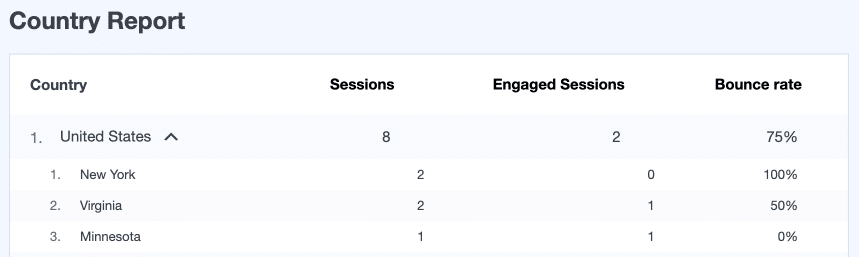
MonsterInsights Tip: Use your MonsterInsights Reports to see which countries, devices, and landing pages already deliver the best conversion rates. Align your geo and device bid adjustments with those high-performing segments so you’re spending more where the data says you win.
Strategy #5: Use Remarketing to Lower Costs and Boost Conversions
Many industry reports suggest that retargeting (or remarketing) campaigns tend to deliver lower CPC or acquisition cost than cold-audience prospecting campaigns — because you’re targeting people who already engaged with your site, which generally reduces competition and improves ad relevance.
Here’s how you can structure remarketing campaigns to get the best results:
- Create different audience lists based on behavior. People who visited your pricing page are more valuable than people who only read a blog post. People who added items to cart but didn’t check out need different messaging than first-time visitors.
- Use different ad messages for each stage. Someone who abandoned their cart needs a “Complete Your Purchase” message, maybe with a small discount. Someone who just browsed needs education about your product benefits.
- Set appropriate frequency caps. Seeing your ad 3-4 times per week keeps you top-of-mind. Seeing it 20 times per day is annoying and wastes money. Keep your frequency between 3-7 impressions per week.
Pro Tip: Exclude people who converted in the last 30 days from your remarketing campaigns. They just bought from you. Give them time to use your product before advertising again.
Platform-specific remarketing works great too. Facebook’s custom audiences let you upload email lists, target website visitors, and create lookalike audiences of your best customers. Instagram remarketing follows the same principles with visual-focused creative.
MonsterInsights Tip: Tag your remarketing campaigns with clear UTM parameters. MonsterInsights will group those in the Campaigns report so you can compare cold vs. warm audiences by CPC, conversion rate, and revenue right inside WordPress.

Strategy #6: Test Everything, Then Test Again
Optimization never stops. The advertisers who really know how to lower CPC while maintaining conversions are the ones who test constantly. Here’s what you can do to ensure you are always iterating and improving your paid search efforts.
A/B test your ad copy every 2-4 weeks. Test one element at a time: headlines, descriptions, or calls-to-action. Let each test run until you have statistical significance (usually 100+ clicks per variation).
Small changes can make big differences. Changing “Learn More” to “Get Started Free” might boost your CTR by 25%. That higher CTR improves your Quality Score, which lowers your CPC. These improvements compound over time.
Test different bidding strategies to find what works for your goals. Manual CPC gives you complete control but requires constant attention. Target CPA bidding lets Google optimize for conversions. Maximize Clicks gets you traffic at the lowest CPC possible.
You may want to start with manual bidding to gather data, then transition to automated strategies once you have enough conversion data. The key is setting realistic targets based on your historical performance.
Monitor your metrics weekly at minimum. Track these key numbers:
- Average CPC
- Quality Score by keyword
- Click-through rate (CTR)
- Conversion rate
- Cost per conversion
- Return on ad spend (ROAS)
Look for trends. If your CPC suddenly spikes, investigate immediately. New competitors? Decreased Quality Score? Seasonal changes? Understanding why metrics change helps you respond quickly.
Pro Tip: Set up automated rules in Google Ads to alert you when CPCs rise above a certain threshold. This early warning system catches problems before they drain your budget.
Check out our beginner-friendly guide on the best PPC metrics to track for more information.
Platform-Specific Strategies to Lower CPC
Different advertising platforms behave differently — and the tactics that lower CPC on one won’t always work on another. Here’s how to adjust your strategy based on where you’re running your campaigns.
Google Search Ads
Google Search often has the highest CPC among Google’s ad formats because searchers show strong intent — they’re actively looking for solutions.
Use the Search Partner Network (carefully)
Google’s Search Partner Network expands reach to sites beyond Google Search, including YouTube and other partner properties. Performance varies, but many advertisers see lower CPC in these placements due to reduced competition.
Add ad extensions to every ad group
Google notes that ad extensions (also called “assets”) can increase visibility and improve performance because they make ads more useful to searchers. Higher engagement can positively affect Quality Score, which may lower CPC.
Adjust bids by time of day
Google supports bid adjustments by time to increase or decrease bids based on performance patterns (“Set bid adjustments”). Identifying peak engagement hours helps you spend more efficiently.
Google Display Ads
Display clicks usually cost significantly less than Search clicks, but they require different optimization tactics.
Use placement and category exclusions
Google recommends reviewing placements and excluding low-quality or irrelevant sites to reduce accidental clicks.
Prioritize remarketing audiences
Google confirms that remarketing campaigns reach users who already interacted with your site, and these audiences typically deliver stronger performance than cold audiences.
Test responsive display ads
Google states that Responsive Display Ads automatically adjust size, format, and appearance to maximize performance.
Google Shopping Ads
For eCommerce, Shopping campaigns often provide cost-efficient clicks because users see product details upfront.
Optimize your product feed
Google’s Shopping documentation emphasizes that high-quality product titles, descriptions, attributes, and images improve visibility and performance.
Add negative keywords regularly
Google confirms that negative keywords help prevent your Shopping ads from appearing for irrelevant queries.
Use campaign priorities
Google officially supports campaign priority settings (High, Medium, Low) to control how Shopping campaigns compete with each other.
Facebook & Instagram Ads
CPC can vary widely on Meta platforms depending on audience size, objectives, and placements.
Choose the right objective for your goal
In Meta’s ad system, your campaign objective tells the algorithm what to optimize for. For example, the Traffic objective optimizes delivery for link clicks, while Sales/Conversions objectives optimize for purchase or other conversion events.
Refine your audience targeting
Meta recommends using detailed targeting options (interests, behaviors, demographics) or lookalike audiences to reach relevant users and reduce wasted spend.
Test multiple placements
Meta’s Ads Guide highlights that Feed, Stories, and Reels placements perform differently and recommends testing to find the most cost-effective options.
Schedule ads during high-engagement times
Meta Ads Manager allows ad scheduling when using a lifetime budget, letting you run ads only at specific days/hours. This helps you focus spend on high-engagement periods and reduce waste during off-peak times.
Use video when possible
Research shows that video is one of the most engaging content formats on social media, and short-form video in particular often outperforms static images in engagement and reach. Higher engagement can improve ad performance in Meta’s auction, which may help reduce your costs over time.
Common Mistakes That Keep Your CPC High
Knowing what NOT to do is just as important as knowing what to do. These common mistakes keep advertisers overpaying for clicks:
Setting and forgetting campaigns. Unfortunately, this happens all the time. Someone sets up a campaign, gets decent results, then ignores it for months. Competition changes. Costs increase. Performance declines. I recommend checking your campaigns weekly at minimum.
Bidding too aggressively on broad keywords. Yes, “insurance” gets lots of searches. It also costs $20+ per click. You can’t afford to compete with massive corporations on their terms. Go niche with long-tail keywords instead.
Ignoring Quality Score. Some advertisers focus exclusively on bids while ignoring the other half of the equation. Low Quality Scores can double or triple your effective CPC. Always work to improve your scores.
Using the same landing page for every ad. Sending all traffic to your homepage is lazy and expensive. Create specific landing pages that match each ad group for better conversions and lower costs.
Not excluding mobile apps and games on Display campaigns. These placements generate tons of accidental clicks that rarely convert. Exclude them immediately.
Competing with yourself. Running multiple campaigns with overlapping keywords makes your ads compete against each other. This drives up your costs. Structure campaigns carefully to avoid cannibalization.
Your Action Plan to Lower CPC Starting Today
You’ve learned a lot. Now it’s time to act. Here’s your step-by-step plan to start lowering your cost per click today:
Week 1: Audit your current campaigns
- Check Quality Scores for all keywords
- Identify keywords with high CPC and low conversions
- Review search terms reports for irrelevant queries
- Analyze your top-performing ads and landing pages
Week 2: Make quick improvements
- Add 20-50 negative keywords based on irrelevant search terms
- Pause keywords with Quality Scores below 4
- Add ad extensions to all ad groups
- Implement placement exclusions on Display campaigns
Week 3: Create new long-tail keywords
- Research 10-20 long-tail variations of your top keywords
- Build new ad groups around these specific terms
- Write highly relevant ads for each new ad group
- Set conservative bids to test performance
Week 4: Optimize landing pages
- Check load speed on all landing pages
- Ensure keywords appear on pages
- Simplify your call-to-action
- Create dedicated pages for top ad groups
Month 2 and beyond
- Review performance weekly
- Test new ad copy every 2-4 weeks
- Adjust bids based on performance
- Expand what works, pause what doesn’t
- Keep building your negative keyword list
Pro Tip: Track your average CPC weekly. Set a goal to reduce it by 10% in your first month, then another 10-20% over the next 2-3 months. These modest improvements compound into major savings.
Track Your Progress the Easy Way
Lowering your CPC isn’t a one-time project. It’s an ongoing process of testing, measuring, and optimizing — and that’s almost impossible if your data is scattered across a dozen different dashboards.
If you’re running ads and have a WordPress website, MonsterInsights makes tracking simple. Once you connect Google Analytics, MonsterInsights pulls your key metrics into easy-to-read reports inside WordPress so you can see what’s working at a glance.

With the PPC Ads Tracking addon, you can:
- Capture Google Ads purchase conversions for WooCommerce, Easy Digital Downloads, and MemberPress with a single conversion ID field.
- Track page views and sales from Microsoft Advertising, Meta, TikTok, Pinterest, and LinkedIn — all tied back to your GA4 data.
- See CPC, conversions, and revenue for every UTM-tagged campaign in the Traffic » Campaigns report, alongside your visual Search Console SEO insights.
- Launch and manage Google Ads campaigns directly from WordPress, then monitor how that paid traffic behaves on your site.
Instead of jumping between ad managers and analytics tools, you get one clear view of your CPC, conversions, and ROAS right inside MonsterInsights.
FAQs: How to Lower Cost Per Click (CPC)
Should I always choose keywords with the lowest CPC?
No. The cheapest keywords aren’t always the best keywords. Focus on keywords with good conversion potential, even if they cost a bit more. A $5 click that converts is better than a $1 click that doesn’t. Look at cost per conversion, not just cost per click.
How many negative keywords should I have?
Most successful campaigns have 50-200 negative keywords. Start by adding the most obvious ones (like “free,” “jobs,” “salary” if you’re not offering those things). Review your search terms report weekly and add 5-10 new negative keywords regularly.
Will lowering my bids reduce my ad position?
Possibly, but not always. Ad position depends on both your bid AND your Quality Score. If you improve Quality Score while lowering bids, you might maintain or even improve your position while paying less. Test small bid decreases (10-20%) and monitor results.
What’s a good Quality Score?
Quality Scores of 7-10 are excellent. Scores of 5-6 are average. Anything below 5 needs immediate attention. Focus your optimization efforts on keywords scoring 4 or below first, as these drain your budget fastest.
How often should I check my campaigns?
Check high-spend campaigns daily. Review all campaigns weekly at minimum. Conduct thorough audits monthly. Quick daily checks catch major issues early. Weekly reviews identify trends. Monthly audits uncover strategic opportunities.
Can I use these strategies on all platforms?
Yes! Quality Score concepts apply to Google. Facebook uses similar relevance metrics. Instagram follows Facebook’s rules. The principles of better targeting, relevant ads, and continuous testing work everywhere. Adapt the tactics to each platform’s specific features.
What if my industry has naturally high CPCs?
Some industries (legal, insurance, finance) face high costs due to competition and customer value. You can still improve your relative position. Focus on long-tail keywords in your niche. Improve Quality Scores. Target audiences more precisely. You might not match other industries’ low CPCs, but you can beat your direct competitors.
Should I pause underperforming keywords immediately?
Not always. Give keywords enough data first (at least 100 clicks or 30 days). Some keywords start slow but improve. However, keywords with Quality Scores of 1-3 after significant spend should be paused or rebuilt with better ad copy and landing pages.
I hope this article helped you learn everything you need to know about lowering cost per click. If you’re looking for more helpful information about paid search, check out these beginner-friendly guides:
- How to Master PPC Analysis: Best Tools, Metrics & Strategies
- How to Boost PPC Conversion Rates (+ Industry Benchmarks)
- Master PPC ROI: How to Calculate and Improve Your Return
- PPC Campaign Optimization: Complete Guide to Boost Your ROI
- Paid Search Analytics Explained: How to Measure PPC Success
- Your Complete Guide to AI-Optimized PPC Campaigns
- How to Measure Social Media ROI With Google Analytics
Not using MonsterInsights yet? Get started today!
Finally, stay connected with us on YouTube for the latest Google Analytics and WordPress tips and tutorials.