


Are you tired of battling it out for ultra-competitive, high-volume keywords? Sure, they can be effective at sending traffic to your site, but they’re hard to rank for and sometimes don’t send the most qualified traffic. To help you boost your traffic, improve your search rankings, and even increase your conversions, you should find and target long-tail keywords.
In this guide, I’m going to walk you through everything you need to know about long-tail keywords. I’ll cover what they are, why they’re so important, and, most importantly, how you can find and use them to supercharge your SEO strategy.
In This Article:
- What Are Long-Tail Keywords?
- Why Are Long-Tail Keywords Important for Your Site? (4 Reasons)
- How to Find Long-Tail Keywords
- How to Use Long-Tail Keywords Effectively
- Start Tracking Your Long-Tail Keyword Success Today
- Frequently Asked Questions About Long-Tail Keywords
- What is an example of a long-tail keyword?
- How many words should a long-tail keyword be?
- Are long-tail keywords better for SEO?
- How do I find long-tail keywords for free?
- What is the difference between short-tail and long-tail keywords?
- How do long-tail keywords increase conversion rates?
- Can I use multiple long-tail keywords in one article?
- How long does it take to rank for long-tail keywords?
- What tools should I use to track long-tail keyword performance?
- Should I create separate pages for each long-tail keyword?
What Are Long-Tail Keywords?
Long-tail keywords are specific, longer phrases often containing three or more words. They target niche audiences and typically have lower search volumes but higher conversion rates. For example, “best organic coffee for French press” is a long-tail keyword. These phrases help attract users with specific search intent, improving SEO and driving targeted traffic.
In general, long-tail keywords target a much smaller audience, but because they’re so specific, the audience is much more likely to convert.
Characteristics of Long-Tail Keywords
- Specificity: They target a niche audience or specific needs.
- Lower search volume: Individually, they’re searched less frequently than short-tail or broad keywords.
- Higher intent: They often indicate a user who’s further along in the buying journey.
- Less competition: Fewer websites are typically targeting these specific phrases.
Why Are Long-Tail Keywords Important for Your Site? (4 Reasons)
Now that we know what long-tail keywords are, let’s talk about why they’re so crucial for your SEO strategy. Once you really understand the power of long-tail keywords, you’ll definitely want to integrate them into your SEO strategy!
1. Long Tail Keywords are Easier to Rank in Search
Let’s face it, trying to rank for a broad term like “SEO” is like trying to win the lottery. It’s possible, but the odds are stacked against you.
Yep, Semrush says the keyword difficulty for “SEO” is 100% (as hard as it gets) to rank your content in search:

On the other hand, ranking for a related long-tail keyword like “how to do SEO on your own” is much more achievable. There’s much less competition, which means you have a better chance of claiming that coveted top spot in the search results.

Sure, you won’t drive as much traffic as you would if you ranked in the top positions for “SEO,” but the traffic you do get is much more focused, and you’ll get it much faster.
This doesn’t mean you shouldn’t try to rank for those super popular keywords! Shoot for the moon, but while you’re on your way in orbit, build up your long-tail keywords.
2. The Conversion Rate of Long Tail Keywords is High
Here’s where things get really exciting. Long-tail keywords have a much higher conversion rate than short-tail keywords.
Why? They catch people further along in the buying or research process. Someone searching for “red Nike running shoes size 10” is much closer to making a purchase than someone just searching for “shoes.”
When a user is in the final stages of the buying cycle, they are more likely to use a long-tail keyword to find something specific and then make a purchase.
Short tail keywords provide the initial information to a buyer when they’re researching a product or a service and making comparisons. Because these are informational keywords, you’re less likely to get a conversion.
In fact, the average conversion rate for long-tail keywords is 36%. That’s huge!
3. They Make Up the Majority of Searches
Did you know that long tail keywords make up about 92% of keywords entered into search engines?
Especially with the continuous rise of voice search, a whopping 92% of queries have a search volume of 0-10 searches per month.
Check out this pie chart from Backlinko:
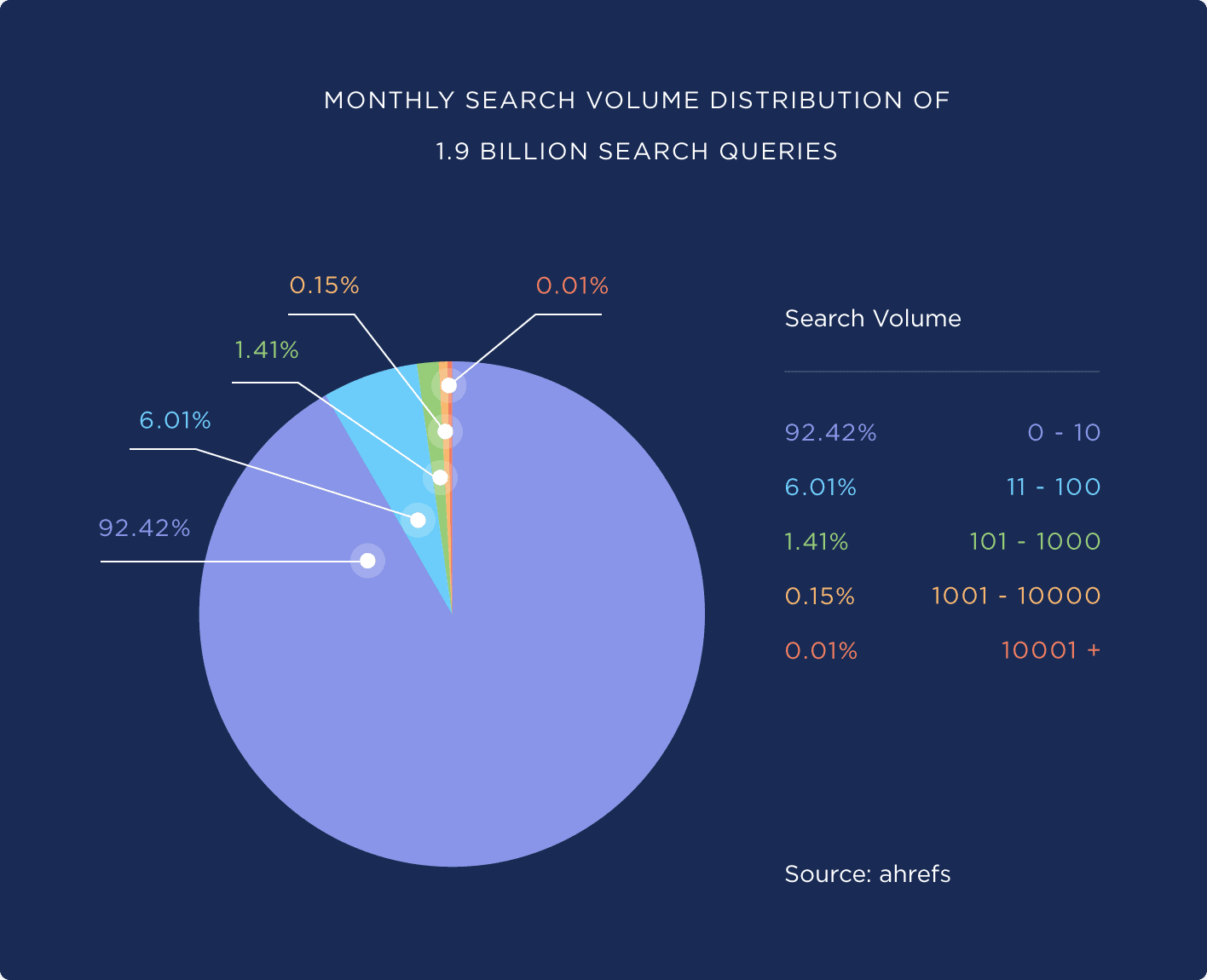
If you take a look at the keywords your visitors use to find your website right now, you’ll notice that the majority of them are long-tail keywords.
This shows that if you want to grow your organic traffic, long-tail search terms must be part of your SEO strategy.
4. They’re Great for SEO
Did you know that Google cares how long your visitors spend on your website?
Google wants its users to have the best experience possible, and that means finding the right results for their queries. If the search engine notices people clicking on your website results and staying put on your website, that means they probably found the answer they were looking for.
Since long-tail keywords tend to fit searchers’ queries more perfectly, the people searching for them are more likely to spend more time on your website.
For more on how Google ranks your website in search engines, check out Google Ranking Factors for 2024 (The 10 Most Important).
How to Find Long-Tail Keywords
Now that you’re convinced of the power of long-tail keywords, I’ll show you how to find them.
To find long-tail keywords, you’ll want to use a few different methods and long-tail keyword research tools.
1. Look at Your Search Console Report
You can start by looking at the long-tail keywords that already bring some traffic to your site. This will help you:
- Find similar queries that you can target with new content
- Find long-tail keywords that are ranking on the second page of results instead of the first, and update your content to rank it higher.
Search Console is the perfect tool for this. In the Search results tab, you can find your clicks, impressions, CTR, and average position for many of the queries that have caused your site to show up in Google search results.

If your site is built with WordPress, you can skip logging into multiple tools and access your Search Console keyword data directly inside your WordPress dashboard with MonsterInsights.

Here’s what makes MonsterInsights perfect for long-tail keyword research:
- See your top-performing long-tail keywords at a glance – No more switching between dashboards
- Identify quick wins – Find keywords ranking on page 2 that you can easily boost to page 1
- Track keyword trends over time – See which long-tail terms are growing in traffic
- Compare keyword performance – Understand which types of long-tail keywords work best for your site
Plus, with the PPC Tracking Addon, you can track how your long-tail keywords perform in paid campaigns too—making it easy to coordinate your SEO and PPC strategies.
Get started with MonsterInsights now!
For a full tutorial on using Search Console for keyword research, check out How to Use Google Search Console for Keyword Research.
2. Use Google Autocomplete & People Also Ask
Another simple way of finding long-tail keywords is by typing your seed keyword (or short-tail keyword) into the Google search bar without hitting enter. This will bring up Google autocomplete.
Google will automatically show you some longer-tail keywords as you’re typing.

While you’re searching on Google, other cool ways of discovering long-tail keywords are to look at the People also ask, People also search for, and Things to know sections.
The People also ask box, located after the first few search results, is a great spot to find inspiration and long-tail keywords. The more questions you click on, the more will continue to appear.

Below that, you may see a Things to know box. This box only appears for some keyword searches, so if it’s not there, that’s okay! If you do see it, make sure to take note of what’s there as possible long-tail keywords to research.

Finally, look at the bottom of the search results page for the People also search for section. This is yet another spot to look for potential long-tail keywords for your content!

Take note of all the long-tail keywords you find. Some of them could be the focus keyword for a new post, or you could include them as a secondary keyword either in new content or content you already have.
3. Use Long-Tail Keyword Research Tools
Of course, there are tons of different keyword research tools out there that you can use when researching long-tail keywords. In fact, there’s an overwhelming number of keyword research tools!
Here are a few of my favorites.
WPBeginner Free Keyword Generator
The first tool on my list is actually a free keyword generator tool from WPBeginner. I love it for researching long-tail keywords because it takes your seed keyword and looks for all the questions and phrases that include it. It’s like the People also ask section, but much larger!

Try the WPBeginner Free Keyword Generator.
Semrush
Semrush is the second tool on my list because of how powerful it is. It’s way more than a keyword research tool—it includes competitor research, rank tracking, and more.
SEMrush offers advanced filters so you can sort your list of keywords based on word count, volume, keyword difficulty, CPC (cost per click), competitive density, and even SERP features.

So, to find long-tail keywords, you might want to run a search for your seed keyword and then pare the results down to phrases that are longer than 3 words.
Semrush can get expensive. If you don’t currently have the budget for it, you can use it for a few searches per day with the free version.
Pro Tip: Don’t rely on just one keyword research method. The best long-tail keyword strategy combines multiple approaches. For the best results, start with Search Console to see what’s already working, then use free tools like Google Autocomplete and WPBeginner’s generator to find new opportunities. After that, you can validate your choices with premium tools like Semrush when you’re ready to invest. This multi-tool approach ensures you’re not missing valuable long-tail opportunities.
ChatGPT (Or your favorite AI tool)
In the age of AI, it’s a good idea to use ChatGPT or another favorite AI tool to generate long-tail keywords. You might be surprised at how helpful it can actually be.
Here’s a prompt you can try:
“You’re an SEO expert, and your mission is to help me rank my website on the first page of Google results. Now, I’m planning to write an article about long-tail keywords. What are some long-tail keywords that are related to the term long-tail keywords that I could target?”
ChatGPT will come back with tons of ideas for you:

How to Use Long-Tail Keywords Effectively
Now that you’ve found a whole list of long-tail keywords, how can you use them effectively?
When writing or updating an article, here are a few best practices for using the keywords from your list:
- Choose one focus keyword for each article
- Use related keywords in headings
- Use People also ask phrases in your FAQ
- Include your focus keyword in your title and meta description
- Create an attention-grabbing headline
- Optimize your images with keyword-rich file names and/or alt tags
- Use a content audit tool to write your content
Remember, the key to success with long-tail keywords is to use them naturally and create content that truly addresses the user’s intent behind the search. Don’t just focus on the keywords themselves—focus on providing value to your audience.
For a full tutorial on on-page SEO best practices, check out On-page SEO in WordPress: Your Complete Guide.
Start Tracking Your Long-Tail Keyword Success Today
Now that you know how to find and use long-tail keywords, the next step is tracking which ones actually drive results for your business. If you’re running a WordPress site, MonsterInsights makes this simple.

You’ll see:
- Which long-tail keywords bring the most traffic
- How visitors from different keywords behave on your site
- Which keywords lead to actual conversions and sales
- Where to focus your optimization efforts for maximum ROI
Over 3 million websites trust MonsterInsights to track their SEO performance. Join them and start making data-driven decisions about your keyword strategy.
Get Started with MonsterInsights Today!
That’s it!
If you liked this article, make sure to also check out:
Quick-Start Guide to Topical Authority in SEO
Critical SEO KPIs to Track Now
Best Free SEO Chrome Extensions to Install Now
Finally, don’t forget to follow us on YouTube for more helpful reviews, tutorials, and Google Analytics tips.
Frequently Asked Questions About Long-Tail Keywords
What is an example of a long-tail keyword?
A long-tail keyword is a specific search phrase typically containing 3+ words. For example, instead of “best coffee” (short-tail), a long-tail keyword would be “best organic coffee beans for cold brew” or “how to make French press coffee at home.” These longer phrases target users with specific intent and typically convert better than broad keywords.
How many words should a long-tail keyword be?
Most long-tail keywords contain 3-5 words, though some can be even longer. The key isn’t the exact word count—it’s the specificity. A phrase like “WordPress analytics plugin” (3 words) can be a long-tail keyword if it targets a specific niche, while “best affordable WordPress analytics plugin for small business” (8 words) is even more targeted.
Are long-tail keywords better for SEO?
Yes, long-tail keywords are excellent for SEO because they’re easier to rank for, attract more qualified traffic, and typically have higher conversion rates. With 92% of all searches being long-tail queries, targeting these phrases helps you capture the majority of search traffic. They’re especially valuable for new websites or those competing in crowded niches.
How do I find long-tail keywords for free?
You can find long-tail keywords for free using several methods:
- Google Autocomplete and “People Also Ask” boxes
- Google Search Console (especially easy with MonsterInsights for WordPress)
- WPBeginner’s Free Keyword Generator
- ChatGPT or other AI tools
- The “People Also Search For” section at the bottom of Google results
- Your own website’s search data and analytics
What is the difference between short-tail and long-tail keywords?
Short-tail keywords are broad, 1-2 word phrases with high search volume and intense competition (like “shoes” or “SEO”). Long-tail keywords are specific, 3+ word phrases with lower search volume but higher intent (like “waterproof hiking boots for women” or “how to do SEO for small business”). Short-tail brings more traffic but converts less; long-tail brings less traffic but converts at rates up to 36%.
How do long-tail keywords increase conversion rates?
Long-tail keywords increase conversions because they capture users further along in the buying journey. Someone searching “laptop” is just browsing, but someone searching “best laptop under $1000 for video editing” knows exactly what they want and is ready to buy. The average conversion rate for long-tail keywords is 36%—significantly higher than broad keywords.
Can I use multiple long-tail keywords in one article?
Yes! You should use one primary long-tail keyword as your focus, then naturally incorporate related long-tail keywords throughout your content. Use them in headings, FAQ sections, image alt tags, and body text. Just make sure they flow naturally and genuinely address user intent—never force keywords where they don’t belong.
How long does it take to rank for long-tail keywords?
Long-tail keywords typically rank much faster than competitive short-tail keywords, depending on your site’s authority and content quality. New websites especially benefit from targeting long-tail keywords first, as they can start seeing traffic and conversions while building authority to tackle more competitive terms later.
What tools should I use to track long-tail keyword performance?
Google Search Console is essential for tracking keyword rankings, clicks, and impressions. If you use WordPress, MonsterInsights pulls your Search Console data directly into your dashboard, making it easy to see which long-tail keywords are already working. You can also use rank tracking tools like Semrush to monitor your positions over time.
Should I create separate pages for each long-tail keyword?
Not necessarily. Create separate pages for long-tail keywords that represent distinct topics or user intents. For closely related long-tail keywords, group them into one comprehensive piece of content. For example, “how to brew cold brew coffee” and “cold brew coffee brewing time” could work together in one article, while “best coffee for cold brew” might deserve its own page.