


People are talking to their devices more than ever. In the United States, about 153.5 million people were expected to use voice assistants in 2025.
That’s not just a trend. It’s how your customers find businesses like yours.
I’ve been watching voice search grow for years, and I can tell you this: if your website isn’t optimized for voice queries, you’re missing out on serious traffic. When someone asks Siri or Alexa for help, you want your business to be the answer they hear.
The good news? Voice search optimization isn’t as complicated as it sounds. In this guide, I’ll walk you through everything you need to know to start ranking for voice searches and capturing this growing audience.
In This Article:
What Is Voice Search Optimization?
Voice search optimization is the process of improving your website so it shows up when people use voice commands to search.
Instead of typing “best pizza near me,” someone might ask their phone, “Hey Google, where can I get pizza right now?” Voice search optimization makes sure search engines pick your website as the answer.

The big difference between regular SEO and voice search optimization is how people phrase their questions. People talk differently than they type.
When I type, I might search for “WordPress analytics plugin.” But when I speak, I’d say, “What’s the best way to track my WordPress website traffic?” That’s a completely different query, and your content needs to match both styles.
Why Voice Search Optimization Matters
Voice search isn’t some futuristic thing we’re still waiting for. It’s happening right now, and the numbers prove it.
Globally, about 20.5% of internet users — roughly 1 in 5 — use voice search. In the United States, that was 153.5 million voice assistant users at the end of 2025.
But here’s what really matters for your business: research suggests that around 58% of consumers have used voice search to find local business information such as hours, directions, and phone numbers.
That means when someone’s looking for a service or product in your area, voice search is one of the first places they turn.
Think about it. Someone’s driving through your town and asks, “Alexa, find a coffee shop open now.” If your business isn’t optimized for voice search, they’ll never find you.
Voice search is also incredibly accurate.
In one benchmark study, major voice assistants overall answered about 93.7% of queries accurately on average, with Google Assistant understanding 100% of questions.
People trust these results, and they act on them fast. The opportunity is huge, especially for local businesses and service providers.
Important Note: As you start optimizing for voice search, you’ll want a simple way to see whether your changes are actually working. That’s where MonsterInsights comes in. It pulls your most important Google Analytics reports into WordPress, so you can see which questions, locations, and devices are driving traffic without digging through GA4.
How Voice Search Actually Works
Understanding how voice search works helps you optimize for it better.
When someone asks a question using voice, their device uses speech recognition technology to convert those spoken words into text. Then, the device runs that text through a search engine to find the best answer.
Here’s where it gets interesting. Voice assistants don’t show you 10 blue links like a regular Google search. They read you one answer. Usually, that answer comes from the top search result or a featured snippet.
Different voice assistants use different search engines:
- Google Assistant uses Google Search
- Siri uses Google Search (with some Apple Maps integration)
- Alexa uses Bing
- Cortana uses Bing
This means you need to optimize for multiple search engines, not just Google. Your Bing optimization matters just as much as your Google optimization when it comes to voice search.
WordPress users can simplify this by using a plugin like AIOSEO, which automatically generates XML sitemaps for both Google and Bing and helps you follow SEO best practices for each.
The device also considers your location, search history, and preferences to personalize results. That’s why local SEO plays such a huge role in voice search optimization.
Key Differences Between Voice and Text Search
Voice search queries look nothing like typed searches. I want you to really understand this difference because it’s the foundation of good voice search optimization. Let’s go over the key differences now.
Length and Structure
Voice searches are longer. One large study of Google Home results found that the average voice search answer is 29 words long, compared to typed searches that are usually 3-4 words.
For instance, when I type, I might search: “SEO tips”
Meanwhile, when I speak, I’d be much more likely to ask: “What are some SEO tips that can help me improve my website rankings?”
See the difference? You need to optimize for these longer, more detailed queries.
Conversational Tone
People speak naturally to voice assistants. They use complete sentences and casual language. Here’s what I mean:
- Text search: “cheap hotels Boston”
- Voice search: “Find me affordable hotels in Boston for this weekend”
Your content needs to match this conversational style. Write like you’re talking to a friend, not like you’re writing a textbook.
Question-Based Queries
Studies suggest that the vast majority of voice queries are phrased in natural, conversational language, with some estimates putting this at around 80% of voice searches.
Many of these queries start with question words like “who,” “what,” “where,” “when,” “why,” or “how.”
Your content should answer these specific questions directly and clearly.
Local Intent
Multiple industry studies agree that a large share of voice searches are local.
Some reports estimate that around three-quarters of voice queries involve local intent, while older studies found that about 58% of consumers used voice search to find local business information in the past year.
People use voice search when they’re on the go and need information fast. They’re asking for directions, looking for open stores, or finding nearby services.
This means your local SEO needs to be rock solid for voice search to work.
9 Ways to Optimize for Voice Search
Ready to learn how to optimize for voice search? Here are the strategies that actually work.
1. Use Conversational Keywords
Voice search is all about natural language.
That’s why I recommend you start by thinking about the questions your customers actually ask. Imagine you’re having a conversation with one of them.
What would they ask? How would they phrase it?
For example, if you run a plumbing business, people might ask:
- “How do I fix a leaky faucet?”
- “What should I do if my toilet keeps running?”
- “Where can I find a plumber open on Sunday?”
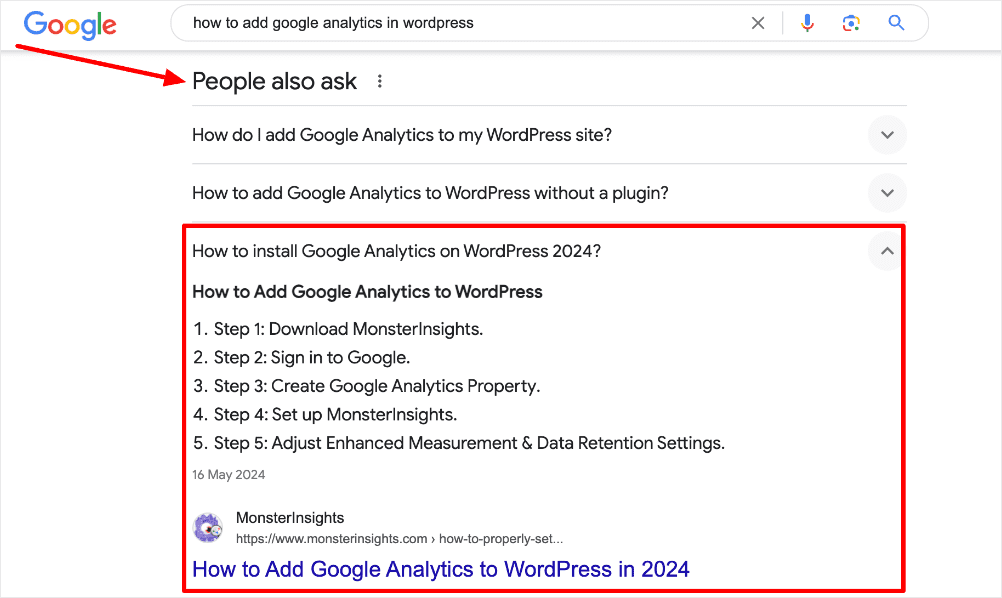
Use tools like AnswerThePublic or Google’s “People Also Ask” section to find these question-based keywords. These tools show you the actual questions people are searching for in your industry.
Pro Tip: Create a list of your most common customer questions. Then write content that answers each question in a natural, conversational way.
2. Optimize for Featured Snippets
Featured snippets are gold for voice search. These are the boxes that appear at the top of Google search results with a quick answer.

Analyses of Google Home results found that about 41% of voice search answers come from featured snippets.
This suggests that if you can capture a featured snippet, you’re much more likely to be the voice search answer.
Here’s how to optimize for featured snippets:
- Answer questions directly and concisely (aim for 40-60 words)
- Use bullet points or numbered lists
- Include the question in your heading
- Format your answer clearly
For example, if you’re answering “What is Google Analytics?”, start your section with a clear, direct answer in 2-3 sentences. Then expand on the details below.
In WordPress, using structured FAQ and HowTo content with a plugin like AIOSEO can make it easier for Google to pull your answers into featured snippets.
3. Focus on Local SEO
Since many voice searches have local intent, you’ll really want to prioritize local SEO.
Claiming and optimizing your Google Business Profile is a great starting point.

For starters, you’ll want to make sure every detail is correct. Make sure to include the following information:
- Business name
- Address
- Phone number
- Hours of operation
- Service area
- Categories
- Photos
It’s important to carefully fill out this information, since even one wrong detail can hurt your voice search rankings. For instance, if your hours are outdated, voice assistants won’t recommend you to someone looking for an open business.
Add location-specific keywords throughout your website. Create dedicated pages for each location you serve. For example, if you’re a landscaping company serving multiple towns, create separate pages like “Landscaping Services in [City Name].”
Encourage customer reviews, especially on Google. Positive reviews boost your local rankings and increase your chances of showing up in voice search results.
A plugin like AIOSEO can also help you implement LocalBusiness schema so search engines and voice assistants see consistent, structured information about your business across your site.
If you’re focused on local SEO, you may also want to check out our guide to local PPC marketing.

Pro Tip: With MonsterInsights, you can see exactly which cities, regions, and local keywords are driving traffic and conversions. Use that data to decide which locations deserve dedicated landing pages, more reviews, or extra content.
4. Improve Your Page Speed
In one large study, pages that appeared as voice search answers loaded in about 4.6 seconds — roughly 52% faster than the average page.
If your website is slow, you won’t rank well for voice searches.
Test your site speed using Google PageSpeed Insights. It’ll show you exactly what’s slowing down your site and how to fix it.

Common speed improvements include:
- Compressing images
- Enabling browser caching
- Minifying CSS and JavaScript
- Using a content delivery network (CDN)
- Upgrading your hosting
A fast website doesn’t just help with voice search. It improves your overall SEO and keeps visitors from bouncing.
Check out our list of the best plugins to speed up your WordPress site for more details.
5. Create FAQ Pages
FAQ pages are perfect for voice search optimization. They naturally answer the questions people ask out loud.
I recommend creating a comprehensive FAQ section on your website. Think about every question a customer might ask at different stages of their journey.
Format your FAQs like this:
- Use the actual question as your heading (H2 or H3)
- Provide a brief, direct answer (1-2 sentences)
- Expand with more details below
For example:
How long does it take to see results from Google Analytics?
You can start seeing data in Google Analytics within 24-48 hours of installing the tracking code. Real-time reports show data immediately, while other reports may take a day to populate.
This format makes it easy for voice assistants to pull your answer as a voice search result.
If you’re on WordPress, AIOSEO’s FAQ Block can automatically add FAQ schema in the background so your questions and answers are easier for search engines and voice assistants to understand.

Pro Tip: Use your FAQ page to target long-tail question keywords that you couldn’t naturally fit into your main content.
6. Use Structured Data (Schema Markup)
Structured data helps search engines understand your content better. It’s like giving search engines a detailed map of your website.
For voice search, certain schema types are especially important:
- LocalBusiness schema
- FAQPage schema
- HowTo schema
- Article schema
- Product schema
- Review schema
You don’t need to be a developer to add schema markup. SEO plugins like All in One SEO (AIOSEO), Yoast SEO, or Schema Pro make it easy for WordPress users.

AIOSEO’s Next-Gen Schema Generator lets you choose the schema type you want and fills in the code automatically—no manual markup required.
That’s especially helpful when you’re adding complex types like HowTo or LocalBusiness schema for voice search.
When you add structured data, you’re more likely to appear in rich results, which voice assistants use to answer queries.
Check out our complete review of the All in One SEO plugin for more information.
7. Make Your Content Mobile-Friendly
Smartphones dominate voice usage: around 27% of people use voice search on their mobile devices, and multiple surveys find that over half of all voice searches happen on smartphones, making mobile optimization critical.
Here are some key mobile optimization tips:
- Use responsive design
- Make buttons and links easy to tap
- Avoid pop-ups that are hard to close on mobile
- Use larger, readable fonts
- Break up text into short paragraphs
If your site doesn’t work well on mobile, people will leave immediately after clicking through from a voice search. This hurts your rankings and wastes traffic.
8. Target “Near Me” Searches
Google has reported that mobile searches containing “near me” grew more than 3x over a recent two-year period, and variants like “where to buy” + “near me” have grown over 200%.
Many of these ‘near me’ moments now happen via voice on mobile.
That’s why it’s a good idea to optimize for phrases like:
- “[Your service] near me”
- “[Your product] close by”
- “[Your business type] open now”
- “Best [your service] in [city]”
Include your location naturally throughout your content. Mention nearby landmarks, neighborhoods, and regions you serve.
Add your location to your title tags, meta descriptions, and heading tags where it makes sense.
AIOSEO’s Local SEO tools and LocalBusiness schema make it easier for search engines to connect your site with specific areas, which is critical for “near me” visibility.
Pro Tip: Create location-specific blog content. If you’re a dentist, write posts like “5 Reasons to Choose a [City Name] Dentist” or “Guide to Dental Care in [Neighborhood].”
9. Optimize for Multiple Voice Assistants
Don’t just optimize for Google. Remember, Alexa uses Bing, and millions of people use different voice assistants.
Make sure your business is listed correctly on:
- Google (for Google Assistant and Siri)
- Bing Places (for Alexa and Cortana)
- Apple Maps (for Siri)
Each platform has slightly different algorithms and ranking factors. By covering all bases, you’ll capture more voice search traffic overall.

On your site itself, plugins like AIOSEO help you generate optimized sitemaps and structured data that work well for both Google and Bing, which power most of the major voice assistants.
How to Track Voice Search Performance
Most web analytics tools won’t explicitly label a session as “voice search,” but you can still measure voice search performance by tracking the signals it leaves behind — longer queries, question-based keywords, mobile patterns, and local search behavior.
MonsterInsights gives you a simpler way to surface these patterns directly inside WordPress, without digging through GA4’s complex reports.

Because MonsterInsights brings your Search Console data, device breakdowns, landing page reports, location insights, and behavior metrics into one place, you can quickly identify which queries and pages are benefiting from voice search — and which optimizations are making the biggest difference.
The methods below show exactly what to look for.
1. Monitor Long-Tail Keyword Rankings
Voice searches tend to be longer, more conversational, and phrased as complete questions.
Use the Search Console report in MonsterInsights to quickly identify these long-tail keywords without leaving WordPress.

Look for keywords that:
- Are 5+ words long
- Start with “how,” “what,” “where,” “when,” or “why”
- Include location modifiers (“near me,” “in [city]”)
- Sound natural and conversational
If these question-based keywords start rising in impressions or clicks, it’s a strong sign your content is being selected for voice queries.
Use this insight to expand related FAQs, add schema (via AIOSEO), or write follow-up articles targeting the questions your audience is already asking.
To learn more about working with Google Search Console, check out these guides:
- How to Add Google Search Console to WordPress and Analytics
- How to Use Google Search Console for Keyword Research
- How to Use Google Search Console for SEO: Top Hacks
2. Track Featured Snippet Appearances
Featured snippets often serve as the spoken answer for voice searches.
SEO tools like Semrush or Ahrefs can show you which snippets you currently own, but MonsterInsights helps you measure how those snippets impact your traffic and conversions.
After identifying snippet wins, check MonsterInsights to see:
- Whether the page receives more mobile traffic
- If Search Console impressions increase for question-based queries
- Whether snippet pages drive more conversions or engagement
If you see higher click-through rates or more mobile visitors on snippet pages, you’re likely appearing as a voice answer. Keep optimizing those pages with clear definitions, tight summaries, and schema markup (AIOSEO makes this easy).
3. Watch Your Local Search Traffic
Local intent drives a huge portion of voice searches — especially queries like “near me,” “open now,” or “best [service] in [city].”
In MonsterInsights, the Country Report lets you see which cities and regions are sending visitors to your site.

Look for increases in traffic from:
- Specific service areas
- New cities appearing in the report
- Users who search for local variations of your target keywords
If you publish new local content, add LocalBusiness schema (via AIOSEO), or update your Google Business Profile and then see traffic rise from those regions, that’s a strong indicator that voice search visibility has improved.
4. Monitor Mobile Traffic
Most voice searches happen on mobile, so an increase in mobile traffic often signals improved visibility for voice-driven queries.
The Device Breakdown report in MonsterInsights makes it easy to monitor how your mobile audience changes over time.

If mobile visitors already make up a large percentage of your audience, focus on mobile optimization — improving loading speed, making buttons easier to tap, and removing intrusive popups.
These improvements help both your mobile SEO and your chances of becoming a voice search result.
5. Check Your “Near Me” Rankings
“Near me” searches are among the clearest indicators of voice search behavior. Tools like BrightLocal or Local Falcon can help you track how you rank for these queries across different neighborhoods or ZIP codes.
Pair these insights with MonsterInsights’ location and keyword data to see whether improved visibility aligns with increased traffic from targeted areas. If “near me” rankings rise at the same time your local traffic grows, that’s a strong sign your voice search optimization is working.
A powerful workflow is to use All in One SEO (AIOSEO) to implement your voice search optimizations — such as schema markup, FAQ pages, and local SEO — and MonsterInsights to measure which changes actually improve your traffic and rankings.
And that’s it!
I hope this article helped you learn how to optimize content for voice search. Check out the following articles for more information on SEO:
- The Beginner’s Guide to Search Engine Visibility
- Predictive SEO: How to Stay Ahead of Search Trends Using Data
- SEO Analytics and Reporting Tips to Boost Organic Traffic
- WordPress SEO Checklist
Want to track your voice search performance the easy way? Get started with MonsterInsights today and see which keywords and searches are driving traffic to your website.
And don’t forget to follow us on YouTube for more helpful WordPress and SEO tips.
Frequently Asked Questions: Voice Search Optimization
What is voice search optimization?
Voice search optimization is the process of improving your website to rank better when people use voice commands to search. It focuses on conversational keywords, direct answers, structured data, and local SEO because voice searches are typically longer and more natural than typed searches.
What’s the difference between voice search and regular search?
Voice searches are longer, more conversational, and usually phrased as complete questions. Someone typing might search “pizza near me,” but speaking, they’d say “Where can I get pizza delivered right now?” Voice searches also have stronger local intent and tend to include more context and specific details.
Which voice assistant should I optimize for?
Optimize for all major voice assistants: Google Assistant, Siri, Alexa, and Cortana. Each uses different search engines (Google or Bing) and has different user bases. By covering all platforms, you’ll capture more voice search traffic overall.
How do featured snippets relate to voice search?
Voice assistants often read the featured snippet as their answer. By optimizing your content to appear in featured snippets, you dramatically increase your chances of being the voice search result.
Does page speed matter for voice search?
Yes, page speed is critical for voice search. Voice search results load in 4.6 seconds on average, 52% faster than regular search results. Slow websites are less likely to rank in voice search results. Use Google PageSpeed Insights to test and improve your site speed.
How do I find voice search keywords?
Use tools like AnswerThePublic, Google’s “People Also Ask” section, and Semrush to find question-based keywords. Look for long-tail keywords that start with who, what, where, when, why, and how. These conversational phrases are most likely to be used in voice searches.