


You’ve published your content. You’ve done the work. Now you’re waiting for Google to show it in search results — and nothing is more frustrating than a page that simply won’t appear.
We’ve worked with enough WordPress site owners to know that slow indexing is one of the most common, and most fixable, problems in SEO.
The good news is that there are several proven steps you can take right now to speed up the process and get your pages appearing in SERPs (search engine results pages) much faster.
In this article, I’ll help you answer “Is Google indexing my site?” and show you exactly how to get your website indexed more quickly. But first, let’s cover how Google indexing actually works.
In This Article:
- What is Google indexing and how does it work?
- How to Check If Google Has Indexed Your Site
- How long does Google indexing take?
- How to Set Up Nearly Instant Website Indexing
- 1. Create and Submit a Sitemap to Search Engines
- 2. Monitor Your Indexing Status
- 3. Remove Nofollow Tags from Internal Links
- 4. Delete Misplaced Noindex Tags
- 5. Check Robots.txt File for Crawl Blocks
- 6. Block or Redirect Low-Quality Pages
- 7. Make Sure There's No Duplication of Pages
- 8. Get High-Quality Backlinks
- 9. Build Powerful Internal Links
- Track How Your Indexed Pages Perform With MonsterInsights
- FAQs: How to Get Google to Index Your Site
What is Google indexing and how does it work?
Google indexing is the process of storing and organizing web pages in Google’s database after they are crawled. Indexed pages appear in search results when users enter relevant queries. Google uses algorithms to determine which pages to index based on content relevance, quality, and user experience.
First, Google finds new web pages through a process called crawling. It’s how Google discovers new content on your website by following different hyperlinks, which include inbound and outbound links.
Once it finds these pages, they’re added to Google’s vast database and officially indexed.
How to Check If Google Has Indexed Your Site
Is Google indexing my site? There are two easy ways to figure that out.
First, you can simply perform a Google search for your website or a webpage (such as “page name here domain” – so for this post I’d search “Google Index MonsterInsights.com”) and see if it appears in the search results. If it doesn’t, then it means your site hasn’t been indexed.
Or, you can try entering the URL of your page along with the site: search operator to see if it’s indexed: site:www.yourdomainhere.com/your-web-page.

Another way to check if your page is indexed is to use Google Search Console.
In Google Search Console, enter the URL of your page in the URL inspection tool. If Google has indexed your page, you’ll see a message saying URL is on Google.
And if it’s not, you’ll see URL is not on Google. This is a pretty simple way to find out if your pages are indexed or not.

Not set up with Search Console? Check out our tutorial on how to configure your WordPress site with Google Search Console.
After checking the index status, how can you improve your website’s indexing process?
See Your Google Search Data Right Inside WordPress
MonsterInsights connects your Google Search Console data to your WordPress dashboard — so you can see which pages are getting found on Google, which keywords they rank for, and where there’s room to improve. No switching between tools.
How long does Google indexing take?
One of the most common questions asked about indexing is “how long does it take Google to index a new website?” The truth is, there’s no guaranteed timeframe.
According to Google’s John Mueller, it can take “anywhere from several hours to several weeks” for a new site to be indexed. For established websites adding new content, indexing can happen within hours.
Several factors affect indexing speed:
- Website authority and age
- Site structure and technical SEO
- Quality of content
- Internal and external link profile
- Crawl budget allocation
For brand new websites, you might need to wait 1–4 weeks for initial indexing. In my experience, the sites that get indexed fastest share a few things in common: clean site structure, consistent publishing, and strong internal linking. The strategies below will help you build exactly that.
How to Set Up Nearly Instant Website Indexing
1. Create and Submit a Sitemap to Search Engines
One of the ways to help search engines index your website is by creating an XML sitemap.
A sitemap is a list of important pages on your website and is written in XML (extensible markup language) format so search engine crawlers can easily understand it. Here’s what it looks like when created using our favorite plugin for the job, All in One SEO:

By creating a sitemap, you’re helping search engine bots navigate through your website, discover new content, and index your pages. It helps improve your search visibility and indexes new pages that don’t have any backlinks yet.
And the best part is that Google offers an option within Google Search Console to submit your sitemaps. This helps the search engine speed up the indexing process for your site and show your pages in search results.
For more on creating an XML sitemap, check out How to Create a WordPress Sitemap (The Easiest Way).
2. Monitor Your Indexing Status
After you’ve submitted your sitemap, you should monitor their indexing status so you can react quickly to any issues.
The best and easiest way to do so is by using the handy Index Status feature by AIOSEO.
Users of AIOSEO get invaluable index status indicators and tools right within their WordPress dashboard.
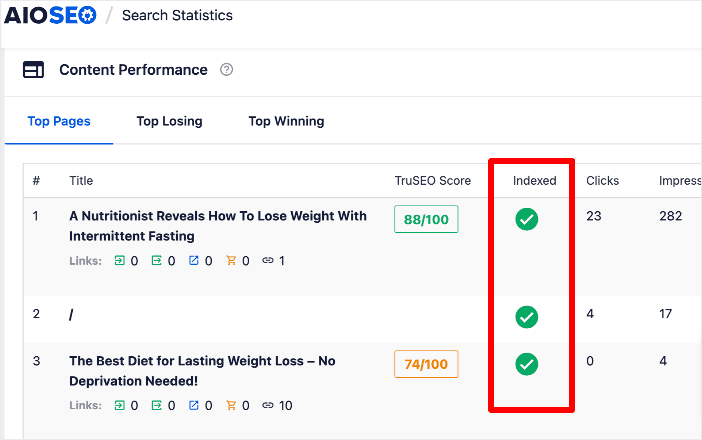
A particularly helpful aspect of this feature is the detailed information it provides when you hover over the index status of a URL.
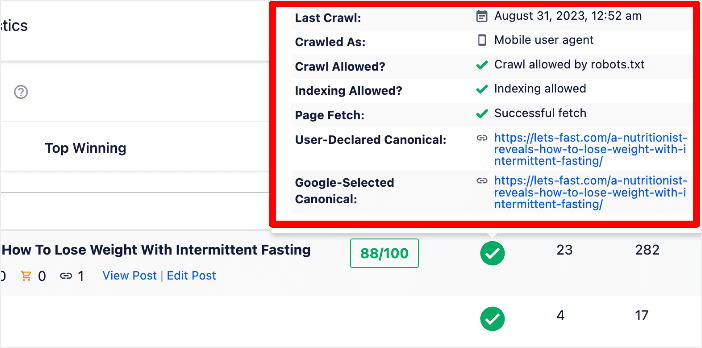
It gives insights into when the URL was last accessed by a crawler, whether the crawl was performed by a mobile or desktop user, and clarifies whether crawling and indexing of the URL are allowed.
Using the Index Status feature, you can quickly pinpoint and react to posts and pages not indexed correctly on your site.
3. Remove Nofollow Tags from Internal Links
At times, your webpages aren’t being indexed because Google can’t crawl them. This can be an issue if you have internal links with a rel=”nofollow” tag. Search engine bots will not crawl the link and access the content that’s linked there.

As a result, no data is sent back to Google servers about your page for indexing, and the page won’t appear on the search results.
So, check for and remove nofollow tags from your internal links. By removing the nofollow tags, you’ll allow the search engine to follow the link and discover those linked pages. To start, check the pages that aren’t indexing on Google, then move on to other pages on your website.
4. Delete Misplaced Noindex Tags
Another reason why Google might not be indexing your website is because you’re telling it not to.
Noindex tags tell Google to leave out a page from the indexing process. As a result, it won’t store the page on its database or show the page on its SERPs.
So, if any page on your site has a misplaced noindex tag, that will prevent it from ranking as Google won’t include it in its index.
To check for a noindex tag, go to the <head> section of your webpage and then look for the meta tag that contains noindex. Here’s what it should look like if you have it turned on:

In the case of Google, the meta name will include googlebot and the tag will look something like this:

If you see this tag on your page, then simply remove it so Google can index the post.
Another way of finding noindex tags is by using Google Search Console’s URL inspection tool. Just enter the URL of your webpage and then look at Indexing allowed under the Coverage report.
If a noindex tag is added to the page, it should appear there, and you’ll see a message saying No or N/A.
5. Check Robots.txt File for Crawl Blocks
The next thing to check to determine why your site isn’t being indexed is to look at the robots.txt file. A robots.txt file tells the search engine where they can go and where they can’t go on your website.
You can find the file for your website by entering robots.txt at the end of your site’s URL (example.com/robots.txt). If you see anything disallowed other than pages you actually want to hide from search (like below), you’ll want to delete it.

That’s because this code blocks the search engine from crawling your website. And if it can’t crawl your site, it won’t index it.
Along with this, you can also look for any crawl blocks that might be stopping Google from indexing your site and then remove them.
For instance, the URL of your webpage shouldn’t be under disallow, especially for user-agent: googlebot. If it is, then remove it, or the search engine will not include it during crawling and indexing.

To learn more, go through this detailed guide on how to optimize your WordPress robots.txt file for SEO.
6. Block or Redirect Low-Quality Pages
The quality of your pages also plays an important role in how Google indexes your site.
If you have hundreds and thousands of posts, but most of them don’t add value, then Google will eventually decrease the number of times your site gets crawled and indexed.
The reason for this decrease is because Google has a limited amount of server resources. If the crawler continuously finds low-quality pages on your site, it will slow down the discovery of new content.
To avoid this issue, you can set up 301 redirects for your low-quality pages and point them toward another high-quality page. Or you can simply remove them from your website.
This may not only boost your site’s indexing time but also improve its health.
The Bottom Line on Crawl Budget
Google has a limited crawl budget for every site — the number of pages it will visit in a given timeframe. Every low-quality or thin page it encounters is one fewer visit to your best content. Cleaning up your site is one of the most direct ways to speed up indexing.
7. Make Sure There’s No Duplication of Pages
Having duplicate content can be another reason for slow or no indexing by Google. If a page is duplicated or has content that’s 99% similar to another page, Google is unlikely to index it.
So, make sure that there are no duplicate pages on your website. If there are, then it’s a good practice to remove them as quickly as possible since Google will see them as unworthy content.
Or, make sure you have the correct usage of the rel=canonical tag on original content.
8. Get High-Quality Backlinks
Since the Google crawler works by following links to your website, securing high-quality backlinks will help boost your website indexing.
Backlinks provide a vote of confidence for your content, and pages with high-quality backlinks will have more importance for Google than those without.
So, as you get links from authoritative websites, Google will see your site as trustworthy and possibly start to index your content more quickly.
There are tons of ways you can get quality backlinks, such as creating infographics, guest blogging, finding broken links, and more.
You can check out these 15 quick and simple ways to get backlinks.
9. Build Powerful Internal Links
Speaking of links, building powerful internal links is another way to speed up your site’s indexing process.
Internal links help Google discover content on your website as it goes from link to link.
If you have a page on your website that doesn’t have any internal links, Google won’t be able to find other content on your site. As a result, it might take a lot of time to index other pages.
This is where you can add internal links to relevant places in your content. But you might wonder, ‘What is a powerful internal link?’
Well, there must be pages that get the most traffic on your site. These pages might be ranking well on Google and must offer users value. By internal linking your other pages from high-traffic posts, you’re creating powerful internal links.
Pro Tip: Start with your top 5 highest-traffic posts when looking for internal linking opportunities. Linking from those pages to newer or lower-traffic content passes the most authority — and Google is more likely to crawl those destination pages quickly.
To easily find new linking opportunities on your site, you can use the All in One SEO plugin.

It will automatically crawl all of the pages of your site and provide you with a report of orphan pages (pages with no links) and linking suggestions.
Track How Your Indexed Pages Perform With MonsterInsights
Once your pages start getting indexed, the next question is: which ones are actually getting found — and how are they performing? That’s where MonsterInsights comes in.
MonsterInsights connects your Google Search Console data directly to your WordPress dashboard. You can see which pages are ranking, which search terms are driving traffic, how many impressions each page is getting, and where there’s room to climb.

You don’t have to log into Search Console separately — it’s all right there where you already work.
When you’re implementing the indexing fixes above, this data tells you what’s working. You’ll see new pages start appearing in organic search, watch impressions grow, and know exactly which pieces of content to build on next.
Know Exactly Which Pages Google Is Sending Traffic To
See your Search Console keyword and landing page data inside WordPress with MonsterInsights. Track the impact of your indexing improvements without ever leaving your dashboard.
That’s it!
I hope this article helped you get your site in front of Google faster. If you want to keep building your search presence, check out these related guides:
- How to Add WordPress Internal Links to Improve Your SEO
- WordPress SEO Checklist: 17 Simple Steps
- How to Do an SEO Audit on WordPress in 12 Quick Steps
- Google Ranking Factors for 2026 (The 10 Most Important)
- The Beginner’s Guide to Search Engine Visibility
Not using MonsterInsights yet? Get started today!
Finally, stay connected with us on YouTube for the latest Google Analytics and WordPress tips and tutorials.
FAQs: How to Get Google to Index Your Site
Why is Google not indexing my website?
Google might not be indexing your website due to several reasons:
- Technical issues like noindex tags or robots.txt blocks
- Poor site quality or thin content
- Duplicate content issues
- Lack of internal or external links
- Your site is new and hasn’t been discovered yet
- Google may have penalties against your site
How do I force Google to index my website?
While you can’t “force” Google to index your site, you can request indexing through Google Search Console. Submit your sitemap, then use the URL Inspection tool to request indexing for specific URLs. This doesn’t guarantee immediate indexing but does bring your pages to Google’s attention faster.
Does Google automatically index new websites?
No, Google doesn’t automatically index every new website. Google’s crawlers need to discover your site first, typically through links from other websites. Even after discovery, indexing isn’t guaranteed if your site doesn’t meet Google’s quality standards or has technical issues preventing indexing.
How often does Google crawl a website?
Google’s crawl frequency varies widely based on your website’s authority, how often you update content, and your crawl budget. High-authority sites with frequent updates might be crawled multiple times per day, while new or less authoritative sites might only be crawled weekly or monthly.
What is crawl budget and why does it matter?
Crawl budget is the number of pages Google will crawl on your site within a given timeframe. Sites with lots of low-quality, duplicate, or thin content can exhaust their crawl budget, leaving important pages undiscovered. Keeping your site lean and high-quality helps ensure Google spends its crawl budget on the pages that matter most.
thank you very much this post about how to fast index the blog post ..