

A great headline can be the difference between a post that gets clicked and one that gets scrolled past. But knowing your headline needs work and knowing exactly what to change about it are two very different things.
You can stare at a “62 out of 100” score with red warning icons next to character count and word balance, and still have no idea which word to swap out.
MonsterInsights 10.1.0 gave the Overview report a cleaner graph style for comparing metrics at a glance. But that upgrade stopped at the Overview screen — click over to Search Console, eCommerce, or Forms, and you were back in the old layout. One report felt modern. The rest didn’t.
MonsterInsights 11.1.0 fixes both of those problems. I’m excited to share an upgraded Headline Analyzer that tells you exactly how to fix a weak headline, and a full rollout of our sleek new report design across every single tab in your dashboard.
What’s New in MonsterInsights 11.1.0
With this release, you’re getting:
- AI Headline Suggestions — get a full list of AI-optimized headline alternatives with one click, instead of guessing what to change (Plus and above)
- Redesigned Reports Interface — the clean, tabbed graph and table style from our Overview report is now on every report (Search Console is on Plus and up; eCommerce and Forms are on Pro and up)
AI Headline Suggestions: Know Exactly What to Fix, Not Just What’s Wrong
The Headline Analyzer already told you when your headline needed work. Now it tells you how to fix it.
Open the block editor and click the H icon in the top toolbar, just like before, and you’ll still get your score out of 100 along with feedback on character count, sentiment, word balance, and beginning and ending words. The difference is what happens next.

How It Works
Click the blue Optimize This Headline button underneath your score, and the analyzer generates a complete list of AI-powered alternatives, each with its own score attached.

Instead of tweaking a word and rechecking your score over and over, you can scan the list, see which options score highest, and select the one that fits your post.
If none of them feel quite right, you can always go back and adjust the wording yourself — the suggestions are a starting point, not a requirement.
AI Headline Suggestions Is Perfect For:
This feature is available on Plus and above, and it’s built for anyone who writes headlines regularly:
- Bloggers: turn a flat, descriptive title into something that actually earns the click
- Content marketers: get several strong options in seconds instead of brainstorming from scratch
- Course creators: make sure the headline on your latest lesson or announcement post pulls its weight
- Agencies: speed up headline review for client content without sacrificing quality
- Anyone publishing on a deadline: stop staring at a low score with no idea what to change before you hit publish
A Fresh Look for Every MonsterInsights Report
When we redesigned the Overview report with a cleaner, tabbed way to compare metrics, it made that one screen easier to read at a glance. Now every report in MonsterInsights gets the same treatment.
How It Works
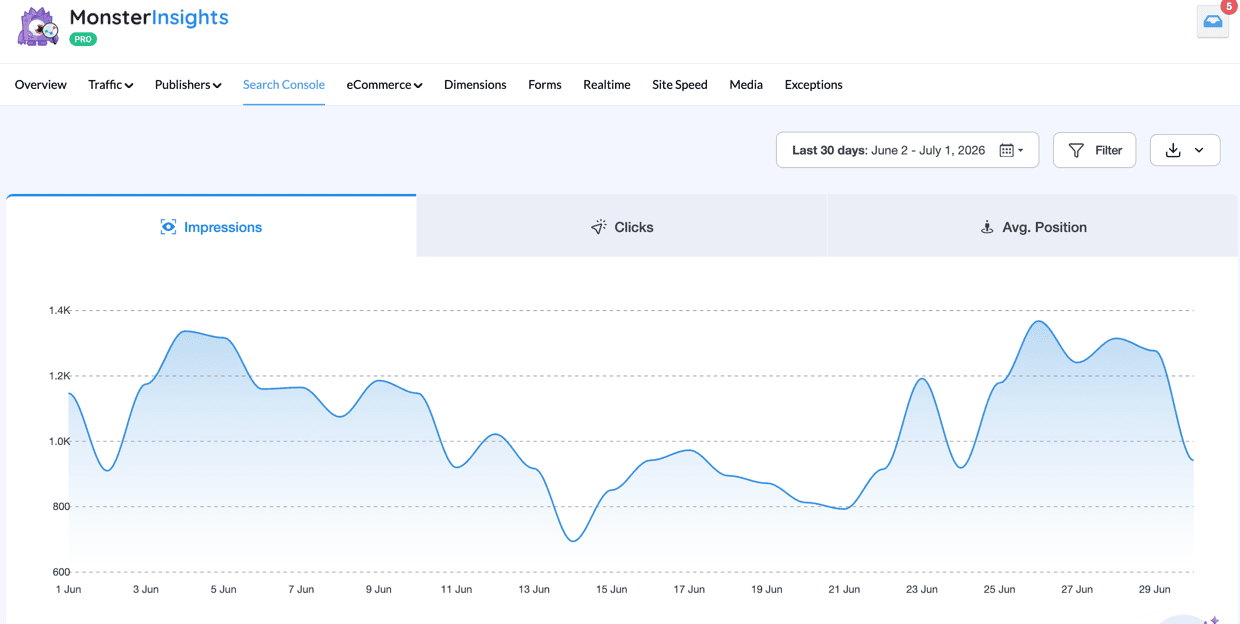
Instead of scanning a crowded legend to figure out which line is which, each metric now gets its own tab at the top of the report. In your Search Console report, that means clicking between Impressions, Clicks, and Avg. Position to see one clear graph at a time instead of three overlapping lines competing for your attention.
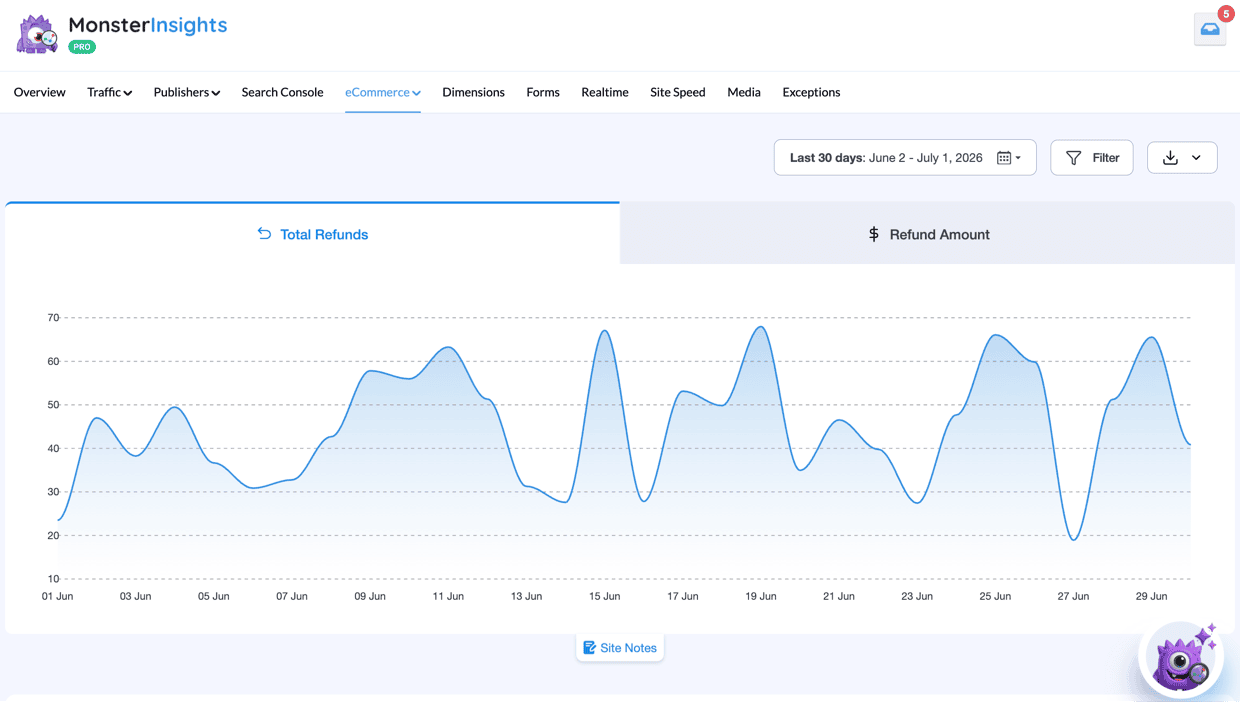
The same upgrade carries into your eCommerce report (Pro and up), where you can tab between figures like Total Refunds and Refund Amount without losing your place.
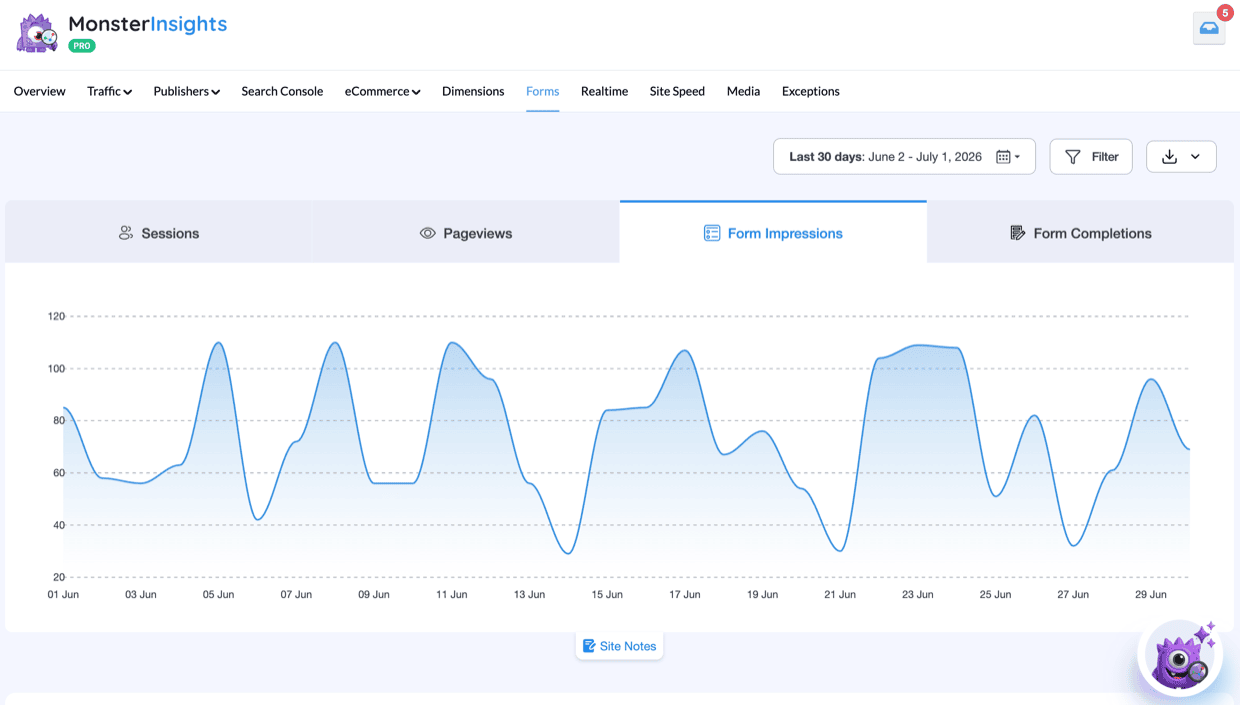
You’ll see it in your Forms report too (also Pro and up), where Sessions, Pageviews, Form Impressions, and Form Completions each get their own tab instead of being crammed onto a single crowded chart.
A Fresh Look for Every Report Is Perfect For:
The new design applies to every report your plan gives you access to, so the read on who benefits depends on which reports you already use:
- SEO-focused bloggers: compare impressions, clicks, and average position in Search Console without cross-referencing a legend
- WooCommerce and Easy Digital Downloads store owners: tab through eCommerce metrics like refunds and revenue at a glance
- Lead-gen sites: see form impressions and completions side by side to spot where visitors drop off
- Agencies: review multiple report types for multiple clients with one consistent, easier-to-scan layout
- Anyone who checks their dashboard regularly: spend less time interpreting a chart and more time acting on what it tells you
Ready to Write Sharper Headlines and See Cleaner Reports?
Think about how much faster it’ll be to land on a strong headline when you have a ranked list of options instead of a blank cursor. And think about opening any report in your dashboard, not just the Overview, and immediately knowing which tab to click for the number you need.
If you’re already using MonsterInsights Plus, Pro, or Agency, update to version 11.1.0 and you’ll see the new report design right away — and if your plan includes the Headline Analyzer, the AI suggestions are ready to use immediately, too.
Get Better Headlines and Clearer Reports Today
Not using MonsterInsights yet? Get AI-powered headline suggestions and our redesigned reports across every tab in your dashboard.
Get MonsterInsights TodayThat’s it for this release! I hope these new features make your analytics workflow simpler and more effective.
Curious about what else we’ve been up to? Check out some of our recent articles and updates:
- Introducing: Improved Overview, Smarter Filters, and Flexible Report Exports
- Block-Based Conversion Tracking + Auto-Synced Site Notes
- How to Write a Headline: Best Practices
- How to Use Google Search Console for Keyword Research
- How to Track Your Form Conversion Source in Google Analytics
Not using MonsterInsights yet? Get started today!
Finally, stay connected with us on YouTube for the latest Google Analytics and WordPress tips and tutorials.
