


Most WordPress sites are missing conversions they can’t see. They’re getting real traffic from specific cities, countries, and regions — and sending everyone the exact same message.
Without personalization or local relevance, there’s often no reason for those visitors to act.
That’s where geomarketing comes in. It’s one of the fastest ways to improve conversion rates without adding a single new visitor.
In this guide, I’ll show you exactly how to use geomarketing to boost your conversions — including how to find your audience’s location data right inside your WordPress dashboard. Let’s dive right in!
In This Article:
What is Geomarketing?
Geomarketing (also called geography marketing or location-based marketing) is the practice of using your audience’s geographic data to design and deliver targeted marketing campaigns.
Instead of sending the same message to everyone, you tailor your offers, content, and ads based on where your visitors are located.
There are two primary approaches to geographic segmentation:
- Static location targeting: Segment users by country, state, city, or ZIP/postal code. This is ideal for content personalization, location-specific offers, and local SEO.
- Geofencing: Trigger real-time actions (like push notifications or SMS) when a user enters or exits a defined geographic area based on GPS data. This is powerful for brick-and-mortar businesses and event marketing.
Both approaches help you meet customers where they are — literally.
What are the Benefits of Geographic Segmentation?
Geographic segmentation gives you a deeper understanding of your audience’s behavior, preferences, and buying intent — by region.

Here’s why it matters for conversions:
- Higher local purchase intent: Research shows that nearly 1 in 5 local mobile searches results in a sale within a single day — and roughly half of all local searchers visit a physical store within 24 hours. Location-aware messaging captures this high-intent traffic.
- More organic traffic from local search: Google has confirmed that approximately 30% of all mobile searches are location-related. On top of that, close to half of all Google searches involve local businesses or services — making local SEO a major traffic opportunity.
- Better ad spend efficiency: Geo-targeted paid campaigns typically outperform broad campaigns because the messaging is more relevant — leading to higher click-through rates and lower cost-per-conversion.
- More relevant content: Content tailored to a specific region, culture, or local event resonates far more than generic posts, which drives longer session times and more affiliate or product conversions.
How to Identify the Location of Your Audience in WordPress
Before you can run any geomarketing strategy, you need to know where your traffic is actually coming from. The easiest way to do this — without digging through Google Analytics 4 — is with MonsterInsights.
MonsterInsights is the best Google Analytics plugin for WordPress. It connects your site to GA4 without touching any code and surfaces your most important reports directly inside your WordPress dashboard — including geographic data.
To find your audience’s location data from your WordPress dashboard, go to Insights » Reports » Publishers » Country Report.
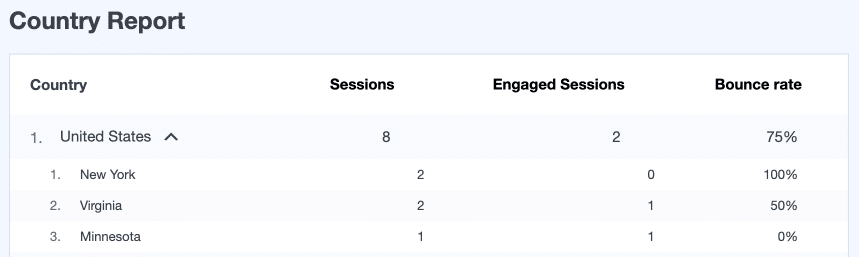
This report shows you which countries and states are driving the most sessions to your site.
Once you have this data, you can build targeted campaigns, localized content, and geo-specific offers around your top-performing regions.
The Foundation of Every Geomarketing Strategy
Every tactic in this guide depends on one thing: knowing where your traffic actually comes from. Run the Top Countries report in MonsterInsights before building any campaigns, content, or offers — it takes 30 seconds and changes how you see your audience.
5 Ways to Use Geomarketing and Boost Conversions
Here are five actionable geomarketing tactics you can start using today to drive more conversions from your existing traffic.
1. Create Location-Specific Marketing Campaigns
Once you know which countries or cities are sending you the most traffic, you can show those visitors highly personalized messages — right on your website.
The most effective tool for this is OptinMonster. Its Geo-Location Targeting feature lets you display popups, banners, slide-ins, and full-screen overlays to visitors from specific countries, cities, or ZIP codes — with zero coding required.
A great example: Sportique, an active lifestyle brand, used OptinMonster’s geotargeting to show a same-day delivery popup exclusively to visitors from San Francisco.

The result? A 200% increase in conversions from that campaign alone.
Here are a few geo-targeted campaign ideas you can test:
- Show free local shipping offers only to visitors in your delivery zone
- Display region-specific promotions tied to local holidays or events
- Promote in-store pickup to visitors near a physical location
- Show currency and pricing in the visitor’s local format
Pro Tip: Use MonsterInsights to identify your top traffic countries or states first, then build your OptinMonster geo-campaigns around those regions for maximum impact.
2. Find the Best Publishing Time for Your Content by Region
Timing matters — and if a significant portion of your audience is in a different time zone, publishing at the wrong time means fewer eyes on your content when it’s freshest.
MonsterInsights’ Real-Time Reports show you the Top Countries and Top Cities that have active users on your site right now.
By monitoring this over time, you can pinpoint the peak activity windows for visitors from your top regions.

For example: if you’re writing a blog post targeting readers in India, you’d want to publish (or schedule social promotion) when Indian users are most active on your site — not when your US-based team is at their desks.
This also applies to:
- Email newsletters: Schedule sends based on the time zone of your largest subscriber segments
- Social media posts: Align posting times with when your geo-targeted audience is most engaged
- Push notifications: Time them to land during local business hours for higher open rates
Check out our full guide on the best time to post a blog for more detail on how to use analytics data to optimize your publishing schedule.
See Your Top Countries and Cities in Real Time
MonsterInsights shows you which countries and cities have active visitors on your site right now — so you can time your content, emails, and campaigns to hit when your audience is most engaged.
3. Uncover New Content Ideas to Drive Conversions
Your location data isn’t just useful for ads and popups — it’s a goldmine for content strategy too.
When you know which countries and cities generate the most traffic on your site, you can look for region-specific content opportunities that are highly targeted and easier to rank for (since they face less global competition).
Here’s how to put this into practice:
- Food or travel blog: If the UK is a top traffic source, write “10 Best Restaurants in London” or “Weekend Trips from Manchester” — and link to your affiliate partners in that region
- eCommerce store: If Australia is a top market, create a gift guide tailored to Australian holidays like Australia Day or EOFY sales
- SaaS or service business: Create localized landing pages that speak to the specific pain points, regulations, or trends relevant to each top-performing region
- Affiliate site: Write product roundups with region-specific availability and pricing (e.g., “Best Budget Laptops Available in Canada Right Now”)
This approach gives your content a built-in conversion advantage: the more relevant your content is to a reader’s specific context, the more likely they are to click, buy, or sign up.
How to research location-specific keywords: Use Google Search Console to see which queries are driving traffic from specific countries. Then use a tool like Ahrefs or Semrush to filter keyword research by country to find local search volume data.
4. Offer Exclusive Location-Based Discounts
One of the highest-converting geomarketing tactics is showing exclusive discounts or promotions to visitors from specific locations. Because the offer feels personalized and relevant, it dramatically increases the likelihood of a purchase.
Again, OptinMonster‘s geo-location targeting makes this straightforward. You can create a discount popup that only appears for visitors from a target country, city, or postal code.
Real-world proof: Skates.co.uk used geo-targeted popups to offer exclusive discounts to visitors from France — and generated an additional £2,000 in sales per day as a result.

Other location-based discount ideas that convert well:
- Offer free or reduced shipping to customers in a specific country or region
- Run flash sales timed to local holidays (Black Friday in the US, Singles’ Day in China, Boxing Day in the UK/Australia)
- Show a “Welcome” discount to first-time visitors from a new market you’re expanding into
- Display a loyalty reward only visible to your highest-converting geographic segment
5. Optimize for Local SEO and AI Search (AEO)
We consistently see that sites showing up in AI-powered local answers are the ones that structure their content to answer specific geographic questions directly — not just broadly.
Geomarketing isn’t just about paid campaigns and popups — it also applies directly to how you rank in search engines, including the AI-powered answer engines that are reshaping SEO in 2025 and beyond.
Here’s what to focus on:
Local SEO Fundamentals
- Google Business Profile: If you have a physical location or serve a specific area, an optimized Google Business Profile is essential for appearing in local map packs and “near me” searches
- Location pages: Create dedicated landing pages for each city or region you serve, with localized content, testimonials, and CTAs
- Local schema markup: Add LocalBusiness schema to your site to help Google and AI crawlers understand your geographic relevance
- NAP consistency: Ensure your Name, Address, and Phone number are consistent across your website, Google, and all local directories
Check out our beginner’s guide to local PPC for more information.
Answer Engine Optimization (AEO) for Location Queries
AI tools like ChatGPT, Google’s AI Overviews, and Perplexity are increasingly answering local and geo-specific queries directly in search results. To appear in these answers:
- Structure location-specific content using clear headings, bullet points, and FAQ sections
- Answer common local questions directly and concisely (e.g., “What is the best [product] in [city]?”)
- Use specific, entity-rich language: real place names, local neighborhoods, regional terminology
- Build local backlinks from regional directories, news sites, and community organizations
How MonsterInsights helps here: Use the MonsterInsights Search Console report to see which location-based queries are already bringing you traffic.

This gives you a clear starting point for which local keywords and regions to double down on — and which content gaps to fill.
Not Connected to Search Console Yet?
Before you can find your local keywords, you need Search Console properly configured on your WordPress site. Follow our step-by-step guide to get it set up in minutes.
Start Using Geomarketing to Grow Your Conversions
Geomarketing is one of the most effective ways to get more value from the traffic you’re already receiving.
By understanding where your visitors are coming from and tailoring your content, campaigns, and offers to match — you can dramatically increase relevance, engagement, and conversions.
Here’s a quick recap of the five strategies covered in this guide:
- Create location-specific marketing campaigns with OptinMonster’s geo-targeting
- Use MonsterInsights Real-Time reports to find the best publishing times by region
- Build location-specific content that targets high-converting local keywords
- Offer exclusive geo-targeted discounts to boost purchase conversions
- Optimize for local SEO and AI-powered answer engines (AEO/GEO)
FAQs About Geomarketing
What is geomarketing in simple terms?
Geomarketing is the practice of using a person’s physical location to deliver more relevant marketing messages, offers, and content. For example, showing a “free same-day delivery” popup to visitors in your city, or writing blog content specifically for your top-traffic countries.
How do I find where my website visitors are located?
The easiest way for WordPress users is with MonsterInsights. It shows a Top Countries report directly inside your WordPress dashboard, powered by your Google Analytics 4 data — no need to log into GA4 separately.
What is the difference between geomarketing and geofencing?
Geofencing is a specific technique within geomarketing. Geomarketing is the broader strategy of using geographic data to personalize your marketing — including content, ads, and website offers. Geofencing goes further by triggering real-time actions, like push notifications or SMS messages, when a device physically enters or exits a defined area. Geofencing is most valuable for businesses with physical locations, while geomarketing works for any website targeting a geographic audience.
Is geomarketing only for large businesses?
Not at all. Small businesses often benefit the most from geomarketing because their customer base is naturally local. Even a simple geo-targeted popup offering free local delivery can significantly boost conversions for a small eCommerce store or local service business.
What tools do I need for geomarketing on WordPress?
For most WordPress sites, two tools cover the full geomarketing workflow:
- MonsterInsights — to identify your top geographic traffic sources and monitor location-based performance
- OptinMonster — to create and display geo-targeted campaigns, popups, and offers
That’s it! I hope this guide helped you use geomarketing to grow your conversions. If you want to keep building on what you’ve learned, check out the following related guides:
- How to Track Links and Button Clicks in WordPress
- How to Find Real-Time Reports in Google Analytics
- How to Create a Data-Driven Marketing Strategy
- Predictive SEO: How to Stay Ahead of Search Trends Using Data
Don’t forget to follow us on X (Twitter) and Facebook for more WordPress and Google Analytics tips.