


Google ranks websites partly based on how well they perform for real users.
Core Web Vitals are the specific metrics Google uses to measure this. They track three aspects of user experience: how quickly your main content loads, how fast your site responds to interactions, and whether page elements shift around while loading.
These aren’t just technical benchmarks—they affect your bottom line. Sites with poor Core Web Vitals scores see higher bounce rates and lower search rankings. On the flip side, improving these metrics can help you rank higher and keep more visitors on your pages.
In this guide, I will explain what each Core Web Vital measures, show you how to check your scores, and walk through practical ways to improve them on your WordPress site.
In This Article:
What Are Core Web Vitals?
Core Web Vitals are three specific measurements Google uses to judge how good your website is for visitors.
Think of them like a health check for your site. Just like a doctor measures your blood pressure, heart rate, and temperature, Google measures your site’s loading speed, responsiveness, and visual stability.

Google introduced these metrics in May 2020. They became an official ranking factor in June 2021. This means that your Core Web Vitals scores directly affect where your pages show up in search results.
As of July 2025, only 44% of WordPress sites on mobile devices pass all three Core Web Vitals tests. That means more than half of WordPress sites are giving visitors a poor experience.
But here’s the opportunity: if you improve your scores while your competitors don’t, you’ll rank higher and capture more traffic.
Pro Tip: Core Web Vitals change over time. Google replaces old metrics with better ones as they learn more about user experience. For instance, in March 2024, they replaced First Input Delay (FID) with Interaction to Next Paint (INP) to give a more accurate picture of responsiveness.
Why Core Web Vitals Matter for Your Business
Core Web Vitals affect your bottom line.
These aren’t just technical metrics that developers care about. They directly impact how many people find your site, how many stay, and how many convert into customers.
Impact on Search Rankings
Core Web Vitals are part of Google’s page experience signals. While Google considers them in ranking, they’re just one of many factors, and content quality and relevance remain the primary ranking signals.
However, the user experience benefits are significant. Better Core Web Vitals lead to faster, more responsive pages that keep visitors engaged.
What does that mean practically?
Better Core Web Vitals improve user engagement, which can indirectly benefit rankings through increased time on site and lower bounce rates. In competitive niches where content quality is similar, page experience can be a differentiating factor.
According to recent data, pages ranking at position 1 are 10% more likely to pass Core Web Vitals scores than URLs at position 9. This correlation reflects both the importance of overall site quality and Google’s holistic evaluation of websites.
Impact on Conversions and Revenue
The business impact of Core Web Vitals goes beyond SEO—it directly affects your bottom line.
Research from Deloitte and Google shows that improving page speed by just 0.1 seconds can boost retail site conversion rates by 8.4% and increase average order value by 9.2%.
Here are some verified examples from real businesses:
- Vodafone: Improved LCP by 31%, resulting in an 8% increase in sales
- Rakuten 24: Optimized all three Core Web Vitals and saw a 53% increase in revenue per visitor and 33% higher conversion rate
- redBus: Improved INP by 72%, which led to a 7% increase in sales (source)
Impact on User Experience
Core Web Vitals measure how frustrating or enjoyable your site is to use, and the data shows that performance directly impacts user behavior.
According to Google research, people who have a negative experience on mobile are 62% less likely to make a future purchase from that business.
Poor Core Web Vitals create exactly this kind of negative experience—through slow loading times, unresponsive interactions, and content that jumps around unexpectedly.
When your site delivers a fast, stable experience, users stay longer, engage more, and are more likely to convert. The opposite is also true: performance issues don’t just cost you the current sale—they can damage your relationship with customers for future visits as well.
The Three Core Web Vitals Metrics Explained
Let me break down each of the three Core Web Vitals so you understand exactly what they measure.
1. Largest Contentful Paint (LCP)
LCP measures how long it takes for the main content on your page to load.
More specifically, it tracks when the largest image or text block becomes visible. This is usually your hero image, main heading, or the biggest piece of content above the fold.
- Good LCP: 2.5 seconds or faster
- Needs Improvement: 2.5 to 4.0 seconds
- Poor LCP: Over 4.0 seconds
Why does this matter? According to research from Google, if page load times increase from 1 second to 3 seconds, bounce rates jump by 32%. If your site takes 6 seconds to load, bounce rates skyrocket by 106%.
Common causes of slow LCP:
- Large, unoptimized images
- Slow server response times
- Render-blocking JavaScript and CSS
- Client-side rendering delays
2. Interaction to Next Paint (INP)
INP measures how quickly your site responds when someone clicks, taps, or types.
This metric replaced First Input Delay in March 2024. Unlike FID, which only measured the first interaction, INP looks at every single interaction throughout a visitor’s entire session. It reports the single longest delay.
- Good INP: 200 milliseconds or less
- Needs Improvement: 200 to 500 milliseconds
- Poor INP: Over 500 milliseconds
Think about it from a user’s perspective. You click a button and nothing happens right away. You click again. Still nothing. Finally, after half a second, something loads. That frustration causes people to leave.
When redBus, an Indian bus ticketing platform, improved its INP by 72%, they increased sales by 7%.
What causes slow INP:
- Heavy JavaScript execution
- Long tasks blocking the main thread
- Slow event handlers
- Excessive third-party scripts
Pro Tip: INP is currently the most challenging Core Web Vital to optimize, which means there’s a significant opportunity to get ahead of your competition by addressing responsiveness issues.
3. Cumulative Layout Shift (CLS)
CLS measures how much your page content moves around as it loads.
You’ve experienced this yourself. You’re reading an article when suddenly everything shifts down because an ad loaded. You were about to click a button when it jumps and you accidentally click something else. That’s layout shift, and it’s incredibly annoying.
- Good CLS: 0.1 or less
- Needs Improvement: 0.1 to 0.25
- Poor CLS: Over 0.25
Poor CLS creates a terrible user experience and can even cause accidental clicks that frustrate visitors. Visual stability is crucial for maintaining user trust and engagement.
Yahoo! JAPAN identified a massive CLS issue on their site. After fixing it, they saw 15.1% more page views per session, 13.3% longer session duration, and a 1.72% lower bounce rate.
What causes layout shifts:
- Images without defined width and height attributes
- Ads, embeds, and iframes that load after other content
- Dynamically injected content
- Web fonts that cause text to jump
- Actions waiting for a network response before updating DOM
How to Measure Your Core Web Vitals
Before you can improve your Core Web Vitals, you need to know where you stand.
Google provides several free tools to measure these metrics. I’ll walk you through the best ones.
1. Google PageSpeed Insights
This is my go-to tool for a quick check. It’s free, easy to use, and gives you specific recommendations.

All you have to do is go to PageSpeed Insights and enter your URL. Then, click Analyze and wait about 30 seconds for the results.
You’ll get both “lab data” (test environment) and “field data” (real user data from Chrome users who visit your site). The field data is what Google uses for rankings.
PageSpeed Insights shows you separate scores for mobile and desktop. Pay extra attention to mobile since Google uses mobile-first indexing.
2. Google Search Console
If you’ve verified your site with Google Search Console, you already have access to Core Web Vitals data.

Navigate to Experience » Core Web Vitals in the left sidebar. You’ll see:
- Which URLs have poor, need improvement, or good scores
- Trends over time
- Specific issues affecting your pages
The advantage of Search Console is that it shows data for your entire site, not just individual URLs. This helps you identify patterns and prioritize fixes.
3. MonsterInsights for WordPress Users
If you’re running a WordPress site, I recommend using MonsterInsights to track your Core Web Vitals alongside your other important metrics.

MonsterInsights makes it easy to:
- See your Core Web Vitals scores right in your WordPress dashboard
- Track how improvements affect your traffic and conversions
- Monitor performance across all your pages
- Get alerts when scores drop
You can connect Google Search Console to MonsterInsights to see all your data in one place. No need to jump between different tools.
Get Started with MonsterInsights Now
4. Chrome User Experience Report (CrUX)
CrUX provides real-world data from actual Chrome users. This is the most accurate picture of how people experience your site.
You can access CrUX data through:
- PageSpeed Insights (it shows CrUX data automatically)
- Chrome UX Report dashboard
- BigQuery for bulk data analysis
The important thing to know about CrUX is that it only includes data if your site gets enough Chrome traffic. Smaller sites might not have CrUX data available.
Pro Tip: Check your scores on multiple pages, not just your homepage. Product pages, blog posts, and landing pages often have different performance characteristics. Focus first on pages with high traffic or high conversion importance.
5 Steps to Improve Core Web Vitals in WordPress
Let me walk you through the practical steps that actually work. I’ll focus on changes you can make right now without being a developer.
Step 1: Quick Wins for All Three Metrics
These four changes improve all three Core Web Vitals at once.
Switch to Fast Hosting
Your hosting provider matters more than you think. Managed WordPress hosting delivers 71% better Core Web Vitals performance than cheap shared hosting.
See the following guides for more information on how to pick the right web hosting for your needs:
Use a Lightweight Theme
Bloated themes slow down your site. Switch to a performance-focused theme like Sydney, GeneratePress, or Kadence.

These are built for speed.
Delete Unused Plugins
Every plugin adds code. That’s why you should follow best practices when managing your tools. If you have been adding lots of plugins to your site without much thought, I recommend running a plugin audit.
Go to your Plugins page in the WordPress dashboard to do this.
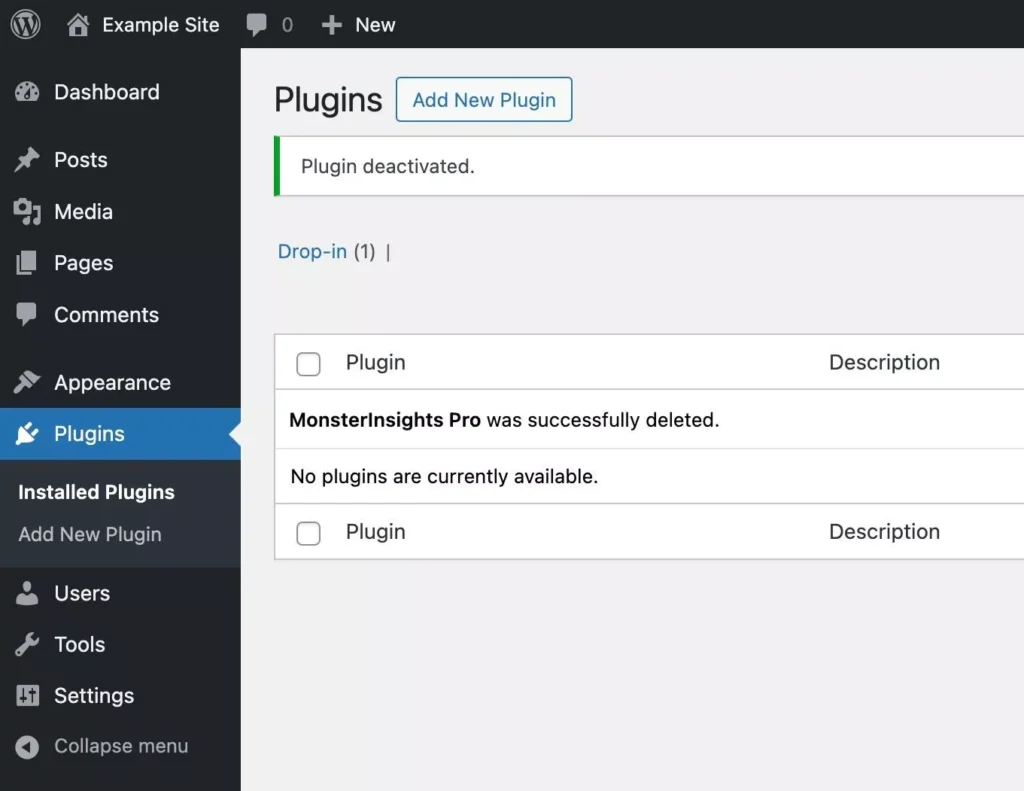
It’s best to delete any plugins you are not using, and choose carefully when adding new ones.
However, keep in mind that you’ll need to be careful when doing this, as you don’t want to delete any plugins that are necessary for your website’s core functionality or design.
Add a CDN
A Content Delivery Network speeds up your site for visitors around the world. This can drastically improve your Core Web Vitals.
See our guide on the best CDN services for more information.
Step 2: Fix Your Loading Speed (LCP)
LCP is usually the easiest Core Web Vital to improve. Here’s how.
Optimize Your Images
Images are the main culprit for slow loading. Here’s what to do:
- Compress images before uploading (use TinyPNG – it’s free)
- Install ShortPixel or Imagify to automatically optimize
- Aim for images under 200KB each
This one change can cut your LCP in half.
Enable Caching
Caching stores a version of your pages so they load instantly. Install WP Rocket or W3 Total Cache (free option).
Turn on page caching and browser caching. The plugin handles the technical stuff for you.
Pro Tip: Only 53% of sites achieve good LCP scores. Fix this first for the biggest impact.
Step 3: Fix Responsiveness (INP)
INP is harder to fix, but here are the changes that matter most.
Reduce Third-Party Scripts
Each analytics tool, chat widget, and ad network slows down your site. That’s why it’s best to remove any you don’t absolutely need.
Defer Non-Essential JavaScript
Most performance plugins have an option to “defer JavaScript” or “delay JavaScript execution.” Turn this on.
This tells your site to load important content first, scripts second.
Pro Tip: INP is the toughest metric, with 47% of sites failing. Even small improvements here give you an advantage.
Step 4: Fix Visual Stability (CLS)
CLS is usually the quickest to fix.
Set Image Dimensions
When you add images in WordPress, make sure to set width and height. This reserves space so content doesn’t jump around when images load.
Most page builders do this automatically. If you’re using the block editor, WordPress handles it for you in newer versions.
Reserve Space for Ads
If you use ads, tell your ad plugin to reserve space. Most ad plugins have a setting for this.
Avoid Pop-ups That Push Content Down
Don’t use pop-ups that push your content down the page. Use overlays instead, or slide notifications in from the side.
Step 5: Track Your Progress
The easiest way to monitor improvements is with MonsterInsights.
MonsterInsights shows Core Web Vitals right in your WordPress dashboard. You’ll see exactly which pages need work and track improvements over time.

Plus, MonsterInsights sets up Google Analytics the right way without slowing down your site.
Get Started with MonsterInsights and see our guide to checking site speed for more information.
Final Thoughts
Core Web Vitals aren’t going away. They’re becoming more important every year.
The good news is that improving Core Web Vitals doesn’t just help your rankings. It makes your site better for real people. Faster loading, quicker responses, and stable layouts lead to happier visitors who stay longer and convert more.
Start with the easiest improvements first. Optimize images, add size attributes, remove unused plugins. Then move on to more technical optimizations.
Track your progress with tools like MonsterInsights so you can see how Core Web Vitals improvements affect your traffic and revenue.
Remember: you don’t need perfect scores. You just need to meet the “good” thresholds consistently across your most important pages.
Want more help with Google Analytics and website performance? Check out these guides:
- How to Properly Set Up Google Analytics in WordPress
- How to Increase Organic Traffic to Your Website
- The Ultimate Guide to Google Analytics 4
Get Started with MonsterInsights Today!
Frequently Asked Questions About Core Web Vitals
What are Core Web Vitals?
Core Web Vitals are three metrics Google uses to measure user experience: Largest Contentful Paint (LCP) for loading speed, Interaction to Next Paint (INP) for responsiveness, and Cumulative Layout Shift (CLS) for visual stability. Google uses these scores as ranking factors in search results.
Are Core Web Vitals a ranking factor?
Yes. Google confirmed that Core Web Vitals became a ranking factor in June 2021. Sites with good Core Web Vitals scores have a better chance of ranking higher in search results, especially when competing with similar content.
What is a good LCP score?
A good LCP (Largest Contentful Paint) score is 2.5 seconds or faster. Scores between 2.5 and 4.0 seconds need improvement. Anything over 4.0 seconds is considered poor.
What replaced FID in Core Web Vitals?
Interaction to Next Paint (INP) replaced First Input Delay (FID) as a Core Web Vital in March 2024. INP provides a more complete picture of responsiveness by measuring all interactions throughout a page visit, not just the first one.
How long does it take to improve Core Web Vitals?
Technical improvements can be implemented in a few weeks, but it takes 28 days for Google to reflect changes in Search Console. The Core Web Vitals report uses data from the past 28 days of real user visits. Be patient and keep monitoring your progress.
Can I check Core Web Vitals in Google Analytics?
Google Analytics 4 does not show Core Web Vitals directly. However, if you use MonsterInsights for WordPress, you can see Core Web Vitals data alongside your Google Analytics metrics in your WordPress dashboard.
What is the most important Core Web Vital?
All three metrics are important, but LCP (loading speed) often has the biggest impact on user experience and conversions.
Will fixing Core Web Vitals guarantee higher rankings?
No. Core Web Vitals are one ranking factor among hundreds. Content quality, relevance, and authority still matter more. However, when you’re competing with similar content, Core Web Vitals can be the differentiator that gets you ranked higher. Plus, better performance leads to better user engagement, which helps rankings indirectly.
Don’t forget to follow us on YouTube for more helpful Google Analytics tips and website optimization strategies.